Wednesday, November 11, 2026

Review: GANZQH 100ft LED Strip Lights

This is a Just the Facts (JTF) post: generated by AI from my own raw material (voice memos, session notes) and a short outline I wrote, then checked by me. What's a JTF?
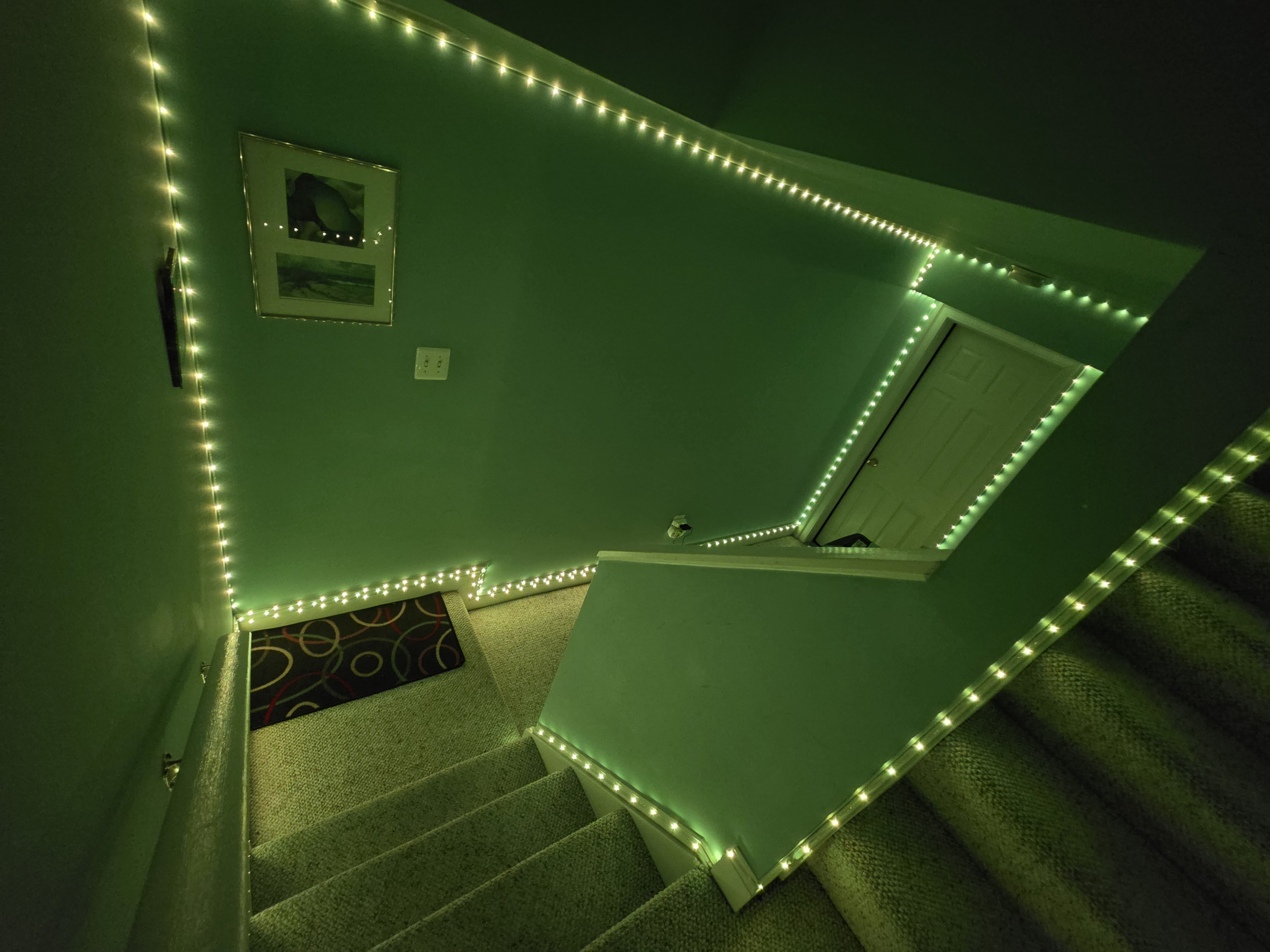
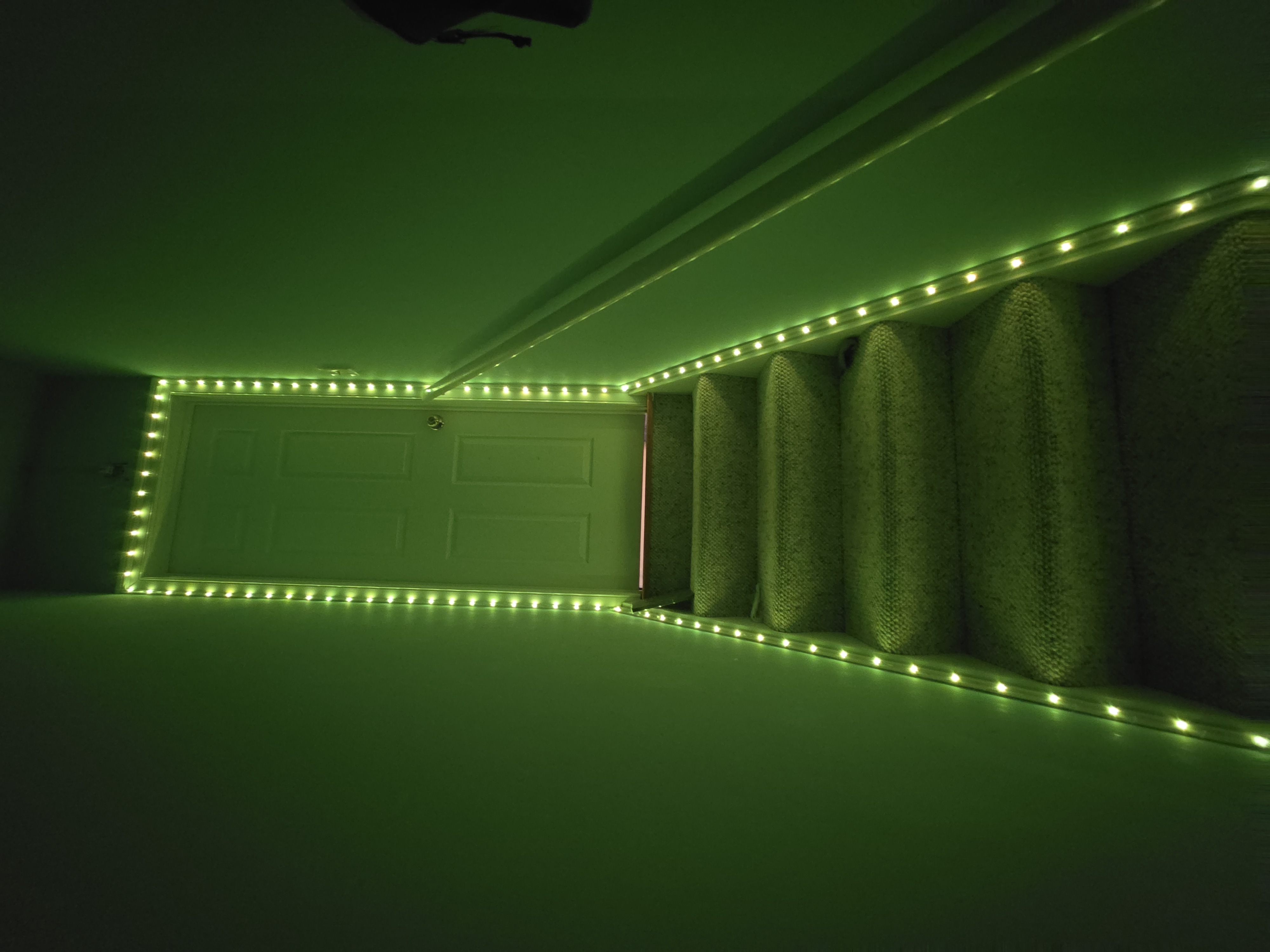
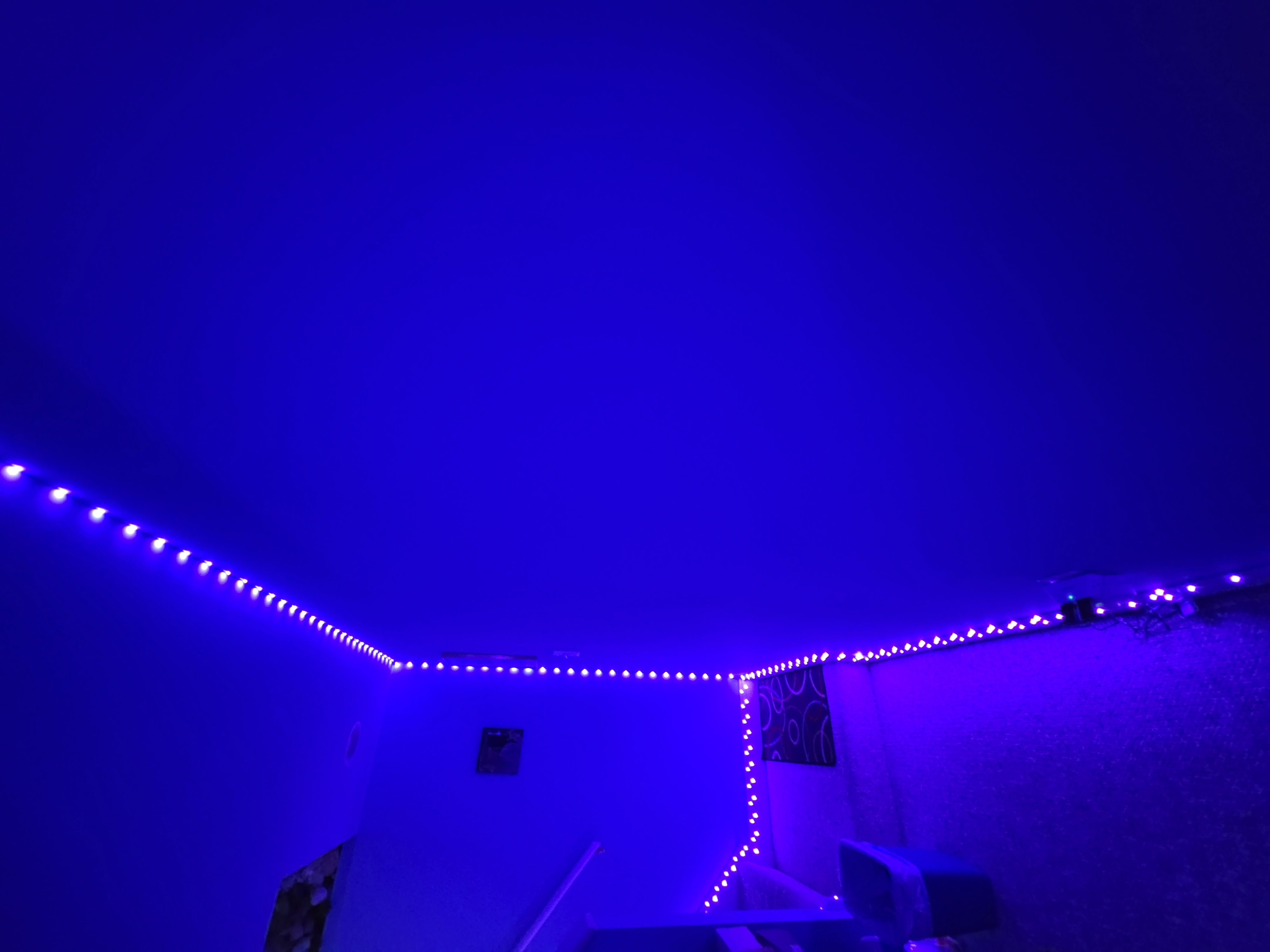
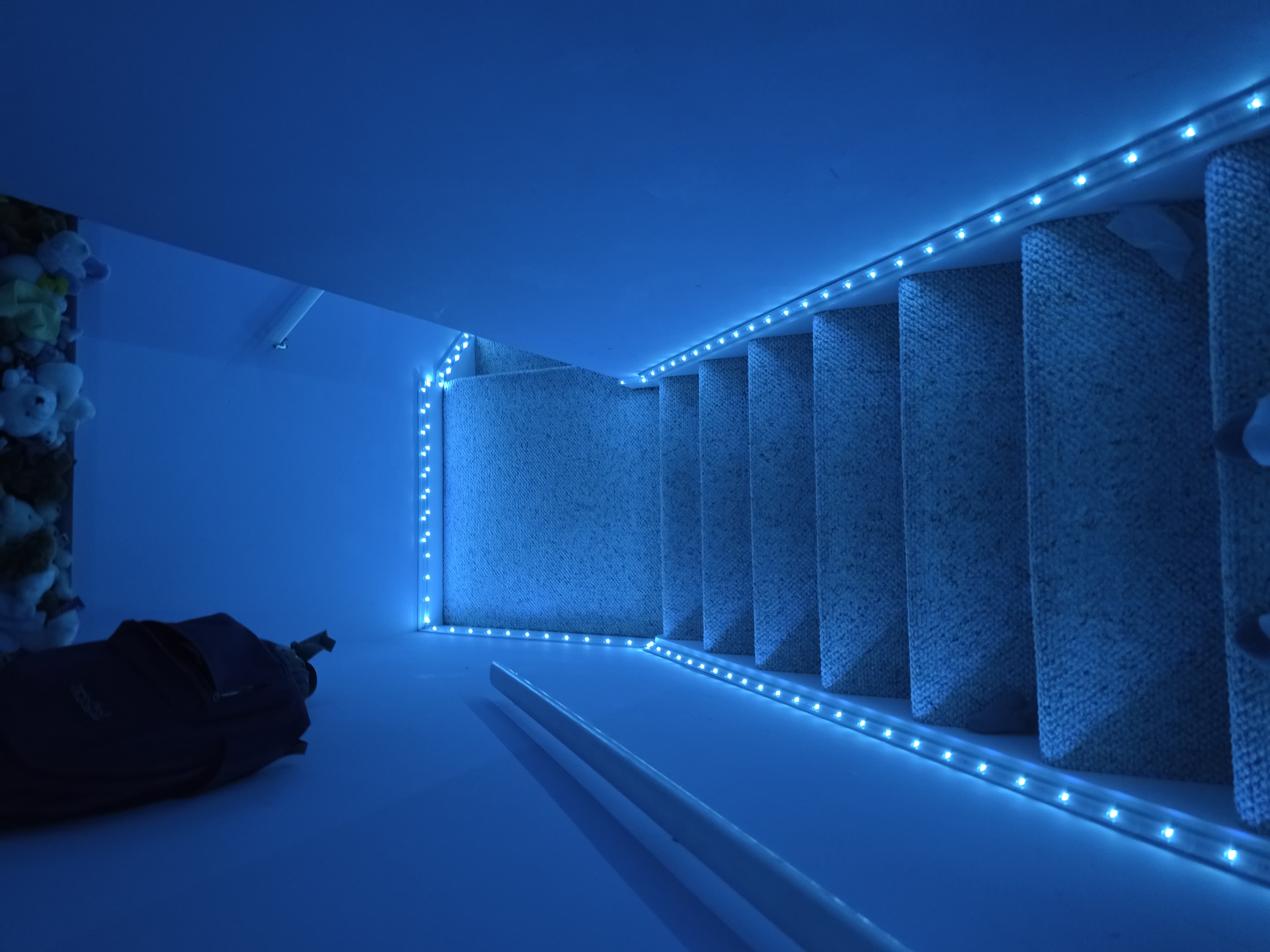
Our nephew lives in our basement guest room, and he kept leaving every light on down there. I nearly called an electrician. Instead I spent $9.99 on a 100ft strip of no-name LED lights to light the path to his room. It worked so well that we've since bought two more.

It felt like karma, but actually it was bad design

  • Shira and I both grew up with our dads telling us to turn off the lights when we left a room. So it seemed only fitting that we were now saying the same thing to our nephew.
  • But really, the problem is the wiring. When he comes downstairs to a dark basement, there's one switch, and it turns on about 12 recessed can lights. He walks to his room and goes in, and the whole space stays lit even though nobody needs it.
  • I thought about having an electrician rewire things, maybe adding a second switch so only the path to his room would light up.
  • On a whim, I tried something cheaper and more fun first: 100ft of LEDs run along the walkway to his room. At $9.99 I didn't see how I could lose. Either it would fix the problem or I'd learn something useful.

A no-name brand that really delivers

  • I bought the generically named "100FT Led Lights for Bedroom, Color Changing RGB Led Strip Lights" from GANZQH. Strip lights I'd bought in the past were always too short and never looked as good as the box, so I expected to be disappointed. I wasn't.
  • 100ft is a lot. I had enough to criss-cross a bit. They worked right out of the box, the remote was usable right away, and the Bluetooth app does everything it needs to.
  • Installing them was easy. The strip is basically tape with tiny LEDs on it, light enough that the sticky backing held on the first try. I plugged it in at the starting point, peeled the backing, and pressed it along the baseboards and up the walls.
  • Right after that we bought another 100ft to line the stairs down to the basement. Then we bought one more for our goddaughter's bedroom so she'd have fun lights too.
  • The basic strips have been a perfect fit all three times.

The limitations of going generic

  • The app isn't polished, and some people would call the lighting effects basic.
  • For a more public part of the house, like the kitchen, I'd probably pay for a fancier strip.
  • For a kid's room or basement decoration, though, this is the best $10 I could imagine spending.
  • I have no idea how hard they'll be to take down. That's a problem for another day.

The verdict: win-win-win

  • Our nephew: He likes the lights. They make the walk to his bedroom fancy instead of plain. He also likes showing his mood by picking just the right color. We have to guess what the colors mean. I suppose teens don't come with an instruction manual.
  • Us: No more yelling "turn off the lights!"
  • Our electric bill: The LEDs should cost a lot less to run than 12 can lights, especially with the app's timer turning them on and off at set times.
Behind This Post

The outline I wrote
- It felt like Karma, but actually it was bad design
  - Both Shira and grew up with our Dad's scolding us: turn off the
    lights when you leave a room!
  - So it's only fitting that we're saying the same thing to our
    newphew J who moved into our guest room in the basement.
  - But really, it's a design flaw: when J comes down stairs and finds
    a dark basement, he flips a single switch which lights the
    area. That's like 12 light cans. He then walks to his room, goes
    in, leaving the entire space lit that no longer needs it
  - I thougth about bringing in an electrician to re-wire things, and
    perhaps install a second lightswitch, so that only the area he
    needs lit stays lit.
  - But, on a whim, I tried a cheaper more fun solution: a stringing
    100ft of LEDs along the corridor to his room.
  - At $9.99 for the LEDs, I didn't see how I could miss: either we
    solve our problem, or learn something useful along the way.
- A no-name brand that really delivers
  - I picked up the generically named "100FT Led Lights for Bedroom,
    Color Changing RGB Led Strip Lights" from the brand GANZQH and
    braced for dissapointment.
  - It never came
  - The LEDs were a home run: 100ft was a generous amount,
    installation was a breeze, the color, brightness and pattern
    choices feel complete, the remote was usuable immdaitely and the
    bluetooth app is compeltely functional
  - Installation was effortless because the LEDs are so tiny and
    lightweight that sticky backing allow them to stay fixed to whever
    I put them on the first try
  - The first thing we did after installation was to buy another 100ft
    to line the steps going down to the basement. We then bought
    another 100ft pack and put them in our goddaugther's bedroom so
    she too can have fun lights.
  - In all three cases, the basic LED strips have been a perfect fit
- The limitations of going generic
  - The app isn't the sexiest, and the choice of LED behavior may be
    considered only basic.
  - In general, I would probably invest in a fancier LED strip if thisu
    was for a more public part of the house
  - But for a kids room or basement decoration, this is seriously the
    best $10 I could imagine spending
  - I've got no idea how much of a hassle uninstallation will be; but
    that's a tomorrow problem
- The verdict: Win-Win-Win
  - J: he enjoys the lights, as they turn the walkway to his bedroom
    from basic to fancy. He also appreciates that he can relay his
    mood by setting just the right color (of course, we have to guess
    what the colors meean; I guess it's too much to ask for teens to
    come with an instruction manual)
  - We: no more yelling, turn off the lights!
  - Our electric bill: the cost of the LEDs is projected to be way
    less, especially using the timer the app includes that turns them
    on and off at a given time
    

Monday, November 09, 2026

Cloudslate, Part 2: From Eight Hours to Weeks of Battery

This is a Just the Facts (JTF) post: generated by AI from my own raw material (voice memos, session notes) and a short outline I wrote, then checked by me. What's a JTF?

Previously in this series: Cloudslate: Turning an Old Kindle Into a Workday Dashboard

In part 1 I jailbroke an old Kindle Paperwhite and turned it into cloudslate: a dashboard that pulls an image from S3 every fifteen minutes and paints it on the screen. The good news is that it works great as a live view of my workday time boxes. The bad news is that the battery barely lasted a day. I asked Claude to fix that without changing the simple architecture, and a handful of small changes got it from about a day to roughly seven weeks on a charge.

The Problem

  • The dashboard itself works. It shows my day's time boxes, it refreshes on its own, and it mostly stays out of my way.
  • The battery life was awful. It went from 100% at 8am to 65% by 12:38. One day was enough to drain it.
  • When Claude read the battery's own registers (cat /sys/class/power_supply/*/uevent), the cell turned out to be fine: 1408 mAh full charge against a 1420 mAh design, and 36 cycles. The Kindle was pulling about 171 mA on average, and 1408 / 171 comes to about 8.2 hours. That's pretty much what I was seeing.

My Worry

  • What made this project a win was how simple it is: curl the image, paint it, sleep, repeat. No app, no SDK, no cross-compiler.
  • I was afraid that same loop was what was eating the battery. If the only way to fix the battery was to throw out that design, then cloudslate was just a toy proof of concept.

Asking Claude

  • I put the question to Claude. It guessed it could get the battery life way up without changing the architecture.
  • Its explanation: a Paperwhite lasts weeks because it spends almost all its time suspended. cloudslate had it suspended 0% of the time. The problem was software, not hardware.

The Changes (in Claude's words)

  • Frontlight off. This was already done in part 1. E-ink holds an image with no power, so the light was the obvious draw and the easy win.
  • Stop telling it to stay awake. lipc-set-prop com.lab126.powerd preventScreenSaver 1 was there so powerd wouldn't draw a screensaver over the dashboard. But the screensaver is the first step in the chain that ends in suspend, so that line also meant the Kindle never slept. That's where the battery was going.
  • Stop waking up every 30 seconds. The old loop woke up every 30 seconds to write a heartbeat file, which also kept the device awake.
  • Sleep between refreshes, using the clock's alarm. Set the alarm, then suspend to RAM:
    • echo "+900" > /sys/class/rtc/rtc0/wakealarm
    • echo mem > /sys/power/state
    That second echo blocks until something wakes the device, which is why this fits right into a shell loop. No daemon, no timer thread. It's about thirty lines of sh.
  • Use the power button for refresh-on-demand. Tap-to-refresh doesn't survive suspend, because touch only wakes a PW3 while the Kindle framework is running, and cloudslate stops the framework. The power button does wake it. You can't tell a button wake from an alarm wake by reading input, because resuming makes the power key report itself either way. So the rule is: if it woke up earlier than the alarm, someone pressed the button, so repaint.
  • Time the loop off the wall clock. sleep doesn't count time spent suspended, so anything timing the loop has to check the real clock instead.
  • Let the screen finish before sleeping. fbink returns when a screen update is queued, not when it's done. Suspending right after a refresh froze the panel halfway through. A sleep 3 after the refresh fixes it, and three seconds every fifteen minutes is nothing.
  • Don't poll more often than you need. Every wake costs a wifi reconnect, and that's now the expensive part. The poll stays at fifteen minutes.

All of this lives in cloudslate.sh, including the suspend and wake handling.

The Result

  • I last charged the Kindle about two weeks ago, and the slate read 100% then. (The fuel gauge reads high right after charging, so it may really have been in the high 90s.)
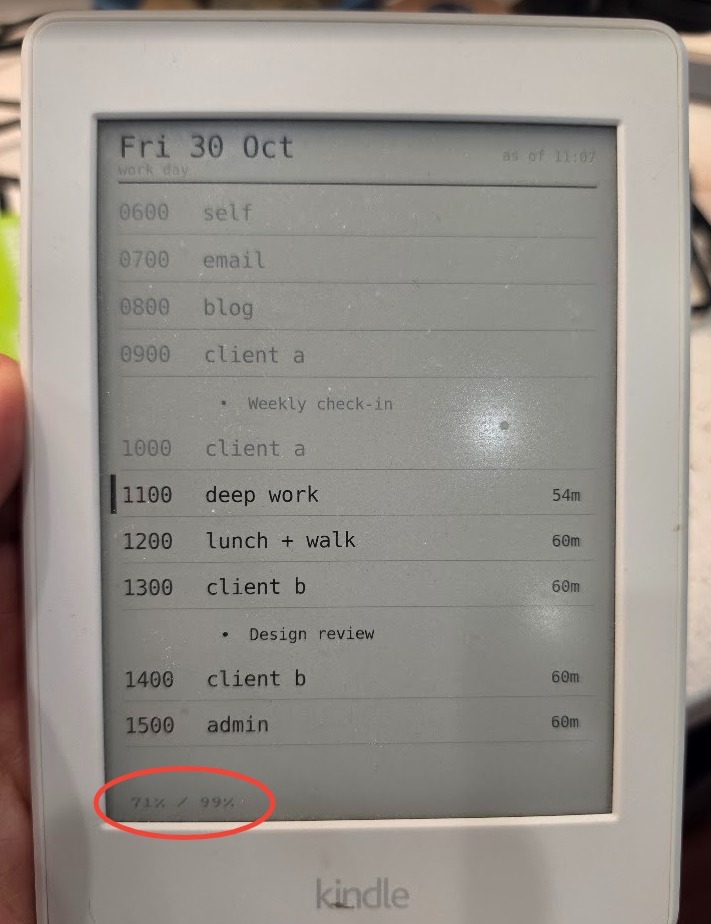
  • Today the status line in the corner reads 71% / 99%. The first number is the battery charge. The second is how much of the time the Kindle has spent suspended.
  • That's about 15 days for 29%, or roughly 1.9% a day, which works out to about seven weeks on a full charge.
  • So it went from one day to seven weeks, without changing the architecture. Not too shabby!

Behind This Post

The outline I wrote
- Good news: my low-effort Kindle based dashboard to show a live
  view of my work day time boxes functions great
- Bad news: the battery life is pretty awful. A single day is all it
  takes to chew through the battery life.
- My worry: the simple `curl`, `sleep`, `repeat` architecture that
  made this project such a win is also responsible for chewing through the battery.
- In that case, `cloudslate` is little more than a toy proof of
  concept
- I put my question to Claude, and it guessed that it could improve
  the performance without chaning the architecture.
- It made the following changes:
  - <consult the notes and insert the optimizations that Claude made,
    fine ot use Claude's voice here>
- The result: It's been about two weeks and the battery is now 71%,
  with 99% of the time the devicek has been sleeping
- So from 1 day to 7 weeks, not too shabby!

Thursday, November 05, 2026

VA Amendment Results: My Predictions Were Spot-On Backwards

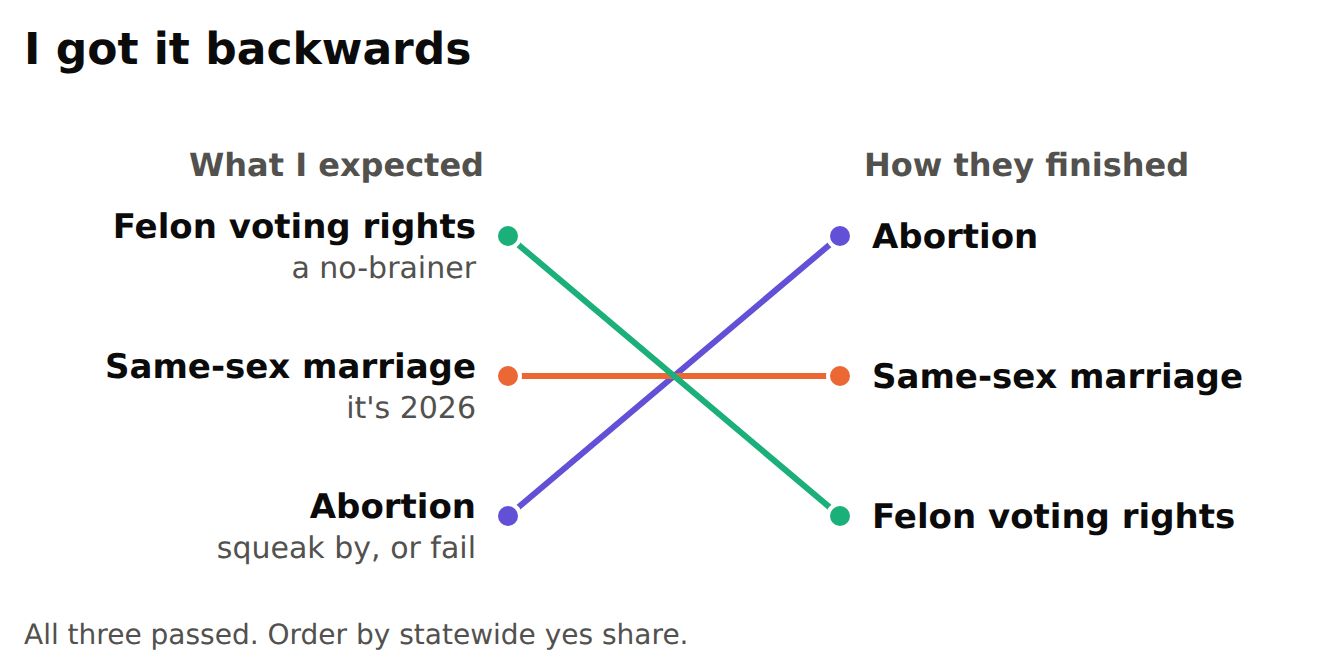
Virginia had three constitutional amendments on this year's ballot: one protecting abortion rights, one removing the old same-sex marriage ban, and one restoring voting rights to people with felony convictions once they're released. I was pretty sure I knew how they'd go.

Here were my guesses. Felon voting rights would be a no-brainer: plenty of people know someone with a record, second chances appeal to both sides, and I assumed that, unlike abortion, it wasn't an issue that splits the country down the middle. Abortion, I figured, would squeak by or fail. There's a lot of red in Virginia. And marriage? It's 2026. Who's against that now?

All three passed. In exactly the opposite order.

Who crossed party lines

I wanted to know why, so I pulled the state's precinct-by-precinct results. Ballots are secret, so nobody knows how any one person voted. But Virginia has about 2,500 precincts, ranging from deep red to deep blue, and lining them up lets you estimate how each side voted. I used the Senate race as the marker: Mark Warner's voters stand in for Democrats, Bert Mizusawa's for Republicans.

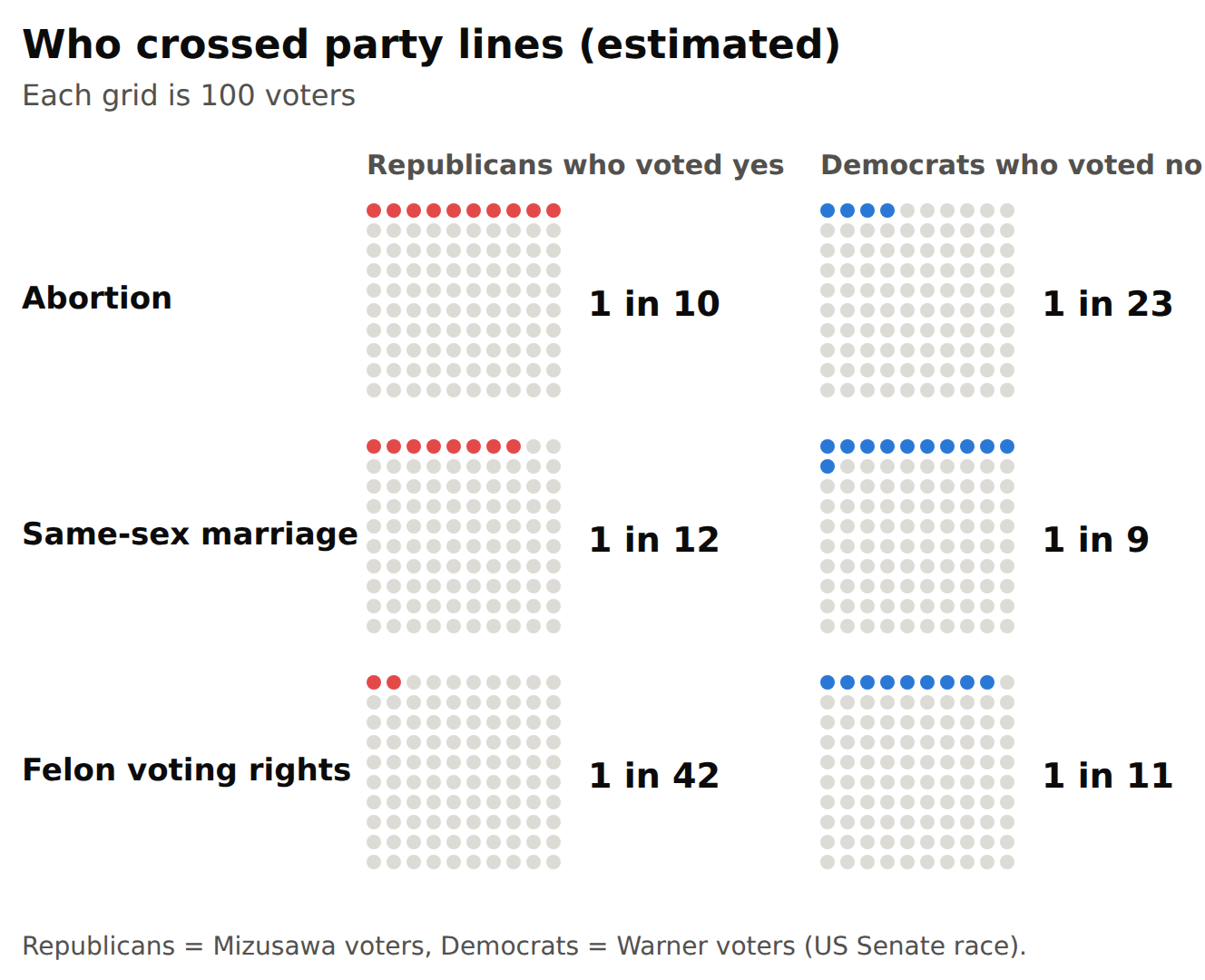
About 1 in 10 Republicans voted yes on abortion. On marriage it was about 1 in 12. On felon voting rights it was about 1 in 42, almost none. And voting rights lost about 1 in 11 Democrats, nearly as many as marriage did.

So the amendment I thought would sail through drew almost no Republicans and still lost Democrats. The one I thought too divisive drew the most Republicans across.

A closer look

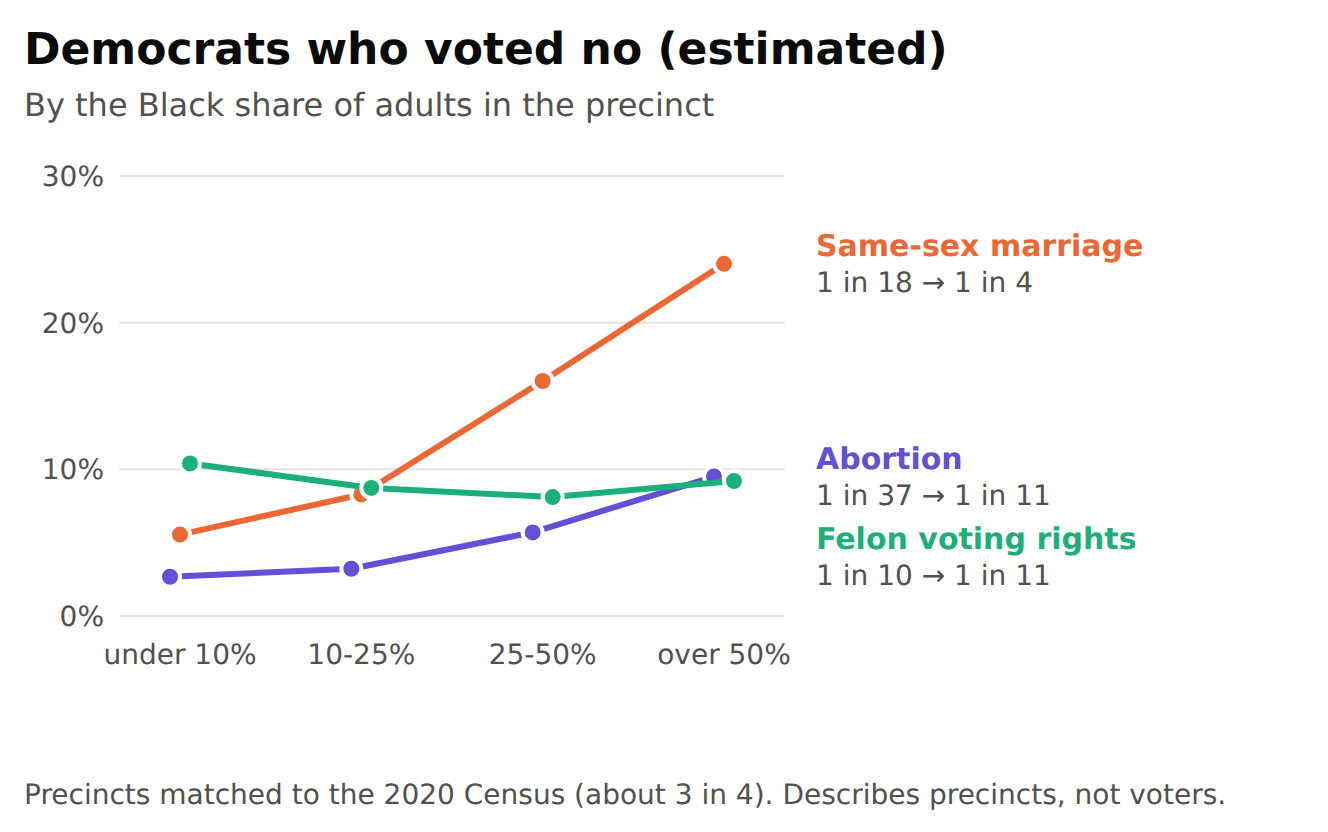
Then I added Census data. On the Democratic side, the marriage "no" vote climbs with the Black share of adults in the precinct: about 1 in 18 in precincts under 10% Black, about 1 in 4 in majority-Black precincts. Abortion's "no" rises too, though less, from about 1 in 37 to 1 in 11. The voting rights "no" barely moves, around 1 in 10 everywhere.

That's a fact about precincts, and only the three-quarters of them I could match to Census data. It can't tell me how any individual voted, or why.

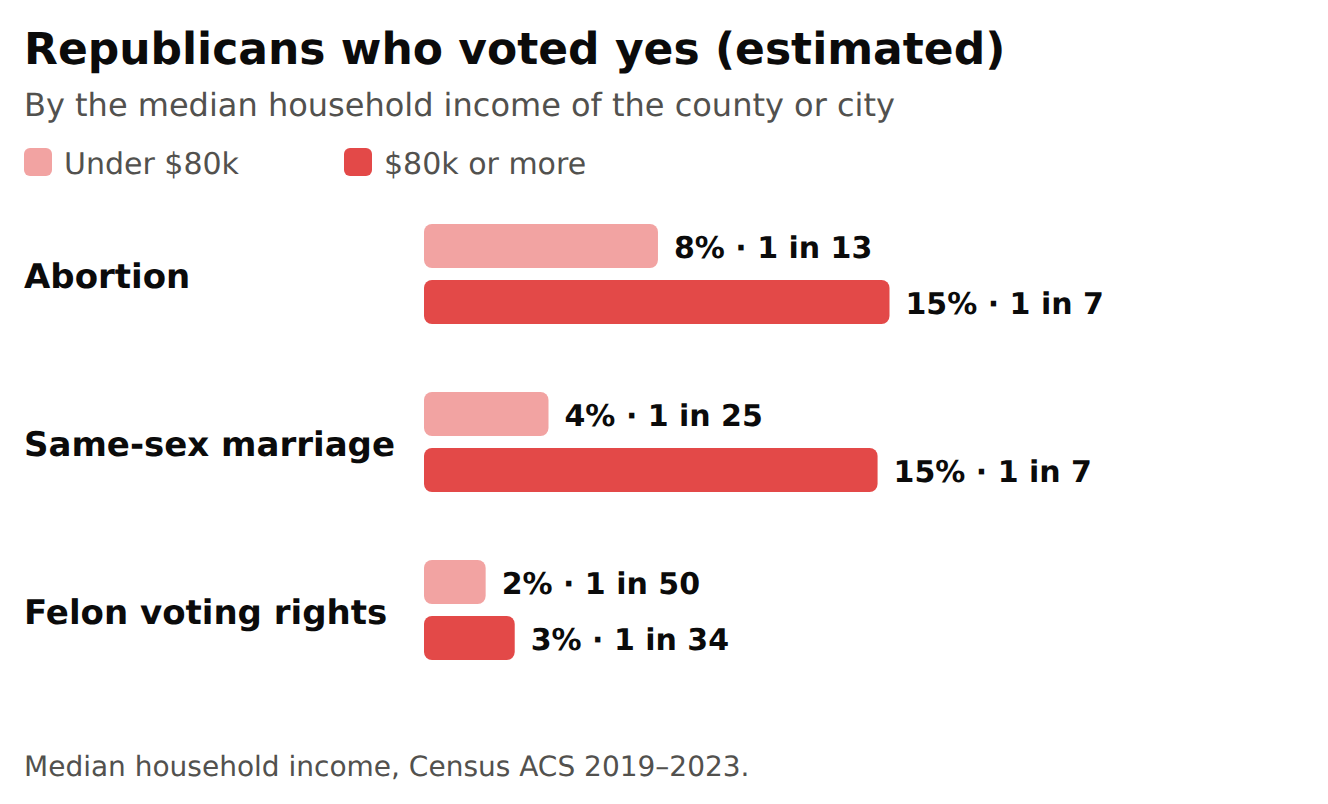
On the Republican side, I split counties and cities by median household income. Where it's $80k or more, Republicans were about twice as likely to vote yes on abortion, and roughly three times as likely on marriage, as in the rest of the state. Voting rights stayed near zero in both.

Higher-income places also tend to be more suburban and college-educated, so income may just be standing in for those.

What I learned

People mostly voted with their party, as I'd expect. What I got wrong was which issues would pull people across. The one I was sure would divide people drew the most Republicans across. The ones that felt like settled common sense to me, second chances and marriage, weren't settled across party lines.

I figured where I live explained some of my blind spot, and partly it does. Here in Arlington, abortion and marriage each got about 81% yes, and voting rights got 75% (Election Day votes only; Arlington's early votes weren't in yet). That's far more than the roughly 55% it got statewide, but it still came in last. About 1 in 4 of my neighbors voted against the idea I'd have called a no-brainer.

Kathryn Schulz has a great TED talk, On Being Wrong, where she asks what it feels like to be wrong. Her answer: being wrong "doesn't feel like anything." She compares it to Wile E. Coyote after he's run off the cliff, before he looks down: "we're already wrong, we're already in trouble, but we feel like we're on solid ground." Then she corrects herself: it "feels like being right." That was me. I've been walking around sure that second chances were something nearly everyone around me agreed on. Analyzing these numbers was me looking down.

About the numbers

These are estimates, not counts, so treat them as rough. The marriage numbers are the shakiest: how Democrats voted on it varied a lot from precinct to precinct, which throws off the statewide estimate, and the real Republican crossover on marriage is probably lower than 1 in 12. Even taken at face value, it could plausibly be anywhere from about 1 in 9 to 1 in 18.

They're also based on unofficial results as of the evening of November 4, when about 50 of Virginia's 133 counties and cities still hadn't loaded their early votes. Where they had, Republican crossover ran a little higher, but the pattern was the same.

I built this with Claude and had other AI models try to poke holes in it, but the real check is the scripts below: they pull the state's data and reproduce every number here.

Wednesday, November 04, 2026

Cloudslate: Turning an Old Kindle Into a Workday Dashboard

This is a Just the Facts (JTF) post: generated by AI from my own raw material (voice memos, session notes) and a short outline I wrote, then checked by me. What's a JTF?

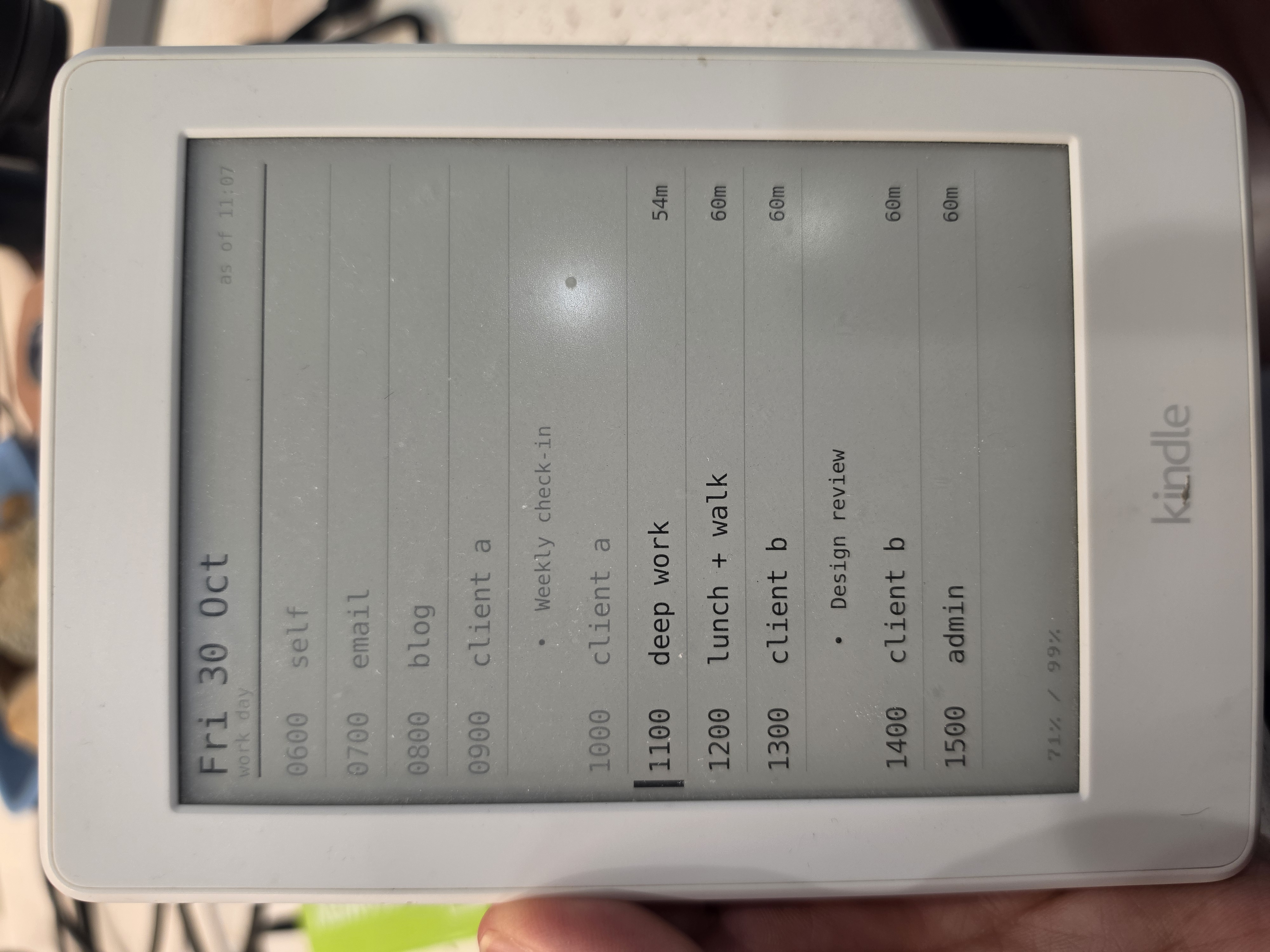
I took an old Kindle that was sitting on a shelf, jailbroke it, and turned it into an always-on display of my day's time boxes. It cost $0.00. Claude wrote the code. The biggest surprise was that once it's jailbroken, a Kindle is just another Unix box you can run shell scripts on.

How it started: Time Boxes

  • What do you do with a TODO list that never seems to end? "This week I'll finish this blog post" is easy to write and hard to schedule. Is editing that post one hour or four? You slot it in, work on it, and the list still doesn't clear.
  • Instead of focusing on the items, I focus on setting aside time to work on them. "I'm going to work on the blog for an hour on this day." I show up and work. I'm not trying to finish a thing, just to work hard for that hour.
  • That's a scheme you can actually win at.
  • The result: time boxes. I don't schedule specific tasks for each project. I schedule time for the project and work hard inside that box.
  • Time boxes take discipline, though. It's easy to blow right through them, especially when I'm in a flow on a project I'm loving and it's time to switch to the next box.

Overengineered idea: a real-time dashboard of my day's time boxes

  • YouTube keeps recommending me sleek e-ink display projects that show some kind of dashboard.
  • The thought: if my time boxes for the day were always in front of me, I'd do a better job of sticking to them.
  • I could write them on a sheet of paper. Cost: $0.00. Time: a few seconds.
  • But those sexy e-ink displays were too tempting. I had to know: could I get a hardware device to show my time boxes in real(ish) time?

The search for the middle ground

  • Known options:
    • DIY: a cheap e-ink screen plus a Raspberry Pi or an ESP32. Cheap parts, but buying parts, soldering, and programming hardware was more time than I had.
    • Buy it: much less effort. TRMNL does exactly this, but it starts at $139. I couldn't justify that for what is basically a toy.
  • The surprise: the old Kindle on my shelf might be the middle ground I was hoping for.
    • Claude suggested putting it to use. It's a Kindle Paperwhite from 2015 that I bought for travel reading and barely touch now.
    • I knew it had an e-ink screen, but I had no idea how the software side worked.
    • Claude was encouraging but careful about it: it depends on the firmware and whether the device can be jailbroken. I took a photo of the Kindle's device info screen with the version numbers and handed it over. The verdict: this can be done.
    • There are well-known Kindle hacking projects, like WinterBreak, that showed this was doable.

Proving It

  • Step 1: jailbreaking the Kindle
    • I blindly followed the steps the AI gave me. I don't normally work that way.
    • I was OK with it here because the worst case was bricking a Kindle I wasn't using anyway.
    • With the Kindle plugged in over USB, Claude could read and write files on it directly. My job was mostly to unplug it and tap the screen when I was told to.
    • I went one step at a time, and before I knew it I had a jailbroken Kindle.
    • I had no idea what that actually meant.
  • Step 2: Hello World
    • Claude wrote a test script and copied it onto the Kindle. I unplugged it and the script showed up right where a book would. I tapped it, like opening a book, and the screen filled with text.
    • Holy smokes: it's basically a shell script. Writing code for the Kindle is like writing code for any other Unix shell. That means curl, while loops, and sleep, plus FBInk, a command that draws an image on the e-ink screen.

Building It

  • The setup for my live time-box view is painfully simple.
  • Server side: on a Linux server I already had, cron runs a command every 10 minutes that creates an image and puts it at a well-known (and hard-to-guess) URL. The command is cloudslateassist -a publish -s workday.
    • cloudslateassist runs a "slate" script. If the script outputs an image, that image gets converted for the Kindle. If it outputs text, the text gets turned into an image with render-text.php.
    • The workday slate calls my existing workdayassist -a today command, which prints the day's boxes. Claude wrote PHP that turns that output into a clean timeline.
  • Kindle side: cloudslate.sh grabs the image, paints it on the screen, sleeps for 15 minutes, and repeats.
  • It couldn't be more basic, but the result looks surprisingly polished.
    • The display looks sophisticated. Really, the Kindle is just downloading one image and painting it on the screen.
  • The trickiest part of the project was naming it. I spent more time on the name than on anything else.
    • I went with cloudslate. A slate is the (literally) old-school board students used to have at their desks, a portable chalkboard for scratch work that got wiped and reused. The Kindle is the slate, and the data comes from the cloud.

Using It

  • Does it solve my blowing-through-the-time-boxes problem? No, but it helps.
  • Did I learn that the Kindle on my desk is just another Unix box I can hack? Yes, yes I did!
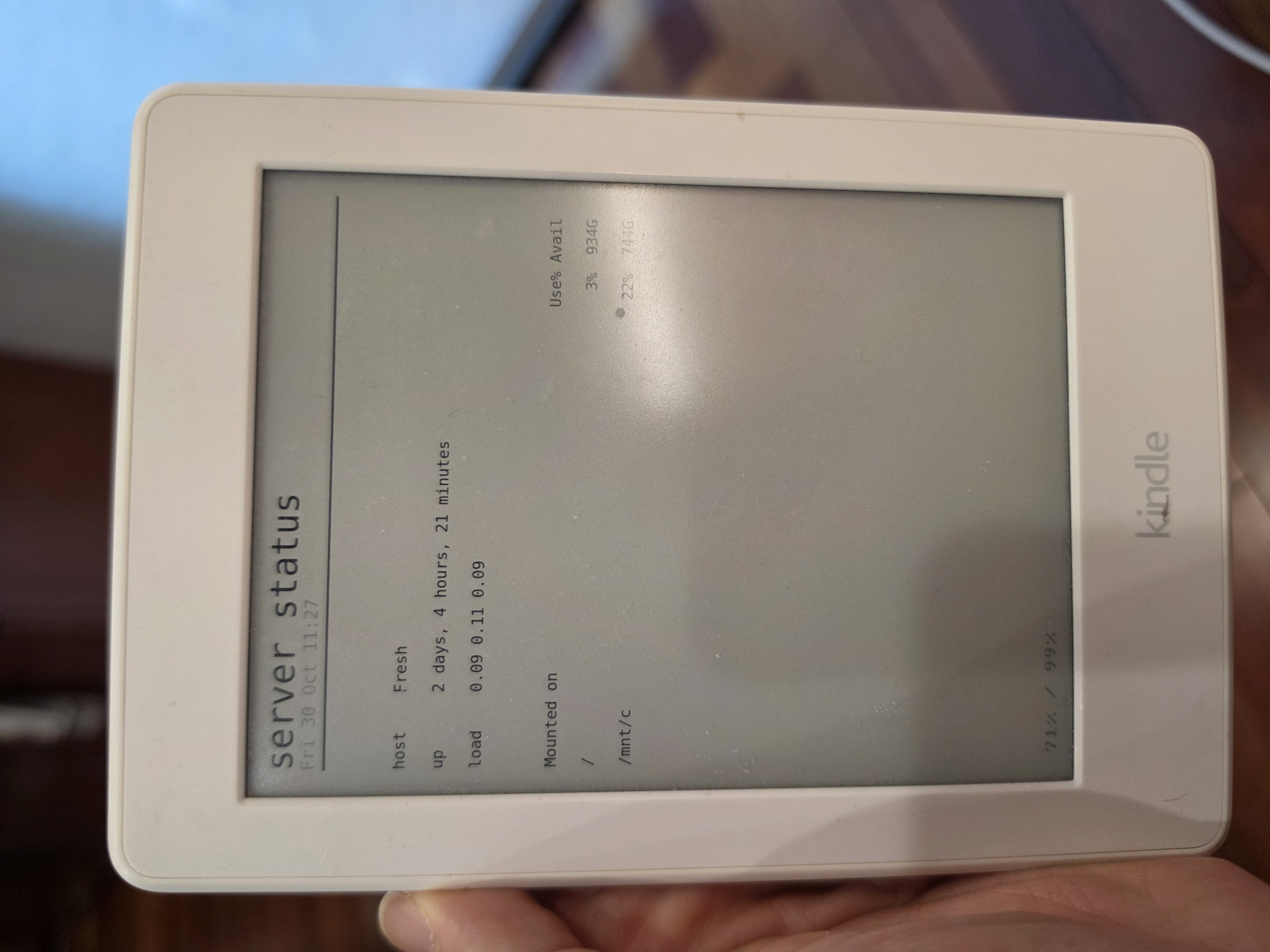
  • Using it for my time boxes is a win, but it would be trivial to show other data too. A slate is just a script that prints text or an image. server-status.sh is a short example.
  • Given the cost ($0.00), the effort (low, since Claude wrote the code), and the sheer cool factor (I have a live-updating dashboard!), this project is hard to beat.

Behind This Post

The outline I wrote
- How it started: Time Boxes
  - What do you do with a TODO list that never seems to end?
  - Intead of focusing on items, focus on allocating time to work on the items
  - That's a scheme you can actually win at
  - The result: time boxes.
  - Instead of focusing on specific tasks for various projects, I
    focus on scheduling time for that project and working diligetnly
    in that time box
  - Time boxes require discpline though, it's easy to blow through
    them
- Overengineered idea: a real time dashboard of my day's time boxes
  - A common YouTube feed recommendation is some sleek e-ink display
    project that shows some dashboard data
  - The thought: if I had my time boxes for the day in front of me,
    then I would do a better job of sticking to them
  - I could scratch them out on a sheet of paper - cost $0.00, time a few seconds
  - But, those sexy e-ink displays are too irressibtable: I had to
    know, could I have a hardware device show me my time boxes in
    real'ish time?
- The search for the middle ground
  - Known options:
    - DIY - Cheap, but the assembly time put these projects out of reach
    - Buy it - Lower effort, but priced well over $100, I couldn't
      justify the cost for what was essentially a toy
  - The surprise: The old Kindle sitting around may be the middle ground I hoped for
    - Claude had a suggestion: put the old Kindle I have lying around to use
    - I knew it was powered by e-ink, but I had no idea how the software side of worked
    - There are some well known hacking projects that suggested this was doable
- Proving It
  - Step 1: jailbraking the Kindle
    - I blindly followed the steps the AI told me
    - I felt safe doing this because the worst case was that I'd brick
      the Kindle, and this was already a device that wasn't in use
    - I followed the steps, one by one and before I knew it, I had a jail broken Kindle
    - I had no idea what this meant
  - Step 2: Hello World
    - Claude wrote me some code to run on the Kindle, and I was able
      to launch it as if I was opening a book
    - Holy smokes: the script is basically a shell script. So writing
      code for the Kindle is basically the same as writing code for
      any other Unix shell
- Building It
  - The architecture for my live time-box view is painfully simple:
  - On a Linux server, I have a command in cron that runs every 10
    minutes and creates an image. This image is stored in a well known
    location
  - On the Kindle, it grabs and renders the image, then sleeps for 15
    minutes, then repeats
  - This couldn't be more basic, and yet, the result was surprisingly polished
    - The display may look sophisticated, but the Kindle is bldinly
      downloading a single image and painting it to the screen
  - The trickiest part of the project: naming.
    - I went with 'cloudslate' - slate, being the (literally) old
      school device used by students as a sort of primitive
      whiteboard, and cloud being the source of the data
- Using It
  - Does it solve my blow-through-the-time boxes problem? No, but it helps.
  - Did I learn that the Kindle on my desk is just another unix box I can hack? Yes, yes I did!
  - Using this for my time boxes is a win, but it would be trivial to
    render any other data, too.
  - Given the cost ($0.00), effort (low, Claude wrote the code), and
    the sheer cool factor (I've got a live updating dashboard), this
    project is hard to beat.
  

Tuesday, November 03, 2026

Halloween 2026 - Found the Fun, (Almost) Lost the Kids

This is a Just the Facts (JTF) post: generated by AI from my own raw material (voice memos, session notes) and a short outline I wrote, then checked by me. What's a JTF?

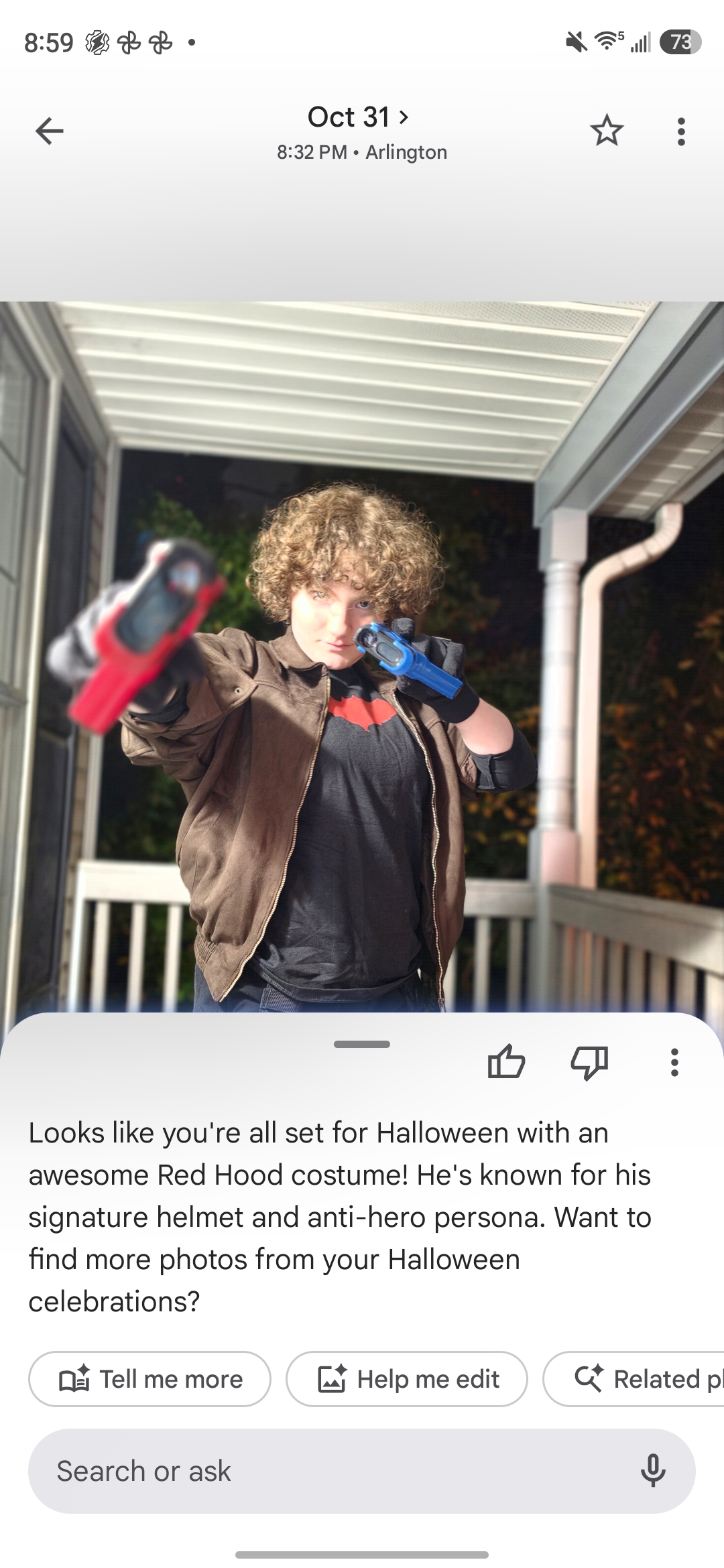
Halloween snuck up on us this year. At 2pm nothing was ready, and by the end of the night we'd had a great time. Along the way we had a slow start, a last-minute pumpkin idea, one brief "I lost the kids" moment, and a bit of vindication from Google.

2pm: Things Were Looking Grim

  • A key piece of J's costume hadn't arrived.
  • The pumpkins hadn't been carved.
  • Baby W had no costume.

5pm: Back on Track, Baby!

  • UPS delivered, literally, and J's Red Hood costume was good to go.
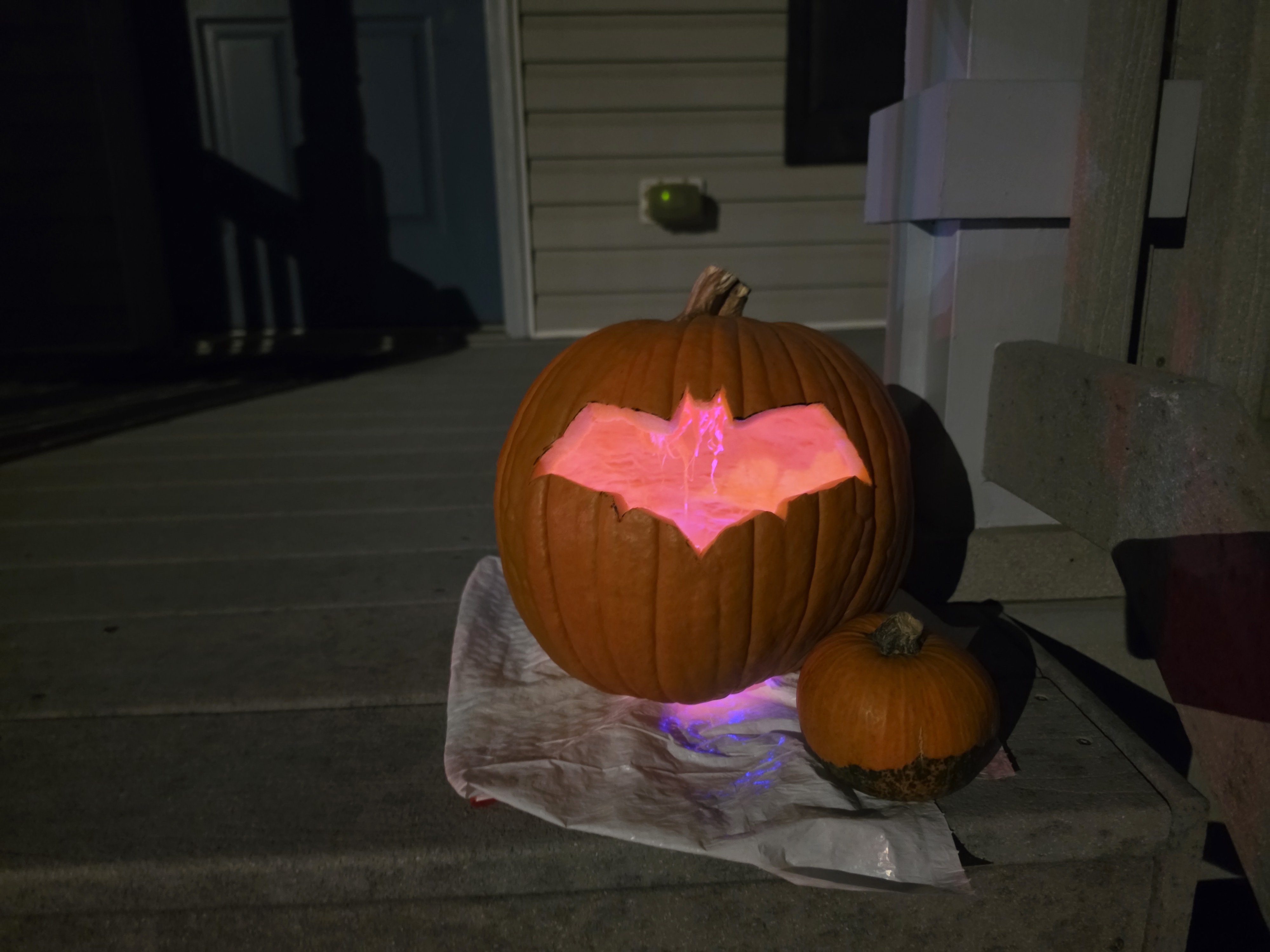
  • J printed a stencil and carved a perfect Red Hood bat symbol into his pumpkin.
  • I couldn't think of anything to carve, so I gave in and carved a simple face into my pumpkin. I looked at my bookshelf for inspiration and saw Structure and Interpretation of Computer Programs (SICP), but didn't make anything of it at first. Then it clicked: the lambda on the cover. I carved (λ) into the side of the pumpkin, a nod to Lisp humor. Next year maybe I'll carve some proper code into a pumpkin.
  • We found a fuzzy brown sleeper for baby W, and its ears matched the wearable blanket I planned to wear that night.

6:15pm: Off to Trick-or-Treat

  • J: Jason Todd / Red Hood. His outfit was a perfect match.
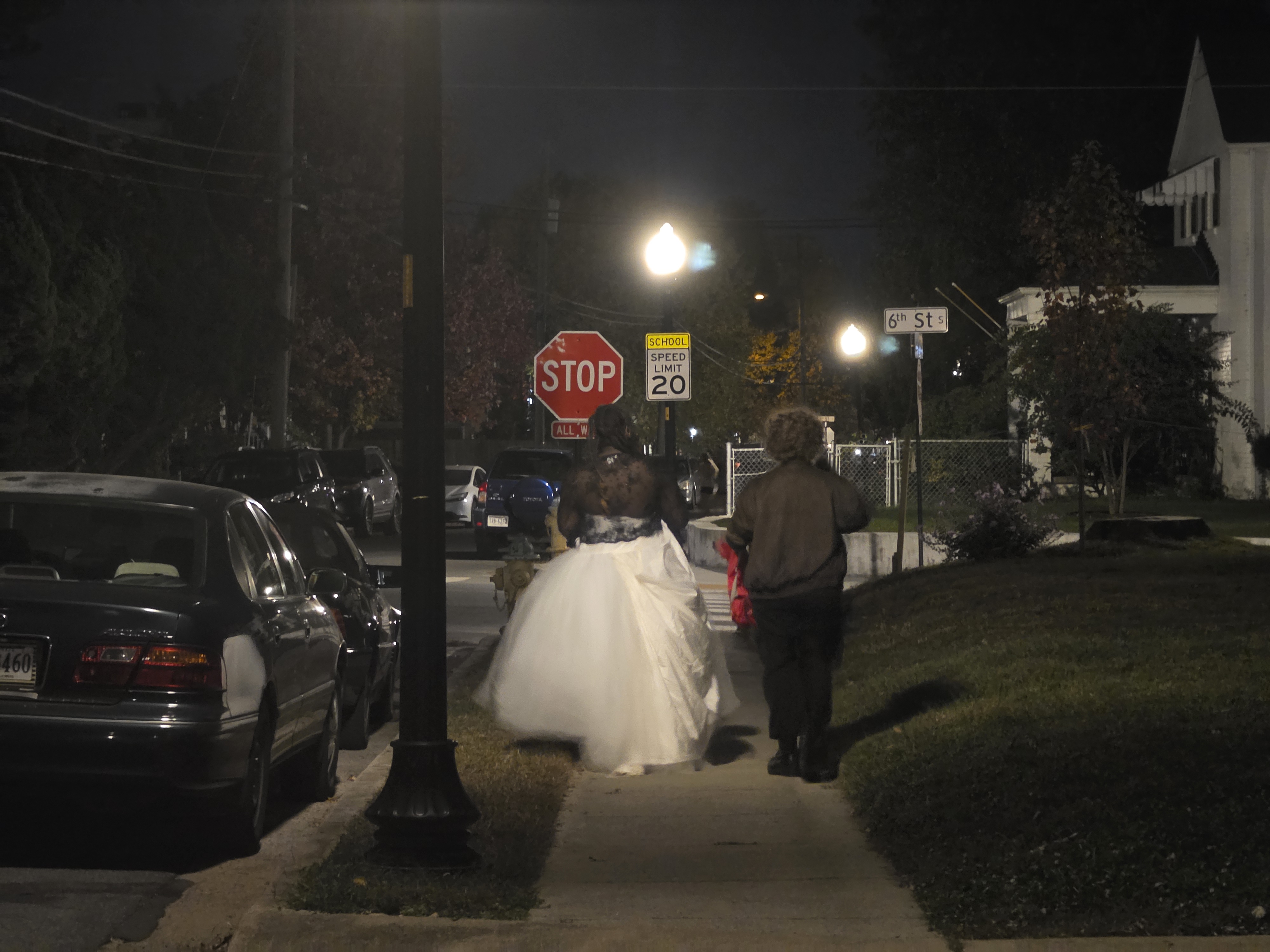
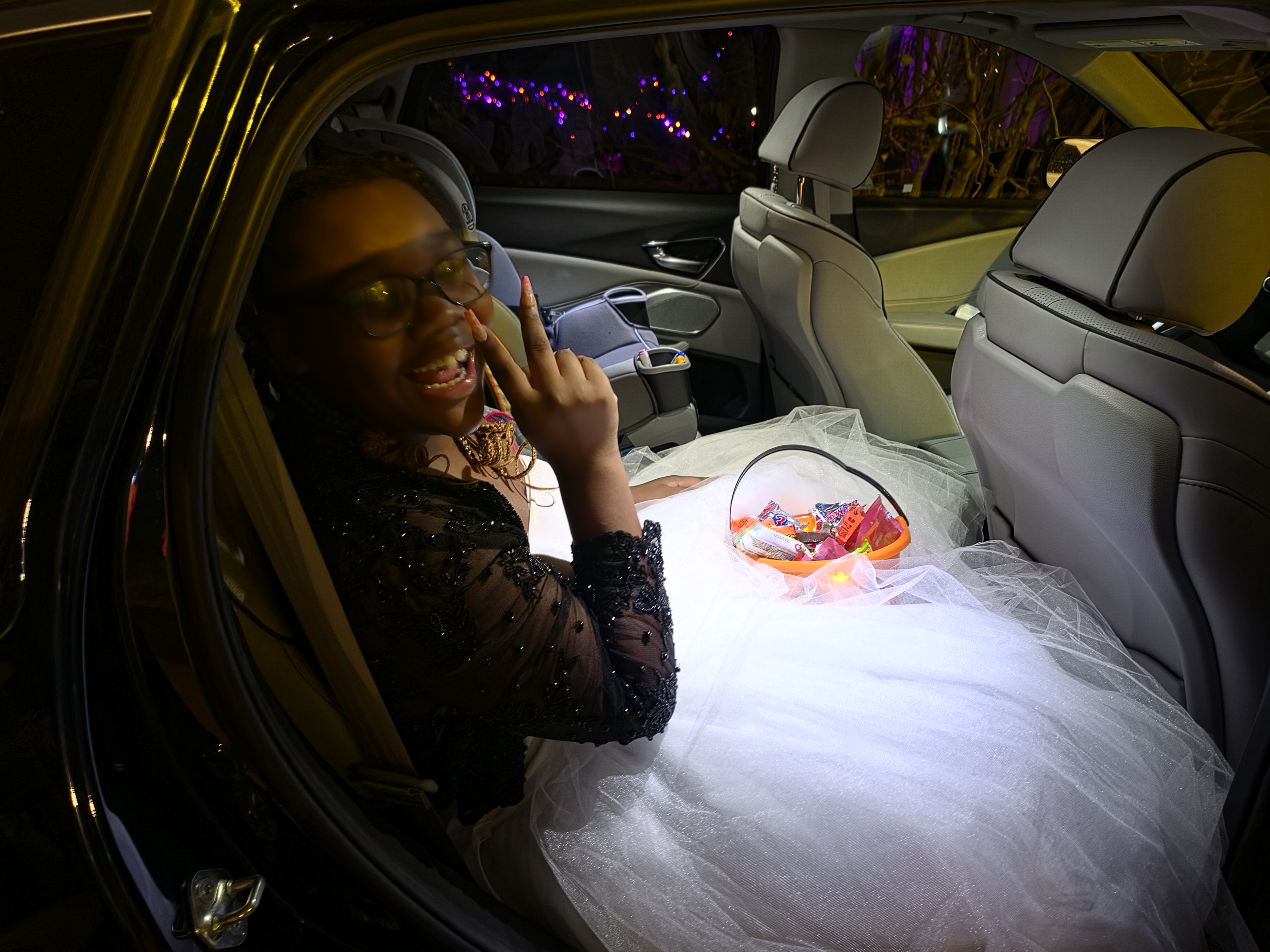
  • E: The Bride of Chucky. She looked smashing.
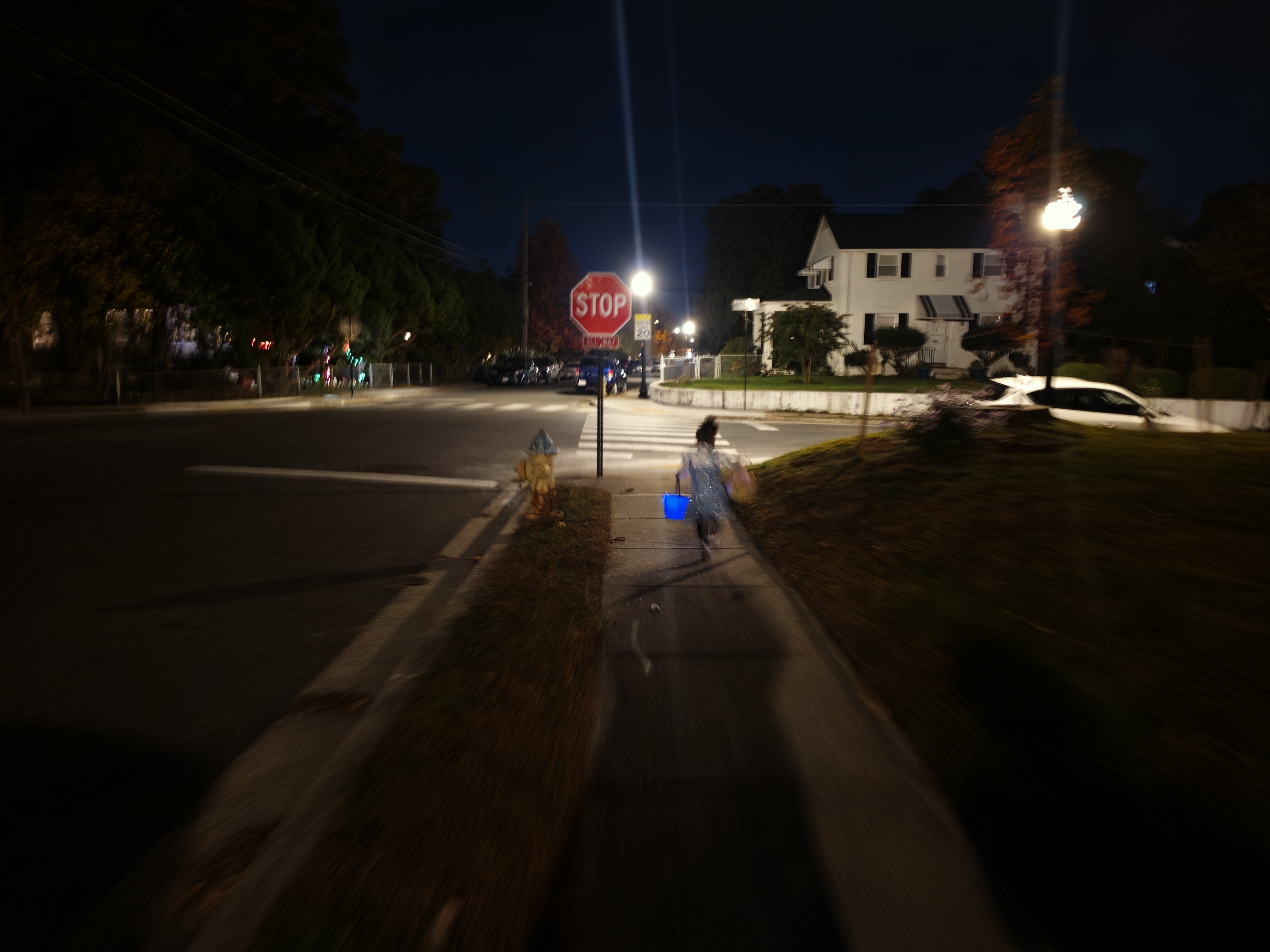
  • L: Dorothy from The Wizard of Oz, with sparkly shoes, a sparkly dress, and a stuffed "Toto" in a basket.
  • Baby W: A little bear, carried by me, a big bear.
  • Rose: Kim Possible. People of the right age totally got it.

We Started Slow, but Things Picked Up

  • We started in our neighborhood, and it was sooooo quiet. Only three or four houses were participating, and I really missed the frenetic energy I remember from when I was a kid.
  • Then we headed over to 6th Street South. It was perfect: the place was hopping, with plenty of candy, decorations, and just the right vibe. It was busy without being crowded.

Sorry Not Sorry About the Phone Situation

  • When J brought up his phone before we left, I told him not to bother bringing it.
  • I didn't want it to be a distraction, and we were planning to stay together anyway.
  • Pretty quickly, J and E peeled off from our group.
  • About 15 minutes after they left us, it hit me: we should have put his phone, with location sharing turned on, at the bottom of his candy bag. Then we'd have had an easy way to find him.
  • E did have her phone, but it was at 3%. Rose watched it go to 2%, then 1%, then dead.
  • After we'd done all of 6th Street, we got back to the car, and J and E weren't there. I wasn't really nervous, since it was Halloween in a fine neighborhood. Still, I called Shira to confess and ask whether I should drive around looking for them.
  • In the middle of explaining, I saw the two of them walking down the street toward us. "Never mind. Just kidding. Halloween joke. Everything's fine. Bye."
  • They'd gotten a little turned around and walked past the car about twice.
  • In the end, I was happy that the phone stayed home. It made J and E solve the problem of finding their way back to us, and they did it somewhere perfectly safe.
  • I think it was a bit of accidental genius. Next year, though, the phone goes in the bottom of the candy bag.

Google AI for the Win

  • J was bummed that nobody recognized him as Jason Todd / Red Hood.
  • But when I opened a photo of him with the "Ask" feature in Google Photos, it figured it out with no hints. Before I'd asked anything, it said something like "your Halloween costume of Red Hood looks great." Vindication!

Behind This Post

The outline I wrote
- 2pm on Oct 31's things were looking grim:
  - A key piece of J's constume handn't arrived
  - The pumpkins hadn't been carved
  - Baby W had no costume
- By 5pm, we were back on track, baby!
  - UPS litterlly delivered, and J's Red Hood Costume was good to go
  - J carved a perfect Red Hood bat-symbol into his pumpkin
  - Stumped for what to carve, I finally caved and carved a simple
    face into my pumpkin. I'd looked at my bookshelf for insperation,
    and saw SICP there, but didn't think anything of. Then it clicked,
    and I carved `(λ)` into the side of the pumpkin a nod to lisp
    humor. Next year maybe I'll carve some proper code into the
    pumpkin
  - We found a fuzzy brown sleeper that baby W could wear, and its
    ears matched the wearable blanket I planned to wear that night
- By 6:15pm, we were heading off for Trick or Treating
  - J: Jason Todd / Red Hood - his outfit a perfect match.
  - E: The bride of Chucky - she was looking smashing
  - L: Dorthy from the Wizard of Oz - wearing sparkly shoes, a
    sparkly dress and carrying 'toto' in a basket.
  - Baby W: a little bear bing carried by me, a big bear
  - Rose: Kimpossible - those folks of the right age, totally got it.
- We started slow, but things picked up nicely
  - We started in our neighborhood, and things were sooooo
    quiet. Only a few homes were participating, and I sorely missed
    the frenetic energy I remember as a kid.
  - We then headed over to 6th Street South. It was perfect: the place
    was hopping, with plenty of candy, decorations and the perfect vibe. It was busy
    without crowded.
- Sorry not Sorry about the Phone Situation
  - When J asked, I suggested he didn't bother bring his phone
  - I didn't want the phone to be a distraction, and we were planning
    to be together
  - Quickly, J and E peeled off from our group
  - 15 minutes after they separated from us, it hit me: uh, we should
    have put his phone, with location sharing enabled, in his candy
    bag, we'd have an easy location fix on him
  - <insert a quick version of the story: E's phone died, I had
    to call and confess to Shira>
  - Ultimately, I was happy with the decision to leave the phone at
    home: it let E and J problem solve their way back to us,
    all while in a perfectly safe environment.
  - In the end, I think it was a bit of accidential genius
- Google AI for the win
  - J was bummed that nobody recognized Jason Todd / Red Hood
  - But, Google's 'ask' feature in Google Photos totally figured it
    out, no hints needed. [[https://www.youtube.com/watch?v=xSTN3mHEAOA][Vindication]]!

Monday, November 02, 2026

Leasing a Car in the Age of AI

This is a Just the Facts (JTF) post: generated by AI from my own raw material (voice memos, session notes) and a short outline I wrote, then checked by me. What's a JTF?

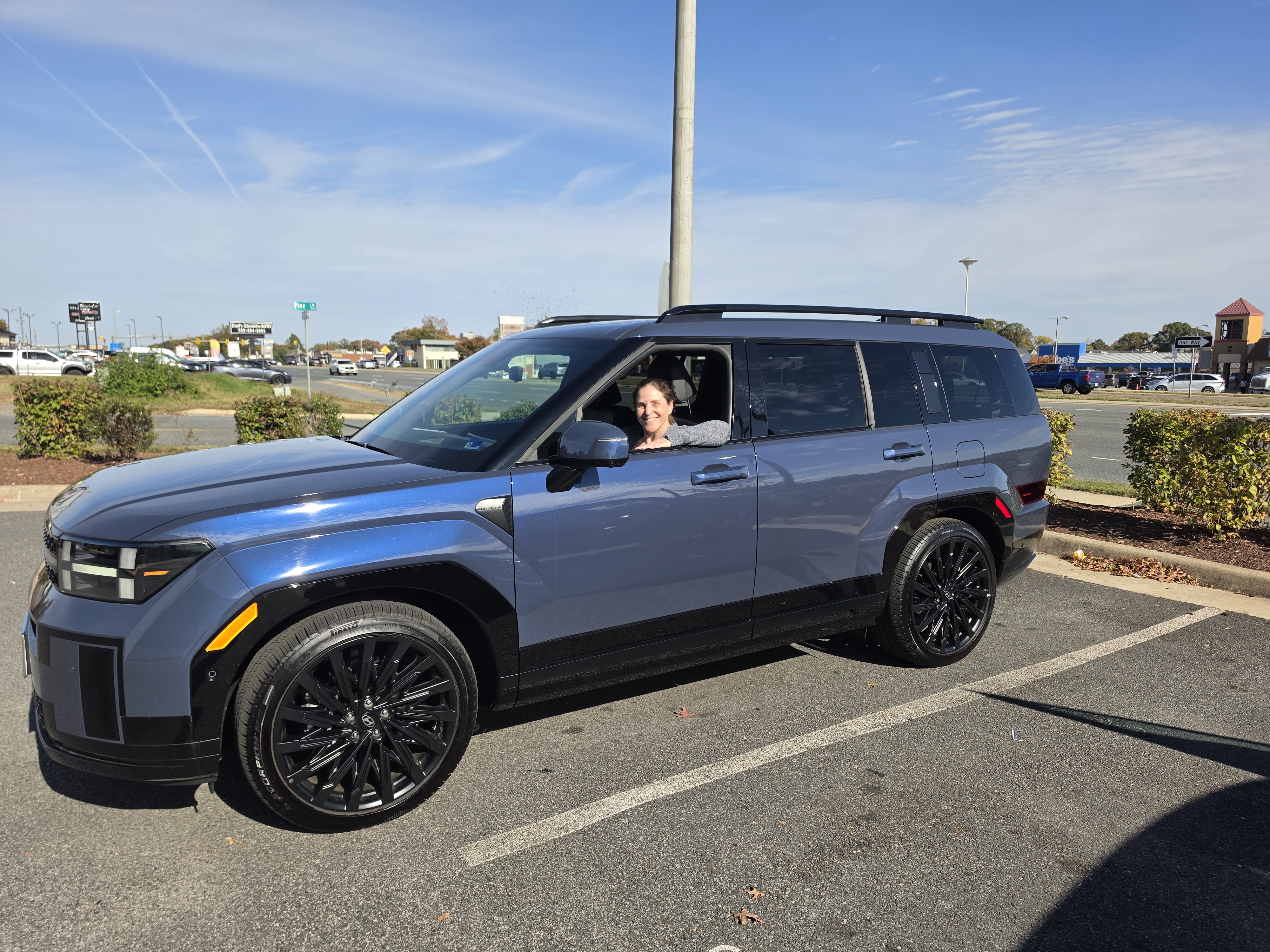
Shira's Acura RDX lease was winding down. We wanted to lease something that wasn't an Acura, and we wanted to get out of the Acura in the way that worked best for us. We ended up with a Hyundai Santa Fe. It was our first car deal in the age of agentic AI. Here's what helped, where the AI went wrong, and what actually got the deal done.

Huge Win: LeaseHackr's Rate Findr

  • Rate Findr on LeaseHackr is like X-ray vision for leasing. It shows the lease program numbers that dealers don't publish: money factor, residual and lease cash.
  • It isn't AI. It's reliable data that the AI can use. Without real numbers Claude guesses, and those guesses can get you in trouble.
  • Lease terms are set for the whole program, so they're the same at every dealer. In theory you could work out the lease deal by comparing offers from different dealers.
  • LeaseHackr makes that much simpler. Because you can see which lease programs are being offered, you don't have to depend on dealers. You can compare your leasing options ahead of time instead of trying to work them out on the fly.
  • Rate Findr also shows how each deal is put together. One model may have a lower interest rate. Another may have a higher rate but come with lease cash, which lowers the cap cost.
  • Access works a little oddly: you join the forum and make a monthly donation, which you can cancel anytime. That's a small price for what you get.
  • If you lease, you need this tool.

Where AI Helped

  • It taught me. None of the explanations of Money Factor or Capitalized Cost I found made sense to me. Claude patiently let me dig into these topics until I understood them.
  • It compared scenarios in seconds.
    • Which lease program was best? The 2026 or the 2027 Santa Fe? Gas or hybrid? A lower interest rate, or a higher rate with more lease cash?
    • Claude put all of this into one table I could actually compare.
    • Gas beat hybrid, because the hybrid's higher MSRP and smaller (or no) lease cash outweighed its better residual. The 2026 and 2027 gas models came out about even.
    • Claude's take on the Acura MDX deal was especially helpful. The low interest rate made it look like a no-brainer. But Claude factored in the MDX's low residual value and showed me that what looked like a great deal wasn't.
  • It mapped the market. Claude could go through sites like cars.com and quickly map the range of discounts on a make and model. That gave us a yardstick. Some dealers were selling at MSRP, and the good deals were around $3,500 off. So when a dealer beat that, we knew we had the winner.
  • It pushed back on ideas that seemed sensible to me but were dead ends:
    • Why not buy out the Acura and sell it to any dealer? Because then we'd pay sales tax on the buyout. It's better to stick with Acura or Honda dealers, who can buy the car straight from the lease so it isn't really a sale on our end. Honda also blocks third-party buyouts, so places like Carvana and CarMax couldn't buy it anyway.
    • Why not email every Acura and Honda dealer within 90 miles and take the best offer? Dealers don't reliably answer cold emails, many don't have a public email address, and I was way overcomplicating this. Call 3 nearby dealers and you're done.

Where the AI Failed Me

When it misread something, had incomplete information, or made a bad assumption, it gave me bad advice that sounded confident:

  • The CX-90 PHEV "giveaway." The AI was convinced Mazda was practically giving away the CX-90 PHEV. It wasn't. The AI had read two separate lease options, one with a low interest rate and one with lease cash, as one very generous deal.
  • The "inflated" cap cost. The AI was sure a dealer's quote had quietly inflated the cap cost. Not so. Claude had "forgotten" that Virginia makes you pay sales tax on the full car up front, and that tax is part of the cap cost. Once I had the real numbers, I could see how the dealer got there, and it was legitimate.
  • The ad that wasn't a lease offer. It saw an ad on a cars.com page and concluded the dealer was running a very low interest rate lease offer. The ad wasn't a lease offer, so everything the AI built on that assumption was wrong.

Taming AI

  • Keep asking. Say "I don't get it, let's discuss" until either (a) you understand it, or (b) the AI admits it was wrong all along.
  • Have it explain things back. Don't tell it what the lease says. Have it read the lease and tell you, then check that it sees what you see.
  • Build tools. I wrote leaseassist to pull lease deals from LeaseHackr and put them in a consistent format, so the AI didn't have to keep re-parsing them. The scraper behind it is ratefindr.js.

What Got It Done: Hustle

  • AI gave us the information to recognize a good deal.
  • Texting, calling and visiting dealers is what actually got the deal done.
  • Leasing the new car: We got a great price on a car in the wrong color. It was silver, and Shira wanted blue. Shira kept shopping until she found a dealer who had the color she wanted and would match the deal.
  • Selling the Acura: It took visits to more than one dealer. I eventually got a good offer, and then found another dealer who wanted the car badly enough to make an even better one. A Honda dealer bought our Acura lease, so the cross-brand buyout really does work.

Behind This Post

The outline I wrote
- The setup:
  - Shira's Acura RDX lease was winding down
  - We wanted to lease a new car that wasn't an Acura
  - We wanted to wind down the Acura in the most beneficial way possible
  - This is our first car purchase in the age of agentic AI
- Huge Win: LeaseHackr's Rate Findr
  - This is like X-Ray visions for Lease
  - This isn't AI, but it's reliable data the AI can use
  - Leasing terms are program wide, so in theory, you can derive lease
    deals by cross-checking dealer offfers
  - LeaseHackr dramatically simplifies this: by being able to see what
    lease programs are beign offered, you don't need to rely on
    dealers and pre-game different leasing options versus trying to
    figure them out on the fly.
  - If you lease, then you *need* this tool
- Where AI Helped
  - It was able educate me: no one description of Money Factor or
    Realized Captilized Costs made sense. But, Claude patiently let me
    explore these topics until I understood them.
  - AI could sift through various scenarios and determine
    which was the best in a few seconds.
    - Which was the best lease program? The 2026 or 2027 Santa Fe?
      What about Gas or Hybrid? What about a lower interest rate vs
      higher interesate rate and a bigger discount?
    - Claude could put a table in front of me normalizing this
    - The clarification on the Acura MDX deal was especially helpful:
      the low interest rate made it seem like a no-brainer. But,
      Claude factored in the low residual value and showed me how what
      looked like a great deal, wasn't.
  - AI could crawl through sites like cars.com and quickly map the
    range of discounts on a make and model. That gave us a yardstick:
    some dealers were selling at MSRP, the good deals were around
    $3,500 off. So when a dealer beat that, we knew we had the winner.
  - The AI could push back on ideas tht made sense to me, but were in
    fact, dead ends:
    - Why don't we buy our Acura and then sell it to any old dealer?
      Doing so causes you to pay sales tax; best to limit to Acura or
      Honda dealers, then it's not a real sale.
    - Why not email all dealers in the area within 90 miles to see who
      wants our car, then take the best offer? Dealers don't relaibly
      answer cold emails; many dealers don't have a public email; and
      you're way overcomplicating this. Call 3 nearby dealers and
      you're done.
- Where the AI failed me: with misread, incomplete or bad
  assumptionns, it gave me conflidently sounding bad advice:
  - The AI was convinced they were practically giving away the CX-90
    PHEV. Nope: it read two lease variations, the first with low
    interest rate, and the second with lease cash, as being one
    super generous deal.
  - The AI was certain a dealer's quote had sneakily inflated the Cap
    Cost. Nope, Claude 'forgot' that VA requires paying sales tax on
    the full car up front and that's part of the cap cost it hadn't
    considered.
  - It saw an ad on cars.com page and derived fromn there that the
    dealer was running a super-low interest rate lease offer. That
    wasn't a lease offer, so the assumptions that flowed from this
    were all wrong.
- Taming AI:
  - Keep asking: "I don't get, let's discuss" until either (a) you get
    it, or (b) the AI reveals it was wrong all along.
  - Build tools: I created `leaseassist` to pull back and normalize
    lease deals from leasehackr so the AI wouldn't need to keep
    re-parsing it.
- What got it done: Hustle
  - AI armed us with information to know what a good deal looked like
  - But, texting, talking and visiting dealers is what actually got
    the deal done
  - On the lease of the new car: we got a great price on the wrong color car. Shira
    shopped around until she found a dealer who had the color she
    wanted and matched the deal
  - On the sale of the Acura: it took taking it to multiple dealers, but
    ultimately, I got a good offer and then found another dealer who
    wanted the car so badly, that they gave me an even better offer

Sunday, November 01, 2026

Review: The Minuscule Mansion of Myra Malone

This is a Just the Facts (JTF) post: generated by AI from my own raw material (voice memos, session notes) and a short outline I wrote, then checked by me. What's a JTF?

Note: this post may contain spoilers.

I picked up The Minuscule Mansion of Myra Malone by Audrey Burges more or less at random and couldn't stop listening to it. The premise is clever, and some of the scenes fit together in really satisfying ways. Once I thought about it a bit, though, it all seemed too neat. Then I started a much heavier book and realized Myra Malone was exactly what I needed right now.

The Premise

  • There's a real mansion and a miniature version of it, and the two are magically linked. Cool!
  • Decorated rooms appear and disappear in the model. In the real house, music plays and nobody can tell where it's coming from.
  • The book never tries to explain the magic. It just runs with it.
  • As a blogger, I liked that Myra's blog is front and center in the story.

Scenes That Snap Together

  • Scene one: Grandpa Lou turns up with a trunk full of Vienna sausages that nobody wants. He comes across as a doddering, out-of-touch old man, or maybe a hoarder.
  • Scene two: years later, a blog post by Myra explains it. Lou grew up in the Great Depression, and for him, food was how you showed love. It wasn't dementia. It was love and childhood trauma.
  • This is a book about magic and fairy-tale endings, and Burges still gives her characters real depth. Lou isn't the butt of a joke.
  • Scenes also repeat across generations. Trixie's two great loves have hints of each other, and the lady of the house stays frozen while the world moves on around her.

Too Neat?

  • In the moment, having all the pieces fit together felt great. Almost too great, to the point of being cheesy.
  • With even a little thought, it started to feel like a pretty simple view of the world. I wanted it to be more complex than it was.
  • Some characters feel one-dimensional. Rutherford is angry from the day he's born and spends his whole life fighting the house, and I never really understood why.
  • The plot has holes. A well-known historic mansion has its miniature posted online, and only the owner recognizes it? Nobody else in town puts it together?
  • The house keeps getting called a refuge, but we never really see anyone take refuge in it.

The Right Book at the Right Time

  • After finishing, I started The Things They Carried by Tim O'Brien, a serious and profound book about the Vietnam War.
  • With everything going on in my life right now, it wasn't the right book. Myra Malone was.
  • Getting to escape into a world of magic and a perfect love story deserves more credit than I first gave it. That doesn't make it an unserious book. It just has its own kind of beauty and pleasure.
  • And the love story between Myra and Alex is what you show up for. Who doesn't love a happily-ever-after?

Read it? Yes! Just don't expect it to survive close plot scrutiny.

Behind This Post

The outline I wrote
1. I found the premise really clever: a physical world and a tiny world
   that are linked. Cool!
2. I was impressed with scenes that snapped together, like the Vienna
   sausages. In scene 1, Grandpa appears to be a doddering, out-of-touch
   old man. In scene 2, we learn that trauma has shaped his world, so
   what looks like hoarding is neatly put into context.
3. Everything snapping together perfectly felt great in the moment, but
   on even a little introspection it felt like a bit too simplistic a
   worldview.
4. It took me trying to read a book about Vietnam to realize: at this
   moment, I needed the magic and perfect love story of The Minuscule
   Mansion of Myra Malone.

Read it? Yes! Just don't expect it to survive close plot scrutiny.