This is a Just the Facts (JTF) post: generated by AI from my own raw material (voice memos, session notes) and a short outline I wrote, then checked by me. What's a JTF?
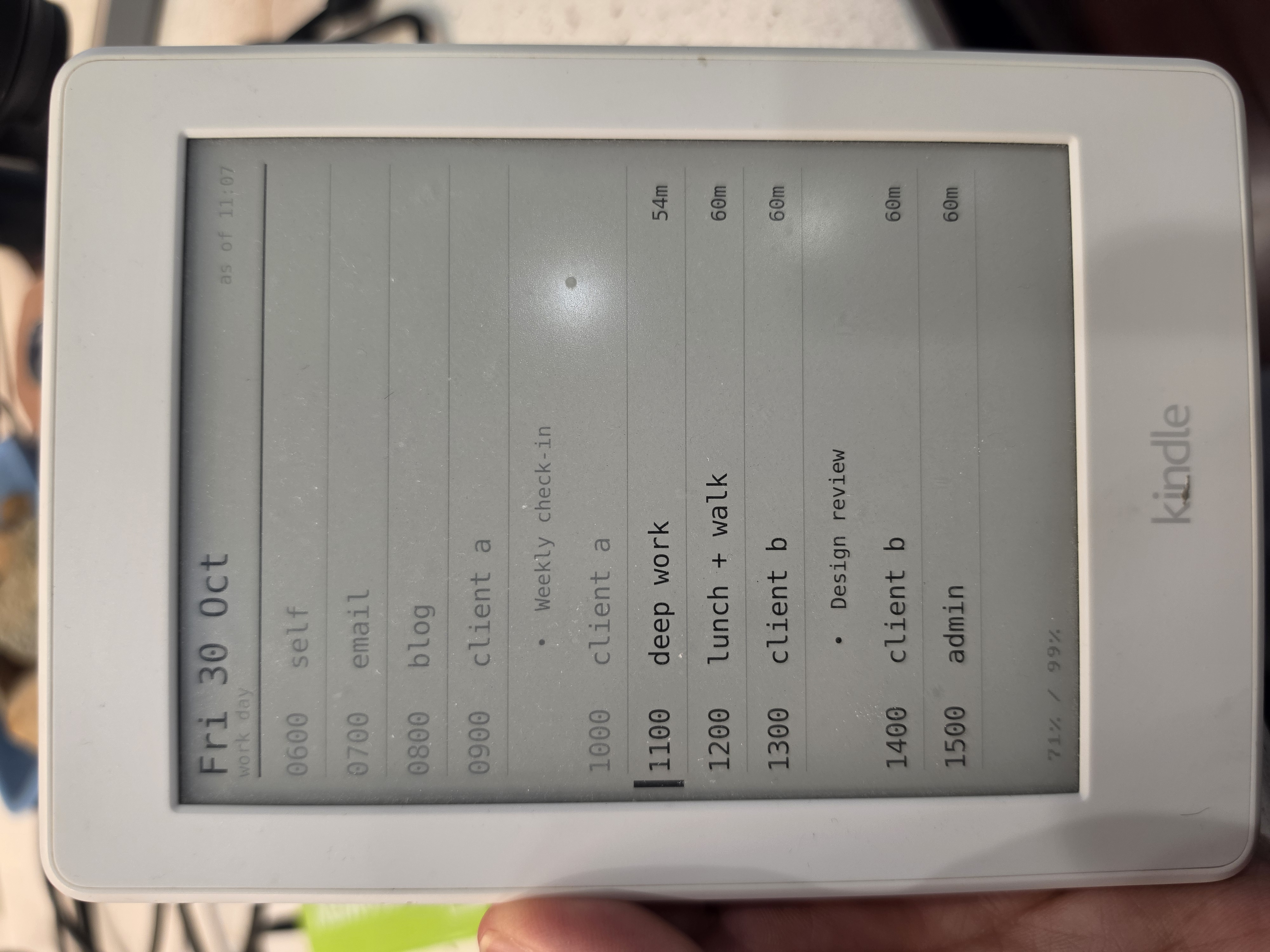
I took an old Kindle that was sitting on a shelf, jailbroke it, and turned it into an always-on display of my day's time boxes. It cost $0.00. Claude wrote the code. The biggest surprise was that once it's jailbroken, a Kindle is just another Unix box you can run shell scripts on.
How it started: Time Boxes
- What do you do with a TODO list that never seems to end? "This week I'll finish this blog post" is easy to write and hard to schedule. Is editing that post one hour or four? You slot it in, work on it, and the list still doesn't clear.
- Instead of focusing on the items, I focus on setting aside time to work on them. "I'm going to work on the blog for an hour on this day." I show up and work. I'm not trying to finish a thing, just to work hard for that hour.
- That's a scheme you can actually win at.
- The result: time boxes. I don't schedule specific tasks for each project. I schedule time for the project and work hard inside that box.
- Time boxes take discipline, though. It's easy to blow right through them, especially when I'm in a flow on a project I'm loving and it's time to switch to the next box.
Overengineered idea: a real-time dashboard of my day's time boxes
- YouTube keeps recommending me sleek e-ink display projects that show some kind of dashboard.
- The thought: if my time boxes for the day were always in front of me, I'd do a better job of sticking to them.
- I could write them on a sheet of paper. Cost: $0.00. Time: a few seconds.
- But those sexy e-ink displays were too tempting. I had to know: could I get a hardware device to show my time boxes in real(ish) time?
The search for the middle ground
- Known options:
- The surprise: the old Kindle on my shelf might be the middle ground I was hoping for.
- Claude suggested putting it to use. It's a Kindle Paperwhite from 2015 that I bought for travel reading and barely touch now.
- I knew it had an e-ink screen, but I had no idea how the software side worked.
- Claude was encouraging but careful about it: it depends on the firmware and whether the device can be jailbroken. I took a photo of the Kindle's device info screen with the version numbers and handed it over. The verdict: this can be done.
- There are well-known Kindle hacking projects, like WinterBreak, that showed this was doable.
Proving It
- Step 1: jailbreaking the Kindle
- I blindly followed the steps the AI gave me. I don't normally work that way.
- I was OK with it here because the worst case was bricking a Kindle I wasn't using anyway.
- With the Kindle plugged in over USB, Claude could read and write files on it directly. My job was mostly to unplug it and tap the screen when I was told to.
- I went one step at a time, and before I knew it I had a jailbroken Kindle.
- I had no idea what that actually meant.
- Step 2: Hello World
- Claude wrote a test script and copied it onto the Kindle. I unplugged it and the script showed up right where a book would. I tapped it, like opening a book, and the screen filled with text.
- Holy smokes: it's basically a shell script. Writing code for the Kindle is like writing code for any other Unix shell. That means
curl,whileloops, andsleep, plus FBInk, a command that draws an image on the e-ink screen.
Building It
- The setup for my live time-box view is painfully simple.
- Server side: on a Linux server I already had, cron runs a command every 10 minutes that creates an image and puts it at a well-known (and hard-to-guess) URL. The command is
cloudslateassist -a publish -s workday.- cloudslateassist runs a "slate" script. If the script outputs an image, that image gets converted for the Kindle. If it outputs text, the text gets turned into an image with render-text.php.
- The workday slate calls my existing
workdayassist -a todaycommand, which prints the day's boxes. Claude wrote PHP that turns that output into a clean timeline.
- Kindle side: cloudslate.sh grabs the image, paints it on the screen, sleeps for 15 minutes, and repeats.
- It couldn't be more basic, but the result looks surprisingly polished.
- The display looks sophisticated. Really, the Kindle is just downloading one image and painting it on the screen.
- The trickiest part of the project was naming it. I spent more time on the name than on anything else.
- I went with cloudslate. A slate is the (literally) old-school board students used to have at their desks, a portable chalkboard for scratch work that got wiped and reused. The Kindle is the slate, and the data comes from the cloud.
Using It
- Does it solve my blowing-through-the-time-boxes problem? No, but it helps.
- Did I learn that the Kindle on my desk is just another Unix box I can hack? Yes, yes I did!
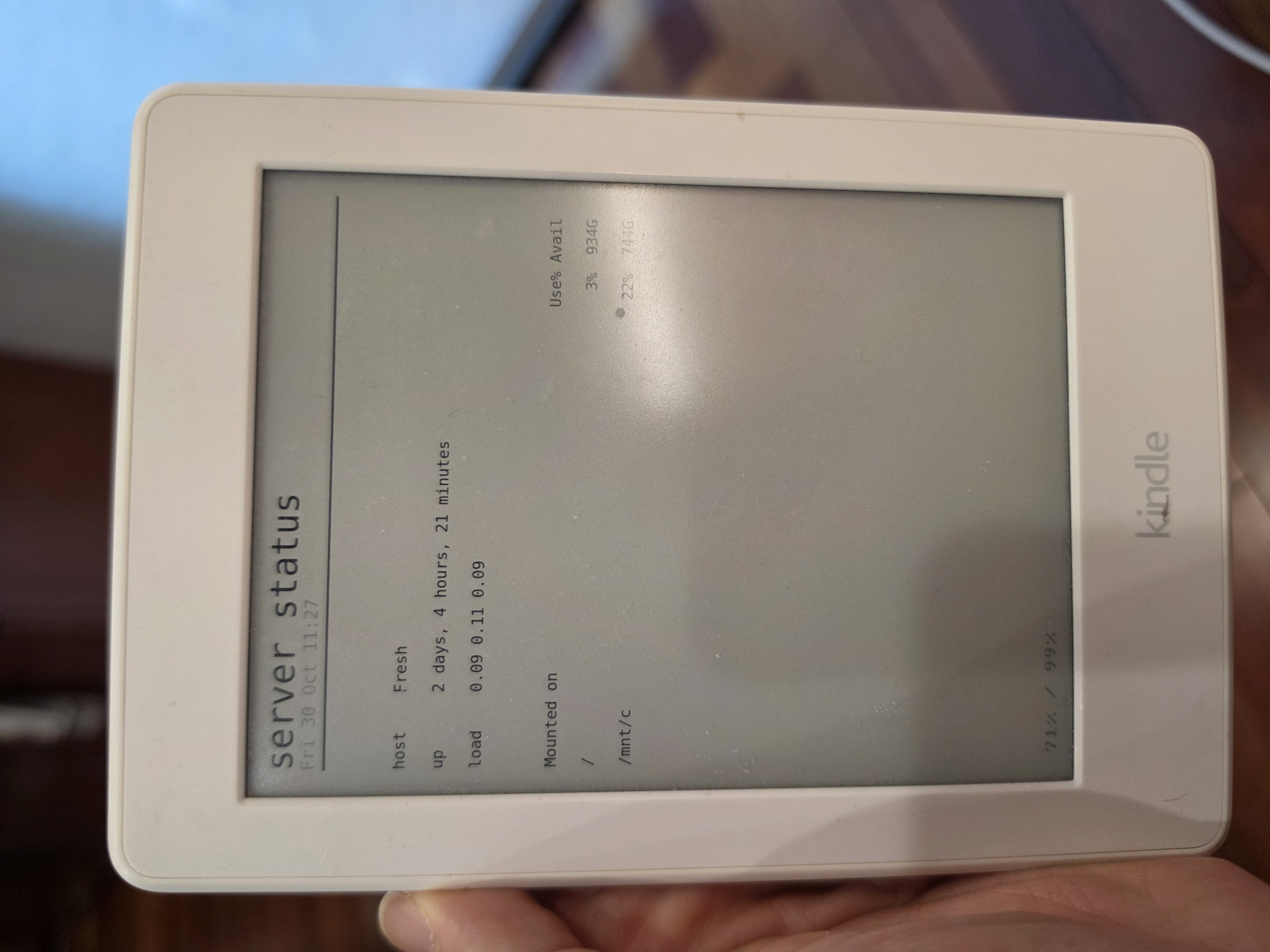
- Using it for my time boxes is a win, but it would be trivial to show other data too. A slate is just a script that prints text or an image. server-status.sh is a short example.
- Given the cost ($0.00), the effort (low, since Claude wrote the code), and the sheer cool factor (I have a live-updating dashboard!), this project is hard to beat.
Resources
- TRMNL, the finished e-ink dashboard product
- WinterBreak, the Kindle jailbrexak
- FBInk, the tool that draws on the e-ink screen
- cloudslateassist: renders and publishes slates, installs the Kindle app
- cloudslate.sh: the app that runs on the Kindle
- render-text.php: turns text into an e-ink image
- server-status.sh: a short example slate script
- workday.sh: the workday slate script
- workday/render.php: draws the workday timeline
- e-ink dashboard YouTube videos that look sooooooo cool
- e-ink DIY projects with an ESP32. Again, soooooo coool.
Behind This Post
The outline I wrote
- How it started: Time Boxes
  - What do you do with a TODO list that never seems to end?
  - Intead of focusing on items, focus on allocating time to work on the items
  - That's a scheme you can actually win at
  - The result: time boxes.
  - Instead of focusing on specific tasks for various projects, I
    focus on scheduling time for that project and working diligetnly
    in that time box
  - Time boxes require discpline though, it's easy to blow through
    them
- Overengineered idea: a real time dashboard of my day's time boxes
  - A common YouTube feed recommendation is some sleek e-ink display
    project that shows some dashboard data
  - The thought: if I had my time boxes for the day in front of me,
    then I would do a better job of sticking to them
  - I could scratch them out on a sheet of paper - cost $0.00, time a few seconds
  - But, those sexy e-ink displays are too irressibtable: I had to
    know, could I have a hardware device show me my time boxes in
    real'ish time?
- The search for the middle ground
  - Known options:
    - DIY - Cheap, but the assembly time put these projects out of reach
    - Buy it - Lower effort, but priced well over $100, I couldn't
      justify the cost for what was essentially a toy
  - The surprise: The old Kindle sitting around may be the middle ground I hoped for
    - Claude had a suggestion: put the old Kindle I have lying around to use
    - I knew it was powered by e-ink, but I had no idea how the software side of worked
    - There are some well known hacking projects that suggested this was doable
- Proving It
  - Step 1: jailbraking the Kindle
    - I blindly followed the steps the AI told me
    - I felt safe doing this because the worst case was that I'd brick
      the Kindle, and this was already a device that wasn't in use
    - I followed the steps, one by one and before I knew it, I had a jail broken Kindle
    - I had no idea what this meant
  - Step 2: Hello World
    - Claude wrote me some code to run on the Kindle, and I was able
      to launch it as if I was opening a book
    - Holy smokes: the script is basically a shell script. So writing
      code for the Kindle is basically the same as writing code for
      any other Unix shell
- Building It
  - The architecture for my live time-box view is painfully simple:
  - On a Linux server, I have a command in cron that runs every 10
    minutes and creates an image. This image is stored in a well known
    location
  - On the Kindle, it grabs and renders the image, then sleeps for 15
    minutes, then repeats
  - This couldn't be more basic, and yet, the result was surprisingly polished
    - The display may look sophisticated, but the Kindle is bldinly
      downloading a single image and painting it to the screen
  - The trickiest part of the project: naming.
    - I went with 'cloudslate' - slate, being the (literally) old
      school device used by students as a sort of primitive
      whiteboard, and cloud being the source of the data
- Using It
  - Does it solve my blow-through-the-time boxes problem? No, but it helps.
  - Did I learn that the Kindle on my desk is just another unix box I can hack? Yes, yes I did!
  - Using this for my time boxes is a win, but it would be trivial to
    render any other data, too.
  - Given the cost ($0.00), effort (low, Claude wrote the code), and
    the sheer cool factor (I've got a live updating dashboard), this
    project is hard to beat.
No comments:
Post a Comment