Showing posts with label linux. Show all posts

Friday, March 20, 2026

Claude Code - Programmer's Partner and Torah Scholar?

With Passover fast approaching, I've been putting AI to use in my Seder prep. Specifically, I've been using it to discover and unpack different topics of conversation I could explore with my guests.

In this post, I want to showcase what you get when you unleash Claude Code, a software development tool, on this sort of research task.

The Setup

To appreciate what Claude Code brings to the table, I fed it and ChatGPT essentially the same prompt. Here's the prompt:

I'd like to do some research for the upcoming Passover Seder. Looking at around the time of the Civil War, one of the reasons given for the morality of slavery was that the Bible didn't seem to condemn it. In fact, it includes a commandment that the descendants of Ham were to be slaves. Some suggested that the African slaves were these descendants.

Can you give me some quotes and links to texts from rabbis that discuss how Judaism traditionally understood this commandment that the descendants of Ham were to be enslaved? Would this argument that was common in the US make any sense in a traditional Jewish context?

So here I'm taking some vague notation I have and I'm asking AI to flesh it out and back up its response with quotes and links.

As a side note, I find it enraging that a couple of verses in the book of Genesis could be used as moral justification for enslaving hundreds of thousands of Africans in America. But, apparently it was. Or at least that's what I wanted AI to help me unpack.

ChatGPT's Performance

You can find ChatGPT's full response here. In general, it did the job we're used to AI doing and while you can quibble with it (does it really need to start with a compliment?), the fact is that it did hours, if not days of research in a few seconds. It then presented the findings in an organized and thoughtful way. To be anything other than blown away by this result is to have lost sight of what life was like in the Pre-ChatGPT era.

And yet, with this type of response, one always needs to ask a critical follow up question: this sounds good, but is it true?

For example, did Ibn Ezra, writing in the 12th century, really directly address this issue of Black people, slavery and Noah's curse?

To ChatGPT's credit, it provides links to sources as I asked for. The Tablet Magazine article is a valuable read, and I appreciate that the link to Chabad is also Kosher. But many of the other quotes link back to Wikipedia, which any high school student can tell you isn't a reliable source. And while the Tablet and Chabad articles are helpful, are they based on accurate readings of source materials?

Claude Code's Approach

Claude Code, as the name suggests, is a coding tool. Developers use it to build software. What makes Claude Code magical isn't that it's brilliant, but that it uses tools—precisely the way software developers do—to learn and build stuff.

My prompt to Claude Code matches what I provided to ChatGPT, with one important addition (noted in bold, below):

I'd like to do some research for the upcoming Passover Seder.

Looking at around the time of the Civil War, one of the reasons given for the morality of Slavery was that the bible didn't seem to comdem it. In fact, it includes a commandment that the descendents of Ham were to be slaves.

Some suggested that the African slaves were these descendents.

Using ~/bin/safariassist - a tool to search sefaria.org - can you give me some quotes and links to texts from rabbis that discuss how judiasm traditionally understood this commandment that the descenants of ham were to be enslaved.

Would this argument that was common in the US make any sense in a traditional Jewish context?

I've asked Claude Code to use sefariaassist, a Linux command line tool that interacts with sefaria.org's API. Sefaria is a website dedicated to hosting Jewish texts and the links between them.

Unlike ChatGPT, Claude Code is pretty chatty as it tries to tackle the task I've given it. You can read its entire transcript here.

You can see that Claude gets off to a slow start as it tries to figure out what sefariaassist is all about. Incidentally, this is exactly what a human who was tasked to use this program would do: poke around, try it and fail.

Claude pushes forward, figuring out how to use sefariaassist and then starts researching the problem in earnest.

You can see that Claude gets stuff wrong - it tries to use jq on the output of sefariaassist -a text and fails. But again, like a human, it learns and moves on.

Like ChatGPT's complimentary intro, Claude gave me hints that it was on to something. Like when it announced:

● Excellent material. Let me read the full commentary links and also search for Rabbi Raphall's infamous pro-slavery sermon:

or

● I have very rich material. Let me get two more key sources:

Who doesn't love the AI powered dopamine rush that we're on the right track! I say 'we', but all I did was pose the question.

In a minute or two, Claude presented me with findings:

The findings, which I asked Claude to write up can be found here. They essentially match what ChatGPT told me. However, every statement that Claude makes is backed up with a link to Sefaria.

For example, Claude doesn't just report Ibn Ezra's quote, but provides a link to the source material

This link allows me to spot-check Claude Code to ensure it's not hallucinating. Another key win is that it lets me browse the source material to get a more complete picture. Even if ChatGPT got the Ibn Ezra quote right, perhaps earlier or later in the text, Ibn Ezra says something that undermines this quote. Or, maybe there's other useful material here that because it's not as widely cited, ChatGPT hasn't picked up on it as being useful.

In this case, the verse before the one considered famous is also quite fascinating:

Here, Ibn Ezra effortlessly dismantles another pro-slavery argument that circulated at the time of the American Civil War. That is, that the Hebrew עבד עבדים means "slave to slaves." Ibn Ezra shows this as a misreading, and that it simply means "servant like all other servants."

The win here isn't that Claude Code gave me a pithy answer to my question, but that it set me up so I could discover my own answers with ease.

And the winner is...

Comparing ChatGPT's performance to Claude Code's is notable. On one hand, ChatGPT was faster and gave me prettier results. It also provided me a link to a Tablet Magazine article which opens up a number of interesting follow-up questions.

What Claude Code lacks in terms of sexiness, it makes up for with both transparency and completeness. By watching its transcript, I can see its reasoning and what it's searching for. Most importantly, it didn't just give me a useful end product, it gave me direct links to trusted source material. This source material not only provides confidence in the answer provided, but opens up new areas to explore.

In truth, there is no winner here. Both tools are astoundingly good, and no doubt the trust issues I cited with ChatGPT will improve over time. Not that long ago, ChatGPT provided answers with no sources. Now it's providing sources, but some of them are weak. I'm sure ChatGPT and other LLMs will get better at this.

And yet, what Claude Code is doing here is something special: it has traded the know-it-all machine model for one that's a tireless assistant who's an exceedingly quick study. This makes for a helpful partnership and for research tasks like this one, is far more valuable than simply sitting at the feet of a guru.

Tuesday, January 20, 2026

Like X-Ray Vision For YouTube Content

While browsing the YouTube API, I came across a section on captions and it hit me: if I could slurp down a video's subtitles, I could feed them to an LLM like Gemini and get insights about the video without ever pressing play. I wondered if I could get answers to questions like: what's novel about this video? (besides a clever title and thumbnail) or does this video show signs of bias?

Digging into this, I quickly learned that the captions endpoint doesn't help solve this problem. It's designed for content creators to download the captions that they've created for their own videos. I wanted a way to grab subtitles for public videos.

But all isn't lost: with additional research, I discovered that you can use yt-dlp to grab a video's' subtitles. yt-dlp is a YouTube command line downloader, and one of its bonus features is downloading caption files. With this tool installed, my idea was trivial to put together.

First off, I added a -a subtitles option to youtubeassist, my command line tool for working with YouTube. I can now quickly grab the captions for any video I want. Here's this functionality in action:

  $ youtubeassist -a subtitles -i https://www.youtube.com/watch?v=dQw4w9WgXcQ | grep ^Never | head -4
  Never<00:00:43.440><c> going</c><00:00:43.520><c> to</c><00:00:43.760><c> give</c><00:00:44.079><c> you</c><00:00:44.480><c> up.</c><00:00:45.360><c> I'm</c><00:00:45.520><c> going</c><00:00:45.600><c> to</c>
  Never going to give you up. I'm going to
  Never going to give you up. I'm going to

Next, I tweaked geminiassist, my command line tool for working with Gemini. I added a -y video-id-or-url option. When -y is provided, the corresponding caption data is downloaded and included as an attachment with the prompt that's sent to Gemini. I was amazed how quickly all this came together.

Consider this video: This Journalling System Solved my Shower Thought Problem. Is it worth my time, or just more of the same? Now I can ask Gemini.

  $ geminiassist -a ask -y ABSV0GzSnS0 -p "Can you please look over the subtitles of this video. Can you summarize the video in a few bullet points. Give me a few bullet points why I should watch the video and a few bullet points why I should skip it. Generate results in HTML so I can embed them in a blog post."

Video Summary

  • The video outlines the creator's journaling system for turning ideas into reality, emphasizing the importance of tools and systems that reduce friction and encourage consistent creative action.
  • The creator recounts how losing an initial idea (a toothbrush with a flossing compartment) spurred the development of his current system.
  • Key components include a pocket journal (Moleskine) for capturing on-the-go ideas and a handmade pencil case filled with useful tools (markers, scissors, tape, ruler, etc.).
  • Digital tools are also key. He has a dedicated notebook, and mini printer to integrate photos and images into his journals, and a digital app (Notion) for organizing and refining ideas and creating a production pipeline.
  • The system prioritizes intentionality and visual representation over convenience, aiming for a harmonious process between idea and outcome.

Why You Should Watch This Video

  • Inspiration for creative systems: The video offers a detailed look into a creative professional's workflow.
  • Practical tool recommendations: Discover specific tools and applications (e.g., Moleskine, Jetream, Notion, mini printer) that enhance the journaling and creative process.
  • Emphasis on consistency: Learn the importance of building a routine around creative work, even if it's not always convenient.
  • Visual learning: The creator's emphasis on visual journaling is beneficial for visual learners and anyone seeking alternative methods of idea capture and development.

Why You Might Skip This Video

  • Not focused on digital tools only:The video has a large focus on a more hand-written and craft styled system. If you prefer pure digital solutions, you might find the physical tools section less relevant.
  • Individualized System: This is _one_ system, it does not mean that it will work for you and may require extra effort and experimentation to get your own system up.
  • Detailed Equipment List: The video goes into specific detail about all the tools which can be tedious to hear about if you're not interested in purchasing some of the tools the creator uses.
  • Personal Preference: The creator is very passionate about his current system, while passion can be great, the heavy emphasis on his personal system may not translate to value for all viewers.

Or, here's a provocative title that I'd normally skip as clickbait: America Just Entered Early-Stage Revolution. But now I can ask Gemini for its opinion before I waste my time and muddy up my feed.

  $ geminiassist -a ask -y '-7sDn_B2TbE' -p "Please review the subtitles for this video. Can you summarize it? Does the video show signs of bias? Is this clickbait or reasoned analysis? Provide your response in HTML bullet form so I can embed this easily in a blog post."
  • Summary: The video analyzes an incident in Minneapolis where Jake Lang, a known January 6th rioter and right-wing agitator, encountered resistance at a protest and then falsely claimed to be stabbed. The video argues that Lang's experience signifies a shift in power dynamics, where right-wing intimidation tactics are becoming less effective as people are physically pushing back against bigotry. It contrasts this with the Charlottesville events, when that intimidation was much more prevalent. The video concludes with cautious optimism, suggesting this could be the beginning of a real resistance movement, but warns that sustained, national, and habitual action is needed to bring on the revolution.
  • Signs of Bias: The video exhibits a clear bias against Jake Lang and the right-wing movement. The language used to describe Lang ("clown," "professional agitator," "racist white grievance movement") is strongly negative. The video frames the confrontation as a positive instance of physical resistance against "fascism". There are other instances of loaded language, such as calling Trump supporters "fascist" and "toxic."
  • Clickbait vs. Reasoned Analysis: This leans more towards reasoned analysis than clickbait, though elements of both are present. The video presents a specific argument, supports it with examples and comparisons (Minneapolis vs. Charlottesville), and draws a conclusion about broader social trends. However, the framing of the title and the language used likely aim to attract a specific audience and provoke an emotional response.

Like all things AI LLM, with an improved prompt, I could get improved responses. Still, even these hastily prepared queries show promise.

I'm not sure how I'll integrate this into my YouTube workflow, but I'm definitely psyched to add this tool to my toolbox.

Friday, January 16, 2026

In Praise Of msmtp - Painless Email Setup For Your AWS Linux Box

I recently kicked off a nano-sized AWS server to run a cron job. Out of the box, the server doesn't support sending email.

Back in the day, a local instance of sendmail would gladly deliver email on your behalf. This made sending email easy. A bit too easy, in fact, as it opened the door for spammers to do their thing. The feature that made this possible, and turned into a nightmare, was that email systems would simply trust the sender.

These days, you can still have sendmail deliver mail on your behalf, but most servers will reject it as they have no reason to trust the identity of your server.

In the AWS world, the next step is usually to turn to SES - Amazon's Simple Email Service. That is, you'd instruct the Linux box to deliver the messages to SES, and SES would manage matters of trust.

Using SES isn't hard, but I was curious if there was a lighter weight solution. A little searching turned up: msmtp.

msmtp is a lightweight mail delivery agent that will securely hand off messages to another server for delivery. In my case, it will deliver messages to my Google Workspace account, which will forward the message on to the recipient. Configuration is simple and the software has few dependencies.

For a full walkthrough of how to set this up, check out this informative post: Send emails from your terminal with msmtp . For a more terse setup description, check out this Gemini Conversation. To skip all the fluff and see the install recipe, check out the code below.

If you're on a Linux box and just want email to work, msmtp is your friend.

Setup Recipe

# 1. Install msmtp and the mail interface
sudo apt-get update && sudo apt-get install -y msmtp msmtp-mta bsd-mailx

# 2. Generate a password using Google's App Password facility

# 3. Create the global configuration file
cat <EOF | sudo tee /etc/msmtprc
defaults
auth           on
tls            on
tls_trust_file /etc/ssl/certs/ca-certificates.crt
logfile        /var/log/msmtp.log

account        gmail
host           smtp.gmail.com
port           587
from           ben@super-cool-company.com
user           ben@super-cool-company.com
password       super-secret-unguessable-password

account default : gmail
EOF

# 4. Setup log file and secure the configuration (600 permissions are required)
sudo touch /var/log/msmtp.log && sudo chmod 666 /var/log/msmtp.log
sudo chmod 600 /etc/msmtprc

# 5. Link the 'mail' command to msmtp
echo "set sendmail=/usr/bin/msmtp" | sudo tee -a /etc/mail.rc

# 6. Send test email
echo "How's it going?" | mail -s "Checking in" bob@aol.com

Monday, January 12, 2026

Building A Better Digital Bat Signal - Part 2 - The Server

I want my phone's background to automatically update to a dramatic looking image when there's an urgent email in my inbox. To implement this, I need to scan my Gmail inbox for such a message and report this to my phone. I've implemented this behavior using a bit of shell scripting on a nano-sized AWS Linux server.

I can access my inbox via the Gmail API. Years ago, I wrote gmail_tool to manage an overrun Gmail inbox from the command line. I recently implemented a cleaned up version of this script, as gmailassist.

gmailassist lets me run a search for matching Gmail threads. Consider this search of my SPAM folder:

  $ gmailassist -p i2x -a threads -q 'label:spam' | head -3
  19baeee1f181be4b|沉默。 娘亲看起来好难过,姐姐也闷闷不乐的,可是为什么祖母跟别人都笑得这么开心涅。 “笑儿,娘舍不得你。”回屋的路上,连翘终是忍不住落下泪来,如果是京中那还好些,偏偏要去无双辣那么远的地方,不""知谷那无双云爷是什么样的人,会不会对笑儿好,嫁过去之后笑儿会不会受欺负。 越想,连翘心里越是难过,仿风已久可以看见慕容笑笑以后悲惨的生活。 “煮母,小姐受媓上赐婚,是件无上荣耀的事情,
  19ba891f8fae60ae|Standard Capital Can Help Apply for a Term Loan Now As a small business owner, you understand that having access to flexible and affordable funding is essential for your success. Standard Capital is
  19ba3a0df841439c|Confirmation for your recent purchase is attached,. 2026-01-10-Call Our Helpline: +1(983) 220-2512

With this command line tool in place, it's straightforward to generate a single 'inbox-status'. Here's the current logic for doing so:

  checks="work_urgent|work|label:inbox_label:unread_subject:urgent"
  checks="$checks personal_urgent|personal|label:inbox_label:unread_subject:urgent_category:primary"
  checks="$checks wife|personal|label:inbox_label:unread_from:wife@gmail.com"
  checks="$checks ok|work|ben" # [A]
  now=$(date +%Y-%m-%d)

  for check in $checks ; do
    status=$(echo $check | cut -d'|' -f1)
    profile=$(echo $check | cut -d'|' -f2)
    query=$(echo $check | cut -d'|' -f3 | tr '_' ' ')

    gmailassist -a threads -q "$query" -p $profile > $TMP/inbox-status.hits
    hits=$(cat $TMP/inbox-status.hits | wc -l)
    if [ "$hits" -gt 0 ] ; then
      echo "$now $status" >> $TMP/inbox-status.log
      if [ -n "$V" ] ; then
        cat $TMP/inbox-status.hits
      else
        echo $status
      fi
      exit
    fi
  done

  echo "$now unknown" >> $TMP/inbox-status.log
  echo "unknown" # [B]
  ;;

This bit of code loops through each $checks. Each 'check' has the format:

  • Status - the value that will be printed to the screen if the Gmail search returns any rows.
  • Profile - the Gmail profile to search. I've set up work and personal so I can get alerts from both my personal and work email.
  • Query - The search to use against Gmail. This looks odd because spaces are replaced with _. Other than this, however, this is a normal Gmail search.

In the first version of inbox-status I neglected to include the last check, [A]. I assumed that if none of the queries returned any rows, then all must be ok. The problem is, occasionally the API glitches. In this case, the searches return no rows not because they are empty queries, but because the API has failed. By setting up [A], the inbox status will only be OK if a search actively returns rows.

[B] is also essential, it says that if none of the rows match then the status is unknown. This will be skipped by the phone, so that when the API is down, the results are ignored.

Finally, I added support for a -v option when querying the inbox status. This reports the matching threads that correspond to the status. This is useful for quickly seeing which message has triggered the inbox status logic.

With a script to derive my inbox status, all that was left was to deliver this information to my phone. I make use of AutoRemote to accomplish this.

AutoRemote is a magic service that allows information to be delivered to an Android phone via a web request.

In my Linux server's crontab I have:

  */10 * * * * i2xassist -a inbox-status | andsend SetInboxStatus

andsend is little more than a simple wrapper around curl. It invokes the URL:

  $ status=$(i2xassist -a inbox-status)
  $ curl -s https://autoremotejoaomgcd.appspot.com/sendmessage \
    -d key=YOUR_AUTO_REMOTE_KEY \
    -d "message=SetInboxStatus=:=$status"

Every 10 minutes, my phone receives a SetInboxStatus message with the current inbox status. Up next is to have the phone react to this. We're almost there!

Wednesday, September 17, 2025

Lightweight Google Photos API Command Line Access

I'm ticking off the boxes needed to automate archiving images from a new camera I picked up. I have taken care of SD card access, and now I'm dealing with pushing files to Google Photos.

What I wanted was a lightweight, curl-based wrapper around the Google Photos Library API. By now, I've written many of these REST wrappers, so I wasn't especially daunted.

I set up new OAuth Credentials and went to work on the first API endpoint: /v1/albums/list. And that's where I hit a roadblock. Despite having hundreds of albums in my Google Photos account, I kept getting a response with this shape:

$ curl -s -H 'Authorization: Bearer <token>' -G https://photoslibrary.googleapis.com/v1/albums
{
  "nextPageToken": "CkAKPnR5cGUuZ29vZ2xlYXBpcy5jb20vZ29vZ2xlLnBob3Rvcy5saWJyYXJ5LnYxLkxpc3RBbGJ1bXNSZXF1ZXN0EowDQUhfdVE0M0Qtd2FKY0FTNkNNSUl3RUdqdHFIQmRuY1FSTy0wTjAxa1lLMUVyWVNFQWFBTnowOE9UZTdlS3dlRTlDd3JRTktvMUxsanhoc3lQZFJ4UWtUdzhUbXlMcm1PYm45Ymk0TVdLSktjalV0dHpSUzZ4OUdoOGpSc29EZ1VQQV9CVUJiVTFOdWNUSVZETVJhRWE1bnFrX3JNQWsta3NuQUFfYmZrVzZnaG5QNXJzMWVNN2FGYWlta1ozMGZ1cGs2MEVLRjRBdm11ek5FRUxvb2M3VXJVQmZtSjhwUkRZbFNrd3dzYzBXT2k4VzdmOGpzeHY1VUxVbThHSkdLZWtSQ0lRUGREamlNMURud2hXZzk2SGc1djJwTFlJdmhXOGRGMzdFUG44OFBVQTRsQy16RlBROXVUeWVJYW52cF9WQ1c5OTJRbk1lLWZ2UjF6bkRxVVJDd0o5V1l1Mzh0a3Q2Q1FpYUxuZHAzUTlQQkJ5WFhwT00tQnJpaENFdlF1RGdQel9raUtJY095GgA"
}

Where's My Stuff?

I found this response baffling: not only were the albums in my Google Photos account not shown, there wasn't even an albums entry in the JSON response. What gives?

Ahhh, the joy of fine print. Taking a moment to actually read the docs for albums/list revealed this description: "Lists all albums created by your app" (emphasis is mine). Wait, what? My app? Do I even have an app?

There's also this note, flagged as a change since April 1st, 2025:

Listing, searching, and retrieving media items and albums

What's changing: You can now only list, search, and retrieve albums and media items that were created by your app.

... If your app relies on accessing the user's entire library, you may need to re-evaluate your app or consider alternative approaches.

So the list of albums is blank because the newly created OAuth configuration I set up has never created any albums. Got it. It's still a bit strange that Google doesn't even return an empty albums array in the JSON response. But, I suppose that's a minor detail I can work around.

Once this sandboxing of images came into focus, I had no problem coding against the API. After all, my albums-list function was working just fine; I just assumed it should return something else.

You can grab gphotoassist here. As always, feel free to customize this script however you would like. Here's a transcript of me using gphotoassist. As a bonus, feel free to pick up geminiassists, too.

Happy hacking!

The Script In Action

  # Prepare a directory to store files locally
  $ photos_dir=$HOME/dl/pics
  $ rm -rf $photos_dir
  $ mkdir -p $photos_dir

  # My reference photo
  $ us=$HOME/dl/20250905_172927.jpg

  # Generate some fresh images to upload
  $ themes="sci-fi jungle western"
  $ for t in $themes ; do \
    echo $t \
    geminiassist -a generate-image -f $us -p "Edit this photo so the couple is in a $t themed photo. Their clothes and background should be updated to match the theme." > $photos_dir/$t.png \
  done
  sci-fi
  jungle
  western

  $ album_id=$(gphotosassist -a album-create -n "Fun Us Pics" | cut -d'|' -f1)
  $ echo "Album Created: $album_id"
  Album Created: AHnaBgu1ZNHo6zvalh4C7EFq4HZJO5jPXVhC39PZcfsW8qNVfRskSNwta7lJ4zldnNcB0BAY1mzw

  $ for f in $HOME/dl/pics/* ; do \
    gphotosassist -a album-add -i $album_id -f $f > /dev/null \
    echo "Added $f" \
  done
  Added /home/ben/dl/pics/jungle.png
  Added /home/ben/dl/pics/sci-fi.png
  Added /home/ben/dl/pics/western.png

  # Confirm the photos are now in the album
  $ gphotosassist -a media-list -i $album_id | while read line ; do \
    name=$(echo $line | cut -d'|' -f 2) \
    echo "$name" \
  done
  jungle.png
  sci-fi.png
  western.png

And here's the newly created pics in Google Photos:

Monday, September 15, 2025

Easy Command Line SD Card Access

I have a firm distrust of all things hardware. A side effect of this is that I tend to interact with a number of different devices and operating systems. Most of the time I live in an OS-agnostic browser, Emacs, or bash prompt. But every once in a while I need to do something OS-specific.

One such task is interacting with Micro SD cards. Years ago, I left myself a note describing how to access an SD card on Windows WSL2. I still refer back to that post every time I need to access a card from within WSL2.

No longer! I've codified accessing an SD card from all three OSs I use: Windows WSL2, Mint Linux, and macOS. Forget searching around; I can now type:

  $ sdcardassist -a root
  /mnt/sdcard

This provides me with the root directory of the SD card that is plugged into the device. It may mount the card if the OS hasn't already done this.

You can grab sdcardassist here. Enjoy!

Up next: My plan is to create gphotosassist, a script to streamline pushing images from an SD card to Google Photos.

Wednesday, August 20, 2025

Google Meet Meets the Command Line

BLUF

Using googlemeetassist it's possible to say:

  $ googlemeetassist -a new | clipit

and a URL to a new Google Meet space will be stored on your clipboard. The meeting is pre-configured to be recorded, have Gemini take notes, and capture a transcript.

More Docs, Less Clicks

I've come to appreciate that recording Google Meet calls is an excellent source of 'free' documentation. Whether it's show and tell with a customer after I complete a new feature, or running through a complex process or feature requirements with another developer, the simple act of hitting record provides the team with a zero-effort capture of this information. What's more, with AI, it should be possible to convert these recordings into a format other than long-form video. I have yet to experiment with this, but I'm confident that the AI capabilities will only improve and the larger the library of source videos, the better.

Google tries to add additional value to recordings by having Gemini take notes. I still prefer capturing the full recording and transcript to the notes, but I have to admit, they're often a pretty impressive summary of the meeting. If nothing else, they showcase AI's burgeoning capabilities.

The process of starting a new meeting with recording enabled isn't hard, but it's enough clicks that it's a candidate for streamlining. Even more problematic is that it's possible to forget to record the meeting. Every so often I'll find myself partway through a record-worthy session, only to realize I never hit the record button. Oh, to have a time machine to fix this!

Fortunately, Google Meet's v2 REST API makes creating and configuring a meeting space for recording to be straightforward. A single curl request with this shape is all it takes:

  curl -s -X POST  https://meet.googleapis.com/v2/spaces \
       -H "Authorization: Bearer $auth_token" \
       -H 'Content-Type: application/json' \
       -d "{ \"config\": {
            \"artifactConfig\": {
              \"recordingConfig\": {
                \"autoRecordingGeneration\": \"ON\"
              },
              \"transcriptionConfig\": {
                \"autoTranscriptionGeneration\": \"ON\"
              },
              \"smartNotesConfig\": {
                \"autoSmartNotesGeneration\": \"ON\"
              }
            }
          } }"

I've wrapped this curl command in a bash script: googlemeetassist. Feel free to grab it, use it and improve it. I can now start a meeting effortlessly by running:

  $ googlemeetassist -a new | clipit

Below is a run-through of all of googlemeetassist's options.

Not Out of a Job Yet

Curiously, when I asked ChatGPT to help me with this project, it came back with the explanation that the script I wanted to create wasn't possible. ChatGPT seems to be relying on this five year-old stack overflow discussion, as one of its primary sources. In this discussion, someone mentions using Google Calendar to create a Google Meet link. ChatGPT echos this suggestion as gospel. That was a clever workaround--5 years ago.

The free version of ChatGPT hasn't processed the Google Meet v2 API yet, so it doesn't know that it's trivial to create a meeting from a web request.

Finding examples of AI missing the mark is hardly unusual. But it made me smile that a humble programmer reading docs still managed to win the day. All that's to say, I wasn't replaced by AI today. Tomorrow maybe, but not today, not today.

See It In Action

Here's a run through of all that googlemeetassist can do:

# Generate a help message
$ googlemeetassist -h
 Usage: googlemeetassist -a new [-p profile] [-v] [-N]
 Usage: googlemeetassist -a init-auth [-p profile]

# Create a new Google Meet meeting, print out the URL to visit
$ googlemeetassist -a new
 https://meet.google.com/nbq-zgid-pao

# Create a new meeting, but print out the full details of the meeting
$ googlemeetassist -a new -v
{
  "name": "spaces/cQCHMqHqLIcB",
  "meetingUri": "https://meet.google.com/btm-byvt-ucz",
  "meetingCode": "btm-byvt-ucz",
  "config": {
    "accessType": "TRUSTED",
    "entryPointAccess": "ALL",
    "moderation": "OFF",
    "attendanceReportGenerationType": "DO_NOT_GENERATE",
    "artifactConfig": {
      "recordingConfig": {
        "autoRecordingGeneration": "ON"
      },
      "transcriptionConfig": {
        "autoTranscriptionGeneration": "ON"
      },
      "smartNotesConfig": {
        "autoSmartNotesGeneration": "ON"
      }
    }
  }
}

# -N stands for 'no recording'
$ googlemeetassist -a new -N
 https://meet.google.com/hos-tnua-cim

# See that -N has set up a no-recording meeting
$ googlemeetassist -a new -N -v
{
  "name": "spaces/ahVuEZgUW_MB",
  "meetingUri": "https://meet.google.com/xcm-zrbw-jrz",
  "meetingCode": "xcm-zrbw-jrz",
  "config": {
    "accessType": "TRUSTED",
    "entryPointAccess": "ALL",
    "moderation": "OFF",
    "attendanceReportGenerationType": "DO_NOT_GENERATE",
    "artifactConfig": {
      "recordingConfig": {
        "autoRecordingGeneration": "OFF"
      },
      "transcriptionConfig": {
        "autoTranscriptionGeneration": "OFF"
      },
      "smartNotesConfig": {
        "autoSmartNotesGeneration": "OFF"
      }
    }
  }
}

# Typical usage: create a new meeting and store the URL
# in the clipboard for pasting into a mail message, slack, etc.
$ googlemeetassist -a new | clipit

Thursday, November 16, 2023

Cramming for an Astrophotography Opportunity

Shira and I have a trip coming up where I should have the chance to shoot some amazing night sky pics. While I've done some research on the topic before, I've never put this into practice. With time quickly running out, I wanted to take whatever steps I could to improve my chances of getting some keeper shots.

To YouTube!

First up, I headed over to YouTube to arm myself with the latest information. In my mind, there are broadly two types of night sky photos to capture: fixed images and star trails. It turns out that both sets of images can be created the same way: capturing hundreds of relatively short exposures and then stacking them together to either form either a static image or star trails.

This tutorial in particular walks you through every step of the process, from preparation, to image capture to post processing. At nearly two hours in length it's a lot to take in, but so worth it. If I have any success at capturing photos in the field, it will because NebulaPhotos got me there.

To Amazon!

Fortunately, the only new hardware I'd need is an introvelometer. This device plugs into your camera and allows you to capture N photos with M delay between each one. It's perfect for capturing thousands of photos of the night sky. It's also handy for time lapses and other photo projects. And, at $20, it was surprisingly affordable.

I thougt I might need a star tracker to have the camera rotate at the same rate as the Earth to avoid un-wanted star trails. But, all of this can be accomplished in post processing.

To Emacs!

To increase the odds that I won't forget something in the field, I've updated my astrophotography cheatsheet I created a few years ago. I've folded in the information learned on YouTube and dropped the distinction between shooting with a DSLR or phone. My Samsung's S22 pro mode should work more or less the same as my DSLR if I want to give that a try.

You can find the source for my astrophotography chatsheet on github. Feel free to grab it and make improvements.

To The Field!

I felt it was really important to get out and do at least some primitive testing with both the camera settings and my new introvelometer. The best scene I could find given my free time for was to set up a poorly lit, sort of busy intersection. My hope was that dark scene would imitate the night sky, the headlights of cars would stand in for stars. This would be my first attempt at working with raw images. I figured any experience I got in the dark and cold would serve me well.

I spent about 10 very chilly minutes shooting outdoors, capturing two 50 photo sequences.

To The Command Line!

Now that I had some photos, I wanted to practice post processing them. This Reddit post had a suggestion for using ImageMagick's convert function to average a set of photos into one. While this is far more primitive than the astrophotography software I'd ultimately be using should I manage to capture some night sky pics, some of the concepts are the same.

My first attempt to producing an averaging shot was a bust:

$ convert -monitor cr2/*.CR2 -evaluate-sequence median output.jpg
convert-im6.q16: delegate failed `'ufraw-batch' --silent --create-id=also --out-type=png --out-depth=16 '--output=%u.png' '%i'' @ error/delegate.c/InvokeDelegate/1958.
convert-im6.q16: unable to open image `/tmp/magick-27807cFWXnZiY4WSQ.ppm': No such file or directory @ error/blob.c/OpenBlob/2874.
convert-im6.q16: delegate failed `'ufraw-batch' --silent --create-id=also --out-type=png --out-depth=16 '--output=%u.png' '%i'' @ error/delegate.c/InvokeDelegate/1958.
convert-im6.q16: unable to open image `/tmp/magick-27807i9EWII9jtzZR.ppm': No such file or directory @ error/blob.c/OpenBlob/2874.
...

The problem was that convert doesn't know how to work with the raw cr2 files my Canon DSLR captured.

I installed dcraw, which is able to convert from cr2 to other formats. While it has a great many options, a simple -T *.CR2 was all I needed to convert a directory of cr2 files to tiffs.

$ dcraw -v -T cr2/*.CR2
Loading Canon EOS Rebel T6s image from cr2/IMG_0021.CR2 ...
Scaling with darkness 2048, saturation 13583, and
multipliers 2.499162 1.000000 1.475508 1.000000
AHD interpolation...
Converting to sRGB colorspace...
Writing data to cr2/IMG_0021.tiff ...
Loading Canon EOS Rebel T6s image from cr2/IMG_0022.CR2 ...
...

Once in the tiff format, convert worked with the images. I kicked off the following command to average one of the sequences:

$ convert -monitor tiff/*.tiff -evaluate-sequence median output.jpg
Load/Image/tiff[IMG_0021.tiff]: 4021 of 4022, 100% complete
Load/Image/tiff[IMG_0022.tiff]: 4021 of 4022, 100% complete
...

As it churned, I imagined just how visually stunning the final product would be. Oh man, it was going to be legendary. When the image finished I found myself beyond disappointed:

That's what I froze my butt off for? Sure, that's the scene that was in front of me, but where are the lights of the cars and blur of the people?

I quickly realized that I got exactly what I should have expected. ImageMagick averaged all the photos, so what remained were just the parts of the image sequence that showed up most often. A car zipping through a frame or two was easily averaged out.

Thinking a bit more about this, I realized that this is actually a pretty clever technique. Say I want to capture a picture of the Lincoln Memorial, but I don't want all the tourists in frame. I can simply capture a whole bunch of images and then average them out.

Still, I was curious if I could combine the images in a way that would emphasize the presence of the cars and people. For that, I found this recipe: Create Star Trails With ImageMagick. Again, I used convert to join images, but this time I composed each image on top of each other.

$ cp tiff/$(ls tiff/* | head -1) master.tiff 
$ for f in tiff/*.tiff ; \
  do echo $f ; \
  convert full.jpg $f -gravity center -compose lighten -composite -format jpg full.jpg ; \
  done

The image while far from being a masterpiece is certainly more fun:

I still feel unprepared for this upcoming photo opportunity. But I now feel armed enough to give this my best shot!

Wednesday, May 03, 2023

Streamlining the Google Takeout Process

A few days ago I found myself in the lobby of my car repair shop waiting for our vehicle's inspection to be completed. The nightly news was blaring from a TV, and there was a woman in tears on the screen. She had either missed or ignored Shutterfly's recent storage policy change, that read in part:

In January 2023, Shutterfly’s photo storage policy was updated, offering unlimited photo storage to active customers who make a purchase every 18 months. As part of the policy update, any photos stored in a customer’s inactive account would be permanently removed from our servers.

She was devastated because she had lost decades worth of photos because she had neglected to keep her account active.

As sympathetic as was I was to the woman on TV, I have to admit I had a moment of mental superiority. I couldn't help but think: Hah! That's what you get when you trust an unreliable platform to store your data. I store my images safely in Google Photos, so I'm good.

It took about 30 seconds for me to see the flaw in my thinking. The woman's sin wasn't merely relying on an untrusted storage partner; it was that she opted to store her data in a single location. From that perspective, I was just as guilty as her. While it's unlikely that Google Photos will disappear any time soon, it's still not ideal to have precious data housed without a backup.

Backing up a Lifetime of Photos

This got me thinking: how could I export the 25,000 or so pics I have in Google Photos to Amazon's S3 platform? S3 is relatively cheap and, most importantly, isolated from Google's hardware and policies.

Google solves a big part of problem with their Takeout Service. Takeout effortlessly bundles your personal data stored on Google into .zip or .tgz files that you can access with ease.

Exporting my Photo library to a series of .tgz files that are accessible in Google Drive took just a few clicks.

Once I had the 58(!) export files, each one weighing in at 50 gig, how was I supposed to pull them off of Google and push them to S3?

The solution I arrived at is found in takeoutassist. This shell script leverages the command line tools gdrive and aws, to pull files from Drive and push them to S3.

The script assumes that any top level folder in Google Drive named Takeout was generated by Google Takeout. One at a time, it downloads a file from this directory, uploads it to an S3 bucket, verifies the upload was successful and then deletes the file from Google Drive.

The process looks like this and is slow as molasses:

$ takeoutassist -a archive -p benjisimon@gmail.com -t 2023-05-02
Downloading takeout-20230502T052704Z-055.tgz
Successfully downloaded takeout-20230502T052704Z-055.tgz
move: .takeoutassist/holding/takeout-20230502T052704Z-055.tgz to s3://archive-benjisimon-com/takeout/benjisimon_gmail.com/2023-05-02/takeout-20230502T052704Z-055.tgz
Deleted 'takeout-20230502T052704Z-055.tgz'
Downloading takeout-20230502T052704Z-057.tgz
...

Thankfully the process is automatic, so I can kick it off and forget about it.

In another few months I'll put in another Takeout request to grab a fresh backup. At that point, I'll add a feature to takeoutassist to remove the old Takeout data from S3 to avoid paying for multiple copies of my backed up data.

I feel for the woman on the news, but at least I could put her pain to use as motivation to avoid her fate.

Friday, February 24, 2023

Termux::API Commands From a Prooted Ubuntu Instance

You can trivially run an entire Linux instance on your Android device by installing Termux, and then using proot-distro to install Ubuntu. The process sounds complex, but all the heavy lifting has been done by others. You don't need to buy anything, root your phone or take any other unusual steps. It's truly amazing.

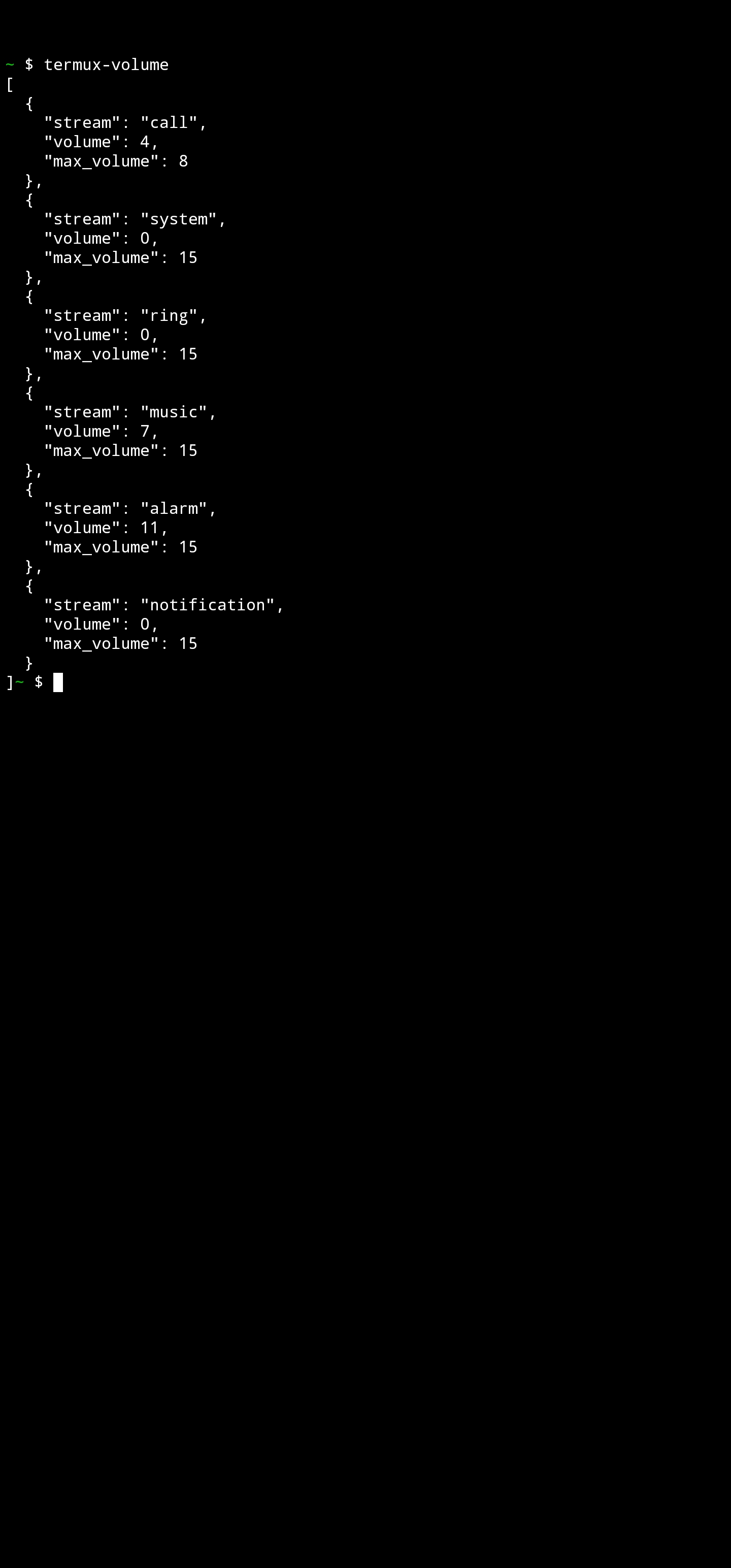
One quirk of this setup is that once I launch Ubuntu, I lose access to Termux::API's Android specific commands. These commands let you interact with your phone from the command line in novel ways, like sending text messages or using the built in camera to snap photos.

For example, from within Termux I can ask what my phone's volume is set to:

Entering this command at an Ubuntu prompt gives a 'command not found' message. To which I say, of course it's not found; Ubuntu's running under Termux, so it doesn't know anything about Termux.

My usual work around for this is to launch two terminal instances within Termux: one running Ubuntu, the other standard Termux. But having two instances is clunky, and more often than not I don't make use of the Termux::API commands.

Today, I finally Googled around to see if anyone else has had this problem. Of course others have, and this discussion suggested that accessing Termux commands from within Ubuntu was doable. The answer hinged on file systems being properly mounted, something that sounded complex. Still, I hoped for the best and checked if /data/data/com.termux was available from within Linux.

It was! Under that directory were all the files that are found in Termux. I then added the following to my .bashrc on Ubuntu:

    export PATH=$PATH:/data/data/com.termux/files/usr/bin/

I reloaded my bash environment and to my surprise and joy, all the Termux commands, as well as my Termux home directory files, were now available to me.

What a great example of a failure of imagination: I assumed these commands weren't available to me, so they weren't.

Wednesday, January 18, 2023

USGS Topo Maps from the Command Line

Below is a script that combines the USGS Product API and Google's Geolocation API to make a shell script to retrieve topo maps from the command line. 'Product' in this context refers to mapping products that the USGS makes freely available to the world.

This is a relatively easy script to write because the USGS API finds products given lat / long bounding box. Google Geolocation API will happily give you back just such a bounding box. This means you can seamlessly convert a place names into a searchable geographic location.

Here's the script in action. As you can see the USGS mapping products are treasure trove just waiting to be mined.


# Topo containing the White House

$ usgsassist -a topos -l "1600 Pennsylvania Ave, Washington DC" Washington West, DC,MD,VA 2019|2019-11-22|https://prd-tnm.s3.amazonaws.com/StagedProducts/Maps/USTopo/PDF/DC/DC_Washington_West_20191122_TM_geo.pdf

# Topo maps for Chicago

$ usgsassist -a topos -l "Chicago, IL" Arlington Heights, IL 2021|2021-04-16|https://prd-tnm.s3.amazonaws.com/StagedProducts/Maps/USTopo/PDF/IL/IL_Arlington_Heights_20210416_TM_geo.pdf Berwyn, IL 2021|2021-04-23|https://prd-tnm.s3.amazonaws.com/StagedProducts/Maps/USTopo/PDF/IL/IL_Berwyn_20210423_TM_geo.pdf Blue Island, IL 2021|2021-04-20|https://prd-tnm.s3.amazonaws.com/StagedProducts/Maps/USTopo/PDF/IL/IL_Blue_Island_20210420_TM_geo.pdf Chicago Loop OE E, IL 2021|2021-04-20|https://prd-tnm.s3.amazonaws.com/StagedProducts/Maps/USTopo/PDF/IL/IL_Chicago_Loop_OE_E_20210420_TM_geo.pdf Chicago Loop, IL 2021|2021-04-20|https://prd-tnm.s3.amazonaws.com/StagedProducts/Maps/USTopo/PDF/IL/IL_Chicago_Loop_20210420_TM_geo.pdf Elmhurst, IL 2021|2021-04-20|https://prd-tnm.s3.amazonaws.com/StagedProducts/Maps/USTopo/PDF/IL/IL_Elmhurst_20210420_TM_geo.pdf Englewood, IL 2021|2021-04-20|https://prd-tnm.s3.amazonaws.com/StagedProducts/Maps/USTopo/PDF/IL/IL_Englewood_20210420_TM_geo.pdf Evanston, IL 2021|2021-04-16|https://prd-tnm.s3.amazonaws.com/StagedProducts/Maps/USTopo/PDF/IL/IL_Evanston_20210416_TM_geo.pdf Hinsdale, IL 2021|2021-04-20|https://prd-tnm.s3.amazonaws.com/StagedProducts/Maps/USTopo/PDF/IL/IL_Hinsdale_20210420_TM_geo.pdf Jackson Park, IL,IN 2021|2021-04-20|https://prd-tnm.s3.amazonaws.com/StagedProducts/Maps/USTopo/PDF/IL/IL_Jackson_Park_20210420_TM_geo.pdf Lake Calumet, IL,IN 2021|2021-04-20|https://prd-tnm.s3.amazonaws.com/StagedProducts/Maps/USTopo/PDF/IL/IL_Lake_Calumet_20210420_TM_geo.pdf Palos Park, IL 2021|2021-04-20|https://prd-tnm.s3.amazonaws.com/StagedProducts/Maps/USTopo/PDF/IL/IL_Palos_Park_20210420_TM_geo.pdf Park Ridge, IL 2021|2021-04-16|https://prd-tnm.s3.amazonaws.com/StagedProducts/Maps/USTopo/PDF/IL/IL_Park_Ridge_20210416_TM_geo.pdf River Forest, IL 2021|2021-04-20|https://prd-tnm.s3.amazonaws.com/StagedProducts/Maps/USTopo/PDF/IL/IL_River_Forest_20210420_TM_geo.pdf Sag Bridge, IL 2021|2021-04-20|https://prd-tnm.s3.amazonaws.com/StagedProducts/Maps/USTopo/PDF/IL/IL_Sag_Bridge_20210420_TM_geo.pdf

# Topo maps for all of Virginia

# Peek at the start of list. $ usgsassist -a topos -l "Virginia, USA" | head -5 Abilene, VA|2022-09-14|https://prd-tnm.s3.amazonaws.com/StagedProducts/Maps/USTopo/PDF/VA/VA_Abilene_20220914_TM_geo.pdf Abingdon, VA|2022-09-16|https://prd-tnm.s3.amazonaws.com/StagedProducts/Maps/USTopo/PDF/VA/VA_Abingdon_20220916_TM_geo.pdf Accomac, VA|2022-08-31|https://prd-tnm.s3.amazonaws.com/StagedProducts/Maps/USTopo/PDF/VA/VA_Accomac_20220831_TM_geo.pdf Achilles, VA|2022-09-09|https://prd-tnm.s3.amazonaws.com/StagedProducts/Maps/USTopo/PDF/VA/VA_Achilles_20220909_TM_geo.pdf Adams Grove, VA|2022-09-14|https://prd-tnm.s3.amazonaws.com/StagedProducts/Maps/USTopo/PDF/VA/VA_Adams_Grove_20220914_TM_geo.pdf # Peek at the end $ usgsassist -a topos -l "Virginia, USA" | tail -5 Woodsboro, MD 2019|2019-11-22|https://prd-tnm.s3.amazonaws.com/StagedProducts/Maps/USTopo/PDF/MD/MD_Woodsboro_20191122_TM_geo.pdf Wye Mills, MD 2019|2019-12-02|https://prd-tnm.s3.amazonaws.com/StagedProducts/Maps/USTopo/PDF/MD/MD_Wye_Mills_20191202_TM_geo.pdf Wyoming, DE 2019|2019-11-21|https://prd-tnm.s3.amazonaws.com/StagedProducts/Maps/USTopo/PDF/DE/DE_Wyoming_20191121_TM_geo.pdf Yellow Spring, WV 2019|2019-12-12|https://prd-tnm.s3.amazonaws.com/StagedProducts/Maps/USTopo/PDF/WV/WV_Yellow_Spring_20191212_TM_geo.pdf Zaleski, OH 2019|2019-12-03|https://prd-tnm.s3.amazonaws.com/StagedProducts/Maps/USTopo/PDF/OH/OH_Zaleski_20191203_TM_geo.pdf # the total number of maps $ usgsassist -a topos -l "Virginia, USA" | wc -l 1697

# Topo maps for a National Park

$ usgsassist -a topos -l "Rocky Mountain National Park, Colorado" Allenspark, CO|2022-03-25|https://prd-tnm.s3.amazonaws.com/StagedProducts/Maps/USTopo/PDF/CO/CO_Allenspark_20220325_TM_geo.pdf Bowen Mountain, CO|2022-03-25|https://prd-tnm.s3.amazonaws.com/StagedProducts/Maps/USTopo/PDF/CO/CO_Bowen_Mountain_20220325_TM_geo.pdf Chambers Lake, CO|2022-03-25|https://prd-tnm.s3.amazonaws.com/StagedProducts/Maps/USTopo/PDF/CO/CO_Chambers_Lake_20220325_TM_geo.pdf Clark Peak, CO|2022-03-25|https://prd-tnm.s3.amazonaws.com/StagedProducts/Maps/USTopo/PDF/CO/CO_Clark_Peak_20220325_TM_geo.pdf Comanche Peak, CO|2022-03-25|https://prd-tnm.s3.amazonaws.com/StagedProducts/Maps/USTopo/PDF/CO/CO_Comanche_Peak_20220325_TM_geo.pdf Crystal Mountain, CO|2022-03-15|https://prd-tnm.s3.amazonaws.com/StagedProducts/Maps/USTopo/PDF/CO/CO_Crystal_Mountain_20220315_TM_geo.pdf Estes Park, CO|2022-03-15|https://prd-tnm.s3.amazonaws.com/StagedProducts/Maps/USTopo/PDF/CO/CO_Estes_Park_20220315_TM_geo.pdf Fall River Pass, CO|2022-03-25|https://prd-tnm.s3.amazonaws.com/StagedProducts/Maps/USTopo/PDF/CO/CO_Fall_River_Pass_20220325_TM_geo.pdf Glen Haven, CO|2022-03-25|https://prd-tnm.s3.amazonaws.com/StagedProducts/Maps/USTopo/PDF/CO/CO_Glen_Haven_20220325_TM_geo.pdf Grand Lake, CO|2022-03-16|https://prd-tnm.s3.amazonaws.com/StagedProducts/Maps/USTopo/PDF/CO/CO_Grand_Lake_20220316_TM_geo.pdf Isolation Peak, CO|2022-03-15|https://prd-tnm.s3.amazonaws.com/StagedProducts/Maps/USTopo/PDF/CO/CO_Isolation_Peak_20220315_TM_geo.pdf Longs Peak, CO|2022-03-25|https://prd-tnm.s3.amazonaws.com/StagedProducts/Maps/USTopo/PDF/CO/CO_Longs_Peak_20220325_TM_geo.pdf McHenrys Peak, CO|2022-03-25|https://prd-tnm.s3.amazonaws.com/StagedProducts/Maps/USTopo/PDF/CO/CO_McHenrys_Peak_20220325_TM_geo.pdf Mount Richthofen, CO|2022-03-25|https://prd-tnm.s3.amazonaws.com/StagedProducts/Maps/USTopo/PDF/CO/CO_Mount_Richthofen_20220325_TM_geo.pdf Panorama Peak, CO|2022-03-25|https://prd-tnm.s3.amazonaws.com/StagedProducts/Maps/USTopo/PDF/CO/CO_Panorama_Peak_20220325_TM_geo.pdf Pingree Park, CO|2022-03-25|https://prd-tnm.s3.amazonaws.com/StagedProducts/Maps/USTopo/PDF/CO/CO_Pingree_Park_20220325_TM_geo.pdf Raymond, CO|2022-03-25|https://prd-tnm.s3.amazonaws.com/StagedProducts/Maps/USTopo/PDF/CO/CO_Raymond_20220325_TM_geo.pdf Shadow Mountain, CO|2022-03-25|https://prd-tnm.s3.amazonaws.com/StagedProducts/Maps/USTopo/PDF/CO/CO_Shadow_Mountain_20220325_TM_geo.pdf Trail Mountain, CO|2022-03-25|https://prd-tnm.s3.amazonaws.com/StagedProducts/Maps/USTopo/PDF/CO/CO_Trail_Mountain_20220325_TM_geo.pdf Trail Ridge, CO|2022-03-15|https://prd-tnm.s3.amazonaws.com/StagedProducts/Maps/USTopo/PDF/CO/CO_Trail_Ridge_20220315_TM_geo.pdf

# Historic maps of Boston published from 1910-39

$ usgsassist -a historic -l "Boston, MA" | grep '|19[123][0-9]' USGS 1:24000-scale Quadrangle for Blue Hills, MA 1936|1936-01-01|https://prd-tnm.s3.amazonaws.com/StagedProducts/Maps/HistoricalTopo/PDF/MA/24000/MA_Blue%20Hills_350022_1936_24000_geo.pdf USGS 1:24000-scale Quadrangle for Cohasset, MA 1936|1936-01-01|https://prd-tnm.s3.amazonaws.com/StagedProducts/Maps/HistoricalTopo/PDF/MA/24000/MA_Cohasset_350067_1936_24000_geo.pdf USGS 1:24000-scale Quadrangle for Nantasket, MA 1936|1936-01-01|https://prd-tnm.s3.amazonaws.com/StagedProducts/Maps/HistoricalTopo/PDF/MA/24000/MA_Nantasket_350329_1936_24000_geo.pdf USGS 1:24000-scale Quadrangle for Norwood, MA 1936|1936-01-01|https://prd-tnm.s3.amazonaws.com/StagedProducts/Maps/HistoricalTopo/PDF/MA/24000/MA_Norwood_350406_1936_24000_geo.pdf USGS 1:24000-scale Quadrangle for Scituate, MA 1935|1935-01-01|https://prd-tnm.s3.amazonaws.com/StagedProducts/Maps/HistoricalTopo/PDF/MA/24000/MA_Scituate_350536_1935_24000_geo.pdf USGS 1:24000-scale Quadrangle for Weymouth, MA 1936|1936-01-01|https://prd-tnm.s3.amazonaws.com/StagedProducts/Maps/HistoricalTopo/PDF/MA/24000/MA_Weymouth_350724_1936_24000_geo.pdf USGS 1:62500-scale Quadrangle for Abington, MA 1920|1920-01-01|https://prd-tnm.s3.amazonaws.com/StagedProducts/Maps/HistoricalTopo/PDF/MA/62500/MA_Abington_352433_1920_62500_geo.pdf USGS 1:62500-scale Quadrangle for Dedham, MA 1919|1919-01-01|https://prd-tnm.s3.amazonaws.com/StagedProducts/Maps/HistoricalTopo/PDF/MA/62500/MA_Dedham_352583_1919_62500_geo.pdf USGS 1:62500-scale Quadrangle for Duxbury, MA 1918|1918-01-01|https://prd-tnm.s3.amazonaws.com/StagedProducts/Maps/HistoricalTopo/PDF/MA/62500/MA_Duxbury_462916_1918_62500_geo.pdf USGS 1:62500-scale Quadrangle for Duxbury, MA 1918|1918-01-01|https://prd-tnm.s3.amazonaws.com/StagedProducts/Maps/HistoricalTopo/PDF/MA/62500/MA_Duxbury_462918_1918_62500_geo.pdf

# The 10 oldest maps of New York city

$ usgsassist -a historic -l "New York, NY" | sort -t'|' -k2 | head -20 USGS 1:62500-scale Quadrangle for Morristown, NJ 1888|1888-01-01|https://prd-tnm.s3.amazonaws.com/StagedProducts/Maps/HistoricalTopo/PDF/NJ/62500/NJ_Morristown_255268_1888_62500_geo.pdf USGS 1:62500-scale Quadrangle for New Brunswick, NJ 1888|1888-01-01|https://prd-tnm.s3.amazonaws.com/StagedProducts/Maps/HistoricalTopo/PDF/NJ/62500/NJ_New%20Brunswick_255290_1888_62500_geo.pdf USGS 1:62500-scale Quadrangle for Paterson, NJ 1888|1888-01-01|https://prd-tnm.s3.amazonaws.com/StagedProducts/Maps/HistoricalTopo/PDF/NJ/62500/NJ_Paterson_255310_1888_62500_geo.pdf USGS 1:62500-scale Quadrangle for Plainfield, NJ 1888|1888-01-01|https://prd-tnm.s3.amazonaws.com/StagedProducts/Maps/HistoricalTopo/PDF/NJ/62500/NJ_Plainfield_255320_1888_62500_geo.pdf USGS 1:62500-scale Quadrangle for Sandy Hook, NJ 1888|1888-01-01|https://prd-tnm.s3.amazonaws.com/StagedProducts/Maps/HistoricalTopo/PDF/NJ/62500/NJ_Sandy%20Hook_255362_1888_62500_geo.pdf USGS 1:62500-scale Quadrangle for Brooklyn, NY 1889|1889-01-01|https://prd-tnm.s3.amazonaws.com/StagedProducts/Maps/HistoricalTopo/PDF/NY/62500/NY_Brooklyn_8033200_1889_62500_geo.pdf USGS 1:62500-scale Quadrangle for Harlem, NJ 1891|1891-01-01|https://prd-tnm.s3.amazonaws.com/StagedProducts/Maps/HistoricalTopo/PDF/NJ/62500/NJ_Harlem_472515_1891_62500_geo.pdf USGS 1:62500-scale Quadrangle for Brooklyn, NY 1891|1891-01-01|https://prd-tnm.s3.amazonaws.com/StagedProducts/Maps/HistoricalTopo/PDF/NY/62500/NY_Brooklyn_8033120_1891_62500_geo.pdf USGS 1:62500-scale Quadrangle for Paterson, NJ 1892|1892-01-01|https://prd-tnm.s3.amazonaws.com/StagedProducts/Maps/HistoricalTopo/PDF/NJ/62500/NJ_Paterson_472458_1892_62500_geo.pdf USGS 1:62500-scale Quadrangle for New Brunswick, NJ 1893|1893-01-01|https://prd-tnm.s3.amazonaws.com/StagedProducts/Maps/HistoricalTopo/PDF/NJ/62500/NJ_New%20Brunswick_255291_1893_62500_geo.pdf USGS 1:62500-scale Quadrangle for New Brunswick, NJ 1893|1893-01-01|https://prd-tnm.s3.amazonaws.com/StagedProducts/Maps/HistoricalTopo/PDF/NJ/62500/NJ_New%20Brunswick_255292_1893_62500_geo.pdf USGS 1:62500-scale Quadrangle for Plainfield, NJ 1893|1893-01-01|https://prd-tnm.s3.amazonaws.com/StagedProducts/Maps/HistoricalTopo/PDF/NJ/62500/NJ_Plainfield_255321_1893_62500_geo.pdf USGS 1:62500-scale Quadrangle for Plainfield, NJ 1893|1893-01-01|https://prd-tnm.s3.amazonaws.com/StagedProducts/Maps/HistoricalTopo/PDF/NJ/62500/NJ_Plainfield_255323_1893_62500_geo.pdf USGS 1:62500-scale Quadrangle for Sandy Hook, NJ 1893|1893-01-01|https://prd-tnm.s3.amazonaws.com/StagedProducts/Maps/HistoricalTopo/PDF/NJ/62500/NJ_Sandy%20Hook_255363_1893_62500_geo.pdf USGS 1:62500-scale Quadrangle for Sandy Hook, NJ 1893|1893-01-01|https://prd-tnm.s3.amazonaws.com/StagedProducts/Maps/HistoricalTopo/PDF/NJ/62500/NJ_Sandy%20Hook_255364_1893_62500_geo.pdf USGS 1:62500-scale Quadrangle for Morristown, NJ 1894|1894-01-01|https://prd-tnm.s3.amazonaws.com/StagedProducts/Maps/HistoricalTopo/PDF/NJ/62500/NJ_Morristown_255269_1894_62500_geo.pdf USGS 1:62500-scale Quadrangle for Brooklyn, NY 1897|1897-01-01|https://prd-tnm.s3.amazonaws.com/StagedProducts/Maps/HistoricalTopo/PDF/NY/62500/NY_Brooklyn_123118_1897_62500_geo.pdf USGS 1:62500-scale Quadrangle for Brooklyn, NY 1897|1897-01-01|https://prd-tnm.s3.amazonaws.com/StagedProducts/Maps/HistoricalTopo/PDF/NY/62500/NY_Brooklyn_123119_1897_62500_geo.pdf USGS 1:62500-scale Quadrangle for Brooklyn, NY 1897|1897-01-01|https://prd-tnm.s3.amazonaws.com/StagedProducts/Maps/HistoricalTopo/PDF/NY/62500/NY_Brooklyn_123121_1897_62500_geo.pdf USGS 1:62500-scale Quadrangle for Harlem, NY 1897|1897-01-01|https://prd-tnm.s3.amazonaws.com/StagedProducts/Maps/HistoricalTopo/PDF/NY/62500/NY_Harlem_129718_1897_62500_geo.pdf

# Historic maps of Rochester from the 1800's

$ usgsassist -a historic -l "Rochester, NY" -v | jq -r '.items[] | select(.publicationDate | test("^18")) | .title' USGS 1:62500-scale Quadrangle for Ontario Beach, NY 1895 USGS 1:62500-scale Quadrangle for Ontario Beach, NY 1899 USGS 1:62500-scale Quadrangle for Ontario Beach, NY 1899 USGS 1:62500-scale Quadrangle for Ontario Beach, NY 1899 USGS 1:62500-scale Quadrangle for Rochester, NY 1895 USGS 1:62500-scale Quadrangle for Rochester, NY 1898 USGS 1:62500-scale Quadrangle for Rochester, NY 1898 USGS 1:62500-scale Quadrangle for Rochester, NY 1898 USGS 1:62500-scale Quadrangle for Rochester, NY 1898 USGS 1:62500-scale Quadrangle for Rochester, NY 1898

# An preview image of these maps

$ usgsassist -a historic -l "Rochester, NY" -v | jq -r '.items[] | select(.publicationDate | test("^18")) | .previewGraphicURL' https://prd-tnm.s3.amazonaws.com/StagedProducts/Maps/HistoricalTopo/PDF/NY/62500/NY_Ontario%20Beach_148062_1895_62500_tn.jpg https://prd-tnm.s3.amazonaws.com/StagedProducts/Maps/HistoricalTopo/PDF/NY/62500/NY_Ontario%20Beach_148065_1899_62500_tn.jpg https://prd-tnm.s3.amazonaws.com/StagedProducts/Maps/HistoricalTopo/PDF/NY/62500/NY_Ontario%20Beach_148064_1899_62500_tn.jpg https://prd-tnm.s3.amazonaws.com/StagedProducts/Maps/HistoricalTopo/PDF/NY/62500/NY_Ontario%20Beach_148063_1899_62500_tn.jpg https://prd-tnm.s3.amazonaws.com/StagedProducts/Maps/HistoricalTopo/PDF/NY/62500/NY_Rochester_148337_1895_62500_tn.jpg https://prd-tnm.s3.amazonaws.com/StagedProducts/Maps/HistoricalTopo/PDF/NY/62500/NY_Rochester_148339_1898_62500_tn.jpg https://prd-tnm.s3.amazonaws.com/StagedProducts/Maps/HistoricalTopo/PDF/NY/62500/NY_Rochester_148345_1898_62500_tn.jpg https://prd-tnm.s3.amazonaws.com/StagedProducts/Maps/HistoricalTopo/PDF/NY/62500/NY_Rochester_148344_1898_62500_tn.jpg https://prd-tnm.s3.amazonaws.com/StagedProducts/Maps/HistoricalTopo/PDF/NY/62500/NY_Rochester_148340_1898_62500_tn.jpg https://prd-tnm.s3.amazonaws.com/StagedProducts/Maps/HistoricalTopo/PDF/NY/62500/NY_Rochester_148343_1898_62500_tn.jpg # Now grab these images and make a contact sheet $ usgsassist -a historic -l "Rochester, NY" -v | \ jq -r '.items[] | select(.publicationDate | test("^18")) | .previewGraphicURL' | \ while read url ; do wget -q $url ; done $ montage *_tn.jpg contact.jpg

Fun, right? Here's the script. Happy Hacking!

#!/bin/bash

##
## Tools to work with the USGS
##

PER_PAGE=50

if [ -f  $HOME/.config/usgsassist/config ] ; then
  . $HOME/.config/usgsassist/config
else
  echo "Missing: ~/.config/usgassist/config file"
  exit
fi

usage() {
  cmd=$(basename $0)
  echo "Usage: $cmd -a topos -l location "
  echo "Usage: $cmd -a historic -l location "
  echo "Usage: $cmd -a geobox -l location"

  exit 1
}

summarize_json() {
  if [ "$verbose" = "yes" ] ; then
    jq '.items[]' | sed 's/^{/,{/' | sed '1s/^,//'
  else
    jq -r '.items[] | .title + "|" + .publicationDate + "|" + .downloadURL' | sed -E  's/^(USGS )?US Topo 7.5-minute map for //'
  fi
}

get() {
  dataset="$1" ; shift
  bb="$1" ; shift
  offset="$1" ; shift

  curl -s -G \
       --data-urlencode datasets="$dataset" \
       --data-urlencode bbox="$bb" \
       --data-urlencode offset="$offset" \
       --data-urlencode max="$PER_PAGE" \
         https://tnmaccess.nationalmap.gov/api/v1/products | tee $HOME/.usgs.last | summarize_json
}


all() {
  dataset="$1" ; shift
  bb="$1" ; shift

  if [ "$verbose" = "yes" ] ; then
    echo '{ "items" : [ '
  fi

  get "$dataset" "$bb" 0

  total=$(cat $HOME/.usgs.last | jq .total)
  remaining=$((total - PER_PAGE))

  if [ $remaining -gt 0 ] ; then
    pages=$(((remaining / PER_PAGE) + 1))
    for page in $(seq 1 $pages) ; do
      offset=$((page * PER_PAGE))

      if [ "$verbose" = "yes" ] ; then
        echo ","
      fi

      get "$dataset" "$bb" "$offset"
    done
  fi

  if [ "$verbose" = "yes" ] ; then
    echo '] }'
  fi
}


while getopts ":a:l:hv" o; do
  case "$o" in
    a) action=$OPTARG ;;
    l) loc=$OPTARG ;;
    v) verbose=yes ;;
    *|h) usage ;;
  esac
done

case "$action" in

  topos)
    if [ -z "$loc" ] ; then
      echo "Missing -l location"
      exit
    fi
    bb=$(usgsassist -a geobox -l "$loc")

    all "US Topo Current" "$bb"
    ;;
  historic)
    if [ -z "$loc" ] ; then
      echo "Missing -l location"
      exit
    fi
    bb=$(usgsassist -a geobox -l "$loc")

    all "Historical Topographic Maps" "$bb"
    ;;


  geobox)
    if [ -z "$loc" ] ; then
      echo "Missing -l address"
      exit
    fi

    bounds=$HOME/.usgs.bounds
    curl -s -G "https://maps.googleapis.com/maps/api/geocode/json" \
         --data-urlencode address="$loc" \
         -d key=$GOOGLE_MAPS_API_KEY  > $bounds
    if [ "$verbose" = "yes" ] ; then
      cat $bounds
    else
      ne_lat=$(cat $bounds | jq '.results[0].geometry.viewport.northeast.lat')
      ne_lng=$(cat $bounds | jq '.results[0].geometry.viewport.northeast.lng')
      sw_lat=$(cat $bounds | jq '.results[0].geometry.viewport.southwest.lat')
      sw_lng=$(cat $bounds | jq '.results[0].geometry.viewport.southwest.lng')
      echo "$ne_lng,$ne_lat,$sw_lng,$sw_lat"
    fi
    ;;

  *) usage ;;
esac

Wednesday, January 11, 2023

Accessing an SD Card on Windows from WSL2

Every so often I find that I want to access a Micro SD card from within Linux on my Windows WSL2 setup. I put the card in my laptop and am pleased when Windows announces the new D: drive is available. And then the confusion begins: how do I access this drive from a WSL2 Ubuntu session?

The C: drive is automatically available to me in /mnt/c; not so with D: and /mnt/d.

A Google search inevitably takes me this page which talks about using wsl --mount. While promising, this never works for me.

Often, by now, I've decided I didn't really need to access the SD card *that* badly and give up.

But, it turns out there's a trivial solution! The following mount command is all I need:

  sudo mount -t drvfs 'D:' /mnt/d

Once that command is issued, the SD card files are available under /mnt/d, and are accessible like any other files on Linux. This works for any drive letter, not just 'D'.

Notably, this isn't SD card specific. I just connected an Adafruit ESP32-S2 TFT Feather micro-controller to my laptop and Windows recognized it as a drive.

I issued the same mount command to make this visible to Linux:

$ ls /mnt/d
ls: cannot access '/mnt/d': No such device
$  sudo mount -t drvfs 'D:' /mnt/d
$ ls /mnt/d
'System Volume Information'   boot_out.txt   code.py   lib   settings.toml

And success! Now, if I can just remember to check the blog for this solution before I give up...

Friday, July 29, 2022

Your Code is Safely Stored In The Cloud. Right?

One of my disaster recovery strategies is to switch my primary work computer every week. I've got a Mac Mini, Intel Nuc and Lenovo Laptop in the current rotation. Come Monday morning, I switch off to a new device for the week. When one of these devices inevitably fails, I can effortlessly switch to a new device and continue my work day.

This strategy has worked well for years, but has one primary annoyance. Back in the day, when most of my projects were Subversion based, I'd occasionally forget to commit files. Mid-week I'd discover the missing changes and I'd have to scramble to find them on another device. It was always a pain. Git exacerbated the problem by adding a new dimension: it's now possible to not only forget to commit files, you can commit them and forget to push them to a remote server.

A few weeks ago it finally occurred to me that I could program my way out of this annoyance. Right before I switch away from a device for the week (typically Friday afternoon, or first thing Monday morning), I now run these commands:

$ cd ~/dt/i2x/
$ svnassist repo-statuses .
M ./src
$ gitassist -a repo-statuses -n .
S ./i2x-website/src/master
M ./project-notes/src/main

Source code for my projects live in ~/dt/i2x so I use this as the top level directory to search from.

svnassist looks for subdirectories that contain the directory .svn. When it finds one, it runs an svn status on that directory. If changes are found, it prints out an 'M' next to the repo root to show that it has pending modifications.

# root=$HOME/dt/i2x -- my project directory
find  -L $root -name '.svn' -type d -prune -exec echo {} \; | while read sdir ; do
  root=$(dirname $sdir)
  modified=$(cd $root ; svn status)
  if [ -n "$modified" ] ; then
    echo "M $root"
  fi
done

gitassist works in a similar fashion, but accounts for the fact that a git repo can either have local changes that need to be committed, or committed changes that need to be pushed.

# name=$HOME/dt/i2x -- my project directory
find  -L $name -name '.git' -type d -prune -exec echo {} \; | while read gdir ; do
  status="_"
  root=$(dirname $gdir)
  modified=$(cd $root ; git status -s)
  if [ -n "$modified" ] ; then
    status="M"
  fi

  if [ -z "$modified" ] ; then
    branch=$(cd $root ; git branch --show-current)
    stalled=$(cd $root ; git cherry -v origin/$branch 2>&1)
    if [ -n "$stalled" ] ; then
      status="S"
    fi
  fi

  echo "$status $root"
done

git cherry was the best way I found to see if there were changes to the local repository that need to be pushed to the remote.

After running these commands, I've found that it takes just a minute or two to either discard the local changes or make them permanent.

Man, is this an improvement over discovering a missing set of changes and having to scramble to find them.

Friday, May 27, 2022

In Search of a Reliable Gmail Permalink

One of my favorite features of Gmail is that every message is backed by a unique URL. I frequently use this URL to easily refer back to a message. This works great, until it doesn't.

The Problem

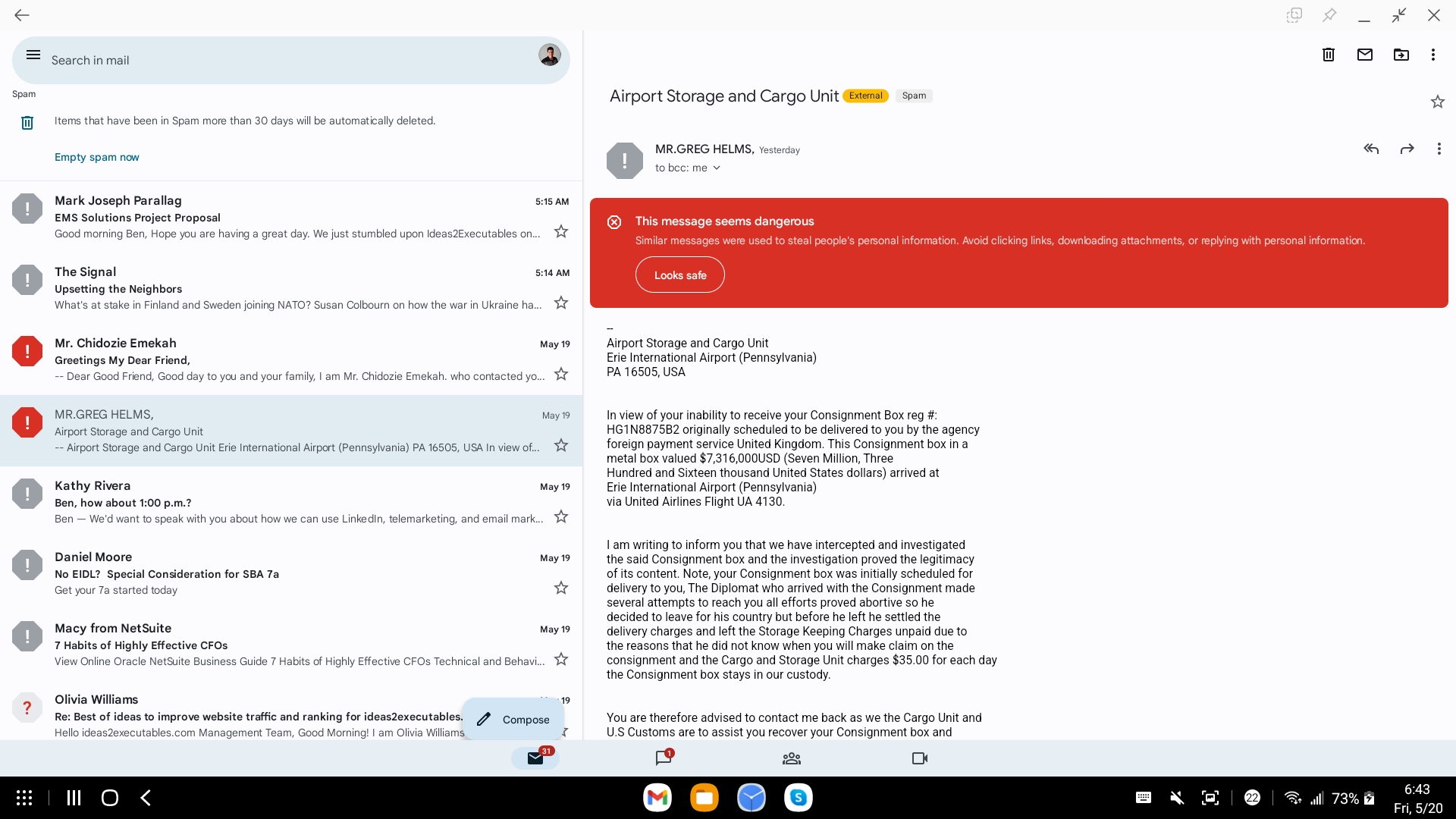
Suppose this intriguing message from Mr. Helms is something I want to follow-up on. After all, seven million dollars is a lot of money. Normally, I'd grab the URL to this message and add it to a card on my 'On Deck' Trello Board. But in the Android version of the Gmail App, there's no obvious way to get a URL to a message.

(Incidentally, the above screenshot is from a Samsung DeX session. DeX is amazing and is on my list of topics to blog about.)

A Solution

The obvious work-around is to visit mail.google.com in the phone's browser. This will bring up the Desktop Gmail interface, which does have a URL to the message:

Depending on your device's screen size, you may end up at an alternative version of Google's web mail UI.

In this case it took some fiddling to land at the Desktop version of GMail. First I had to convince Google that I wanted to see the Basic HTML interface, and from there I could click over to the Standard interface:

So while it's possible to convince Chrome on my phone to navigate to the Desktop Gmail UI, in practice this can be maddeningly difficult to do. The multiple Google Accounts on my phone, multiple Gmail UIs and the 'smart' logic that guesses what I want to see, means that I often end up clicking in circles in search of the right page.

A Better Solution. Maybe.

An obvious replacement for all this clicking would be to leverage the Gmail API. I even have an existing command line tool, gmail_tool, that interacts with this API.

Currently, I can use gmail_tool to get me the details of the message in question:

$ gmail_tool -a list -q "label:SPAM Helms"
180df45360340ba9:.GREG HELMS, Director. Airport Storage and Cargo Unit Erie International Airport (Pennsylvania) PA 16505, USA eMAIL.

All that's need is to map the above message to the Gmail URL:

https://mail.google.com/mail/u/1/#spam/FMfcgzGpFzwKLQTspjZvpjCvNxLXMQjz

But alas, that's where things get tricky. The magic token FMfcgzGpFzwKLQTspjZvpjCvNxLXMQjz is neither a message ID nor a thread ID. Apparently, this is a 'view token' and while you can decode it in some respects, there's no obvious mapping from information in the API to this token.

A Better Solution. For Sure.

But all is not lost. This article suggests another way forward to uniquely identify a message within Gmail. The answer, which is obvious in hindsight, is to use the search operator rfc822msgid.

This is quite sensible. Each message comes with it's only unique Message-Id header. Searching by this value you should always bring up the one message in question.

So while I can't get the token FMfcgzGpFzwKLQTspjZvpjCvNxLXMQjz from the Gmail API, I can get the headers for a given message, from there search out the Message-Id value.

$ gmail_tool -a list -q "label:SPAM Helms"
180df45360340ba9:.GREG HELMS, Director. Airport Storage and Cargo Unit Erie International Airport (Pennsylvania) PA 16505, USA eMAIL.

# Pull the full JSON for all messages associated with thread id: 180df45360340ba9
$ gmail_tool -a get -i 180df45360340ba9 -v |  head -4
{
  "id": "180df45360340ba9",
  "historyId": "357728706",
  "messages": [

# Dump out all the headers associated with this thread
$ gmail_tool -a get -i 180df45360340ba9 -v | \
  jq  '.messages[] | .payload.headers[] | .name ' | gmail_tool -a get -i 180df45360340ba9 -v |  jq '.messages[] | .payload.headers[] | .name '
"Delivered-To"
"Received"
"X-Received"
"ARC-Seal"
"ARC-Message-Signature"
"ARC-Authentication-Results"
"Return-Path"
"Received"
"Received-SPF"
"Authentication-Results"
"DKIM-Signature"
"X-Google-DKIM-Signature"
"X-Gm-Message-State"
"X-Google-Smtp-Source"
"X-Received"
"MIME-Version"
"Received"
"Reply-To"
"From"
"Date"
"Message-ID"
"Subject"
"To"
"Content-Type"
"Bcc"

Once I combined my knowledge that you can search by rfc822msgid and how to access the message headers using the Gmail API, I was able to put that together into a simple option for gmail_tool:

# set the shell variable $tid to the matching thread id
$ tid=$(gmail_tool -a list -q "label:SPAM Helms" | cut -d: -f1)

# look up the URL to for $tid
$ gmail_tool -a url -i $tid
https://mail.google.com/mail/u/0/?#search/rfc822msgid:CAMHjZTPcpcGY6nyxKNDTDhxjvw1GTrZf%3DVrH-BCtaLxq2d_vqg%40mail.gmail.com

Visiting this URL takes me a Gmail search result page with the one message I'm seeking:

Success!

Here's the latest version of gmail_tool with both url and header options added:

#!/bin/bash

##
## command line tools for working with Gmail.
##
CLIENT_ID=<from https://console.cloud.google.com/apis/>
CLIENT_SECRET=<from https://console.cloud.google.com/apis/>
API_SCOPE=https://www.googleapis.com/auth/gmail.modify
API_BASE=https://www.googleapis.com/gmail/v1
AUTH_TOKEN=`gapi_auth -i $CLIENT_ID -p $CLIENT_SECRET -s $API_SCOPE token`

usage() {
  cmd="Usage: $(basename $0)"
  echo "$cmd -a init"
  echo "$cmd -a list -q query [-v]"
  echo "$cmd -a get -i id [-v]"
  echo "$cmd -a labels"
  echo "$cmd -a update -i id  -l labels-to-add -r labels-to-remove"
  echo "$cmd -a headers -i id"
  echo "$cmd -a url -i id"
  echo "$cmd -a messages -q query [-v]"

  exit
}

filter() {
  if [ -z "$VERBOSE" ] ; then
    jq "$@"
  else
    cat
  fi
}

listify() {
  sep=""
  expr="[ "
  for x in "$@" ; do
    expr="$expr $sep \"$x\""
    sep=","
  done
  expr="$expr ]"
  echo $expr
}

while getopts ":a:r:q:i:l:vp" opt ; do
  case $opt in
    a) ACTION=$OPTARG             ;;
    v) VERBOSE=yes                ;;
    q) QUERY="$OPTARG"            ;;
    l) LABELS_ADD=$OPTARG         ;;
    r) LABELS_REMOVE=$OPTARG      ;;
    i) ID=$OPTARG                 ;;
    p) PAGING=yes                 ;;
    \?) usage                     ;;
  esac
done

invoke() {
  root=$1 ; shift
  curl -s -H "Authorization: Bearer $AUTH_TOKEN" "$@" > /tmp/yt.buffer.$$
  next_page=`jq -r '.nextPageToken' < /tmp/yt.buffer.$$`

  if [ "$PAGING" = "yes" ] ; then
    if [ "$next_page" = "null" -o -z "$next_page" ] ; then
      cat /tmp/yt.buffer.$$
      rm -f /tmp/yt.buffer.$$
    else
      jq ".$root"  < /tmp/yt.buffer.$$ | sed 's/^.//'> /tmp/yt.master.$$
      while [ "$next_page" != "null" ] ; do
        curl -s -H "Authorization: Bearer $AUTH_TOKEN" "$@" -d pageToken=$next_page |
          tee /tmp/yt.buffer.$$ |
          ( echo "," ; jq ".$root" | sed 's/^.//' ) >> /tmp/yt.master.$$
        next_page=`jq -r '.nextPageToken' < /tmp/yt.buffer.$$`
      done
      rm -f /tmp/yt.buffer.$$
      echo "{ \"$root\" : [ "
      cat /tmp/yt.master.$$
      echo ' ] }'
      rm -f /tmp/yt.master.$$
    fi
  else
    cat /tmp/yt.buffer.$$
    rm /tmp/yt.buffer.$$
  fi
}

case $ACTION in
  init)
    gapi_auth -i $CLIENT_ID -p $CLIENT_SECRET -s $API_SCOPE init
    exit
  ;;
  list)
    if [ -z "$QUERY" ] ; then
      echo "Uh, better provide a query"
      echo
      usage
    fi
    invoke threads -G $API_BASE/users/me/threads \
           --data-urlencode q="$QUERY" \
           -d maxResults=50 |
      filter -r ' .threads[]? |  .id + ":" + (.snippet | gsub("[ \u200c]+$"; ""))'
    ;;

  get)
    if [ -z "$ID" ] ; then
      usage
    fi
    invoke messages -G $API_BASE/users/me/threads/$ID?format=full \
           -d maxResults=50 |
      filter -r ' .messages[] | .id + ":" + (.snippet | gsub("[ \u200c]+$"; ""))'
    ;;

  labels)
    invoke labels -G $API_BASE/users/me/labels |
      filter -r ' .labels[] | .id + ":" + .name'
    ;;


  update)
    if [ -z "$ID" ] ; then
      echo "Missing -i id"
      exit
    fi

    if [ -z "$LABELS_ADD" -a -z "$LABELS_REMOVE" ] ; then
      echo "Refusing to run if you don't provide at least one label to add or remove"
      exit
    fi

    body="{ addLabelIds: $(listify $LABELS_ADD),  removeLabelIds: $(listify $LABELS_REMOVE) }"

    invoke messages -H "Content-Type: application/json" \
           $API_BASE/users/me/threads/$ID/modify \
           -X POST -d "$body" |
        filter -r '.messages[] | .id + ":" + (.labelIds | join(","))'
    ;;

  url)
    if [ -z "$ID" ] ; then
      echo "Missing thread ID"
      exit
    fi

    base_url="https://mail.google.com/mail/u/0/?#search/rfc822msgid"
    message_id=$(gmail_tool -a get  -i $ID -v |
                   jq -r '.messages[0].payload.headers[] | select(.name | ascii_downcase == "message-id") | .value| @uri' |
                   sed -e 's/^%3C//' -e 's/%3E$//' )

    echo "$base_url:$message_id"

    ;;

  headers)
    if [ -z "$ID" ]; then
      echo "Missing thread ID"
    fi

    gmail_tool -a get -i $ID -v |
      jq -r '.messages[] | .id + ":" + (.payload.headers[] | .name + ":" + .value)'
    ;;

  *)
    usage
    ;;
esac