Showing posts with label youtube. Show all posts

Monday, October 16, 2023

Taming YouTube, Part 5: Command Line Searching

The last piece of my YouTube hacking journey was to implement command line searching for content. The idea is that rather than paging through results in a web browser, I can kick off and process searches at a shell prompt. As with many Unixy endeavors, the approach initially seems less powerful than an interactive UI. But, given the ability to script and post process results, I'm confident that the command line approach will ultimately win the day. 

Let's see this in action. Suppose I want to catch up on a classic outdoorsy topic: Altoids Survival Kits. The idea is to pack an Altoids candy tin with the essentials for dealing with an emergency in the woods.

Here's what my initial search looks like:

$ youtubeassist -a search -q "Altoids Survival Kit" | wc -l
     198

$ youtubeassist -a search -q "Altoids Survival Kit" | head -5
0-fj28qufo0|2023-09-23T01:35:37Z|Rivers End Outdoors|Altoids Tin Can be used for many other things. #Shorts #Bushcraft #Survival.
kqPGdBdB8ow|2023-09-20T22:04:00Z|Best Damn EDC [Taylor Martin]|I put together an EPIC EDC Urban Altoids Survival Kit 2023
LXf-fiAhOlo|2023-08-20T06:53:35Z|Ashton's EDC|My Take on the Altoids Tin: What I Keep in Two Different Altoids EDC Kits
dpwEhyV-VbA|2023-08-18T18:15:04Z|Jon Gadget|My 2023 Altoids EDC Essentials Kit (Everyday Carry)
cECC341Y074|2023-08-10T00:35:18Z|Typical Chris|How to Make A Mini Survival Kit Out of an Altoids Tin!

My search turned up only 198 hits out of the bazillion of these videos on YouTube. That's because I limit my search results to the first 200 hits.

If I wanted to move all 200 of these videos to a playlist for easy watching I could say:

# make the playlist
$ youtubeassist -a playlist-create -n "Search Hits"
PLBuxEPZOHHKZE-uDfDReNTN6bmUu3r_WE|private|Search Hits

# -o 'output's the results to the requested playlist
$ youtubeassist -a search -q "Altoids Survival Kit" -o 'Search Hits'
...bye bye quota...

Outputting to a playlist helps bridge the divide between the command line and interactive worlds.

It's also possible to process the output and add videos to a playlist after the fact. For example:

# Put all fire related videos into a 'Fire Making' playlist
$ youtubeassist -a search -q 'Altoids Survival Kit' -F | \
    grep -i fire | cut -d'|' -f1 | \
    youtubeassist -a playlist-items-add -n "Fire Making"

The -F in this case shows the 'full results', not just the most recently executed search.

Because executing a search is quota heavy, I've set it up so that searches are cached for one hour. After an hour, re-running a search will show you only the new results. For example:

# wait a couple of hours ...
 
$ youtubeassist -a search -q "Altoids Survival Kit" 
EHK820jd32c|2023-07-09T22:58:59Z|Mount Kephart Outdoors|Altoids tin Kits USLESS? Blackie Thomas does it again Bushcraft & Wilderness Survival Gear
PA_TpbwCfQQ|2023-07-01T17:00:22Z|The Modern Rogue|Filling an Altoids Tin with crime tools �
jXWqPw27Yk8|2023-06-28T20:00:10Z|Survival Dispatch|From the City to the Wilderness: EDC Survival Kit | Fuel The Fires
dIuYFZ1zRN4|2023-05-02T21:21:13Z|WayPoint Survival|Perfect Belt Survival Kit?  [ It has ALL the stuff! ]
eHuMgL4Ex-k|2023-03-03T00:12:05Z|Comandos Benin Prepper|EDC melhor kit de sobrevivência do mundo. Altoids é passado?
DbnHhFhG2Bo|2023-02-21T01:27:17Z|WayPoint Survival|Old School Pocket Survival Kit!
WCb6kVgMGl0|2023-01-28T16:02:48Z|David Hindin, M.D.|Squeezing an operating room inside an Altoids tin
mZiasleIwxM|2022-10-09T22:58:26Z|Buckeye Bushcraft|Ultralight Survival Kit For Hunters
u5wieAfgR3o|2022-03-12T16:23:17Z|Freddy Ramos|Custom Sheath Bushcraft Utility Pouch for Altoids Tin
4zrjx40_gHc|2021-09-29T22:34:09Z|Grim Granite|Is survival gear REALLY possible from a DOLLAR STORE?
8X4dHYnPdUM|2021-04-09T09:00:03Z|Ultimate Survival Tips|IT WORKS! Cheap DIY Survival Kit Compass Hack - Altoids Tin Micro Compass Kit...
sGyv_dkWLfk|2020-10-14T00:24:13Z|JoeDom|Altoids Survival Tin
h6dQK4tp2yI|2020-10-09T17:43:28Z|Lone wolf Survival|Altoid Tin Survival Kit
IFF1vmMnSjo|2020-10-03T05:28:05Z|Adventures with Cowboy Col|20 Altoids Survival Tin/Kit Items In A Wallet ? The ULTIMATE EDC WALLET!
YgOvhC0_lCw|2020-10-01T01:58:59Z|Overlander Benny|DIY altoid survival kit tin! More than your average tin. Fire, water, hunt, fish from your kit!
jO3il9sdLG8|2020-09-15T15:13:12Z|Rockos Modern Survival|Altoids survival kit
LmfaNcvYS60|2020-09-09T19:49:15Z|Swagger|Altoids Survival Kit
QIJr7RuYgoc|2020-08-19T00:09:08Z|Old Time Skills|How to make an Altoids tin survival kit
UrKMGooOYZc|2019-10-05T17:01:34Z|yamato623|The altoids smalls survival kit $15
$ youtubeassist -a search -q "Altoids Survival Kit"  | wc -l
      19

$ youtubeassist -a search -q "Altoids Survival Kit"  -o "Search Hits"

By default, searches have their sort order set to date, which should only show me newly added content to YouTube. But, as you can see above, the results aren't that strict. I'm seeing 19 'new' hits, even though many of them are from years ago.

In general, YouTube API searches tend to be broad in what they return. For example, not all of the hits above mention 'Altoids' in their title. Generally, this works for me as I'm often looking for more esoteric content rather than the same high-profile videos YouTube show again and again.   I can always narrow down searches by using grep and other tools.

I'm not entirely sure how I'm going to fold this search capability into my YouTube workflow. However, I am confident that running and grep'ing through command line searches will be far more efficient than mindlessly scrolling.

Give all this a try by grabbing youtubeassist from github. Happy hacking!

Tuesday, October 10, 2023

Taming YouTube, Part 4: Playlist Aging and Rotating

After much setup and cleanup, I was finally ready to code my way to a better YouTube experience. The goal I'm after is to craft a workflow that has me spend an accountable amount of time queuing and watching videos, and helps avoid clutter and brain overload.

The workflow I envisioned consists of a series of playlists and rules for moving videos betwee these lists. Here's what I'm planning:

  • Incoming - where videos are queued up for watching.
  • In Progress - where longer videos live after I've started watching and they have caught my interest.
  • Stale - where videos are moved to after they've spent too long on Incoming or In Progress.
  • Nice - where videos that were educational, inspirational or hilarious end up.
  • Wow - where life changing videos end up.

The idea is that once a day I queue up videos in Incoming. This limits my zombie scrolling time on YouTube to a single session. From there, it's fair game to watch Incoming and In Progress videos throughout the day. Running youtubeassist -a playlists-rotate moves videos either between or off playlists. The rules are tersely defined in $HOME/.config/youtubeassist/config:

ROTATE_DIR=$HOME/dt/i2x/youtube-archive/src/main/playlists/archived
ROTATE_RULES="Incoming:7:Stale: \
      Stale:14::Stale \
      In_Progress:14:Stale: \
      Nice:7::Nice \
      Wow:30::Wow"

The format is: playlist, time-to-live in days, destination playlist followed by destination directory. For example, videos stay on the Incoming playlist for 7 days, and then are moved to Stale. Videos live on the Stale playlist for 14 days and then are moved to the Stale directory, found inside of the $ROTATE_DIR. This takes them off of YouTube, stashing them in a git repository for long term archival.

The Nice and Wow playlists are ultimately archived in a git repo, too. My expectation is that I'll eventually mine these directories, publishing a list of my favorite videos over a given time or subject.

Here's the output of me rotating playlists for today:

$ youtubeassist -a playlists-rotate
name=Incoming, ttl=7, output=Stale
name=Stale, ttl=14, dir=/Users/ben/dt/i2x/youtube-archive/src/main/playlists/archived/Stale
name=In Progress, ttl=14, output=Stale
name=Nice, ttl=7, dir=/Users/ben/dt/i2x/youtube-archive/src/main/playlists/archived/Nice
name=Wow, ttl=30, dir=/Users/ben/dt/i2x/youtube-archive/src/main/playlists/archived/Wow

Implementing -a playlists-rotate was easy once I'd implemented a slightly lower level operation, -a playlist-age. Aging a playlist works by taking in a number of days and moving all videos off the list that meet that threshold. Below is an example of aging items out of the Sketching playlist.

# All videos on the list for more than 15 days are moved to the 'Stale' playlist  
$ youtubeassist -a playlist-age -n "Sketching" -t 15 -o "Stale" -p preview
Aging 'Adriaen van de Velde (1636-1672) A collection of paintings 4K Ultra HD.mp4', 20 > 15
Aging 'Sketch People Loosely like a Pro: Urban Sketching Tips', 20 > 15
Aging 'How to do urban sketching', 20 > 15
...

# See, all the videos are gone
$ youtubeassist -a playlist-age -n "Sketching" -t 15 -o "Stale" -p process

# And, they were moved to the Stale playlist
$ youtubeassist -a playlist -n "Stale"
UExCdXhFUFpPSEhLYVhuUHpzdTRqUUxUMUhQb3lic29Cby4zMDg5MkQ5MEVDMEM1NTg2|czCqXPURvK0|0|9 Drawing Exercises to Improve Your Urban Sketching Skills
UExCdXhFUFpPSEhLYVhuUHpzdTRqUUxUMUhQb3lic29Cby45ODRDNTg0QjA4NkFBNkQy|05Ucm95fpTs|0|Travel Journal Sketching #1 Start up tips
UExCdXhFUFpPSEhLYVhuUHpzdTRqUUxUMUhQb3lic29Cby5EMEEwRUY5M0RDRTU3NDJC|emCpEE223RI|0|How to Draw and Sketch with a Fountain Pen - The Very Basics - Tutorial and Tips
...

# Let's see what's left
$ youtubeassist -a playlist -n Sketching
UExCdXhFUFpPSEhLYjRNZ2hwdHRnV3FNd3gzMnZjQVRsVS4zRjM0MkVCRTg0MkYyQTM0|2gY51vW2H-U|12|How to Draw Anything - 7 Easy Tips for Beginners
UExCdXhFUFpPSEhLYjRNZ2hwdHRnV3FNd3gzMnZjQVRsVS5DNzE1RjZEMUZCMjA0RDBB|BjSJCMeH_8I|11|A Brief Guide to Perspective // Urban Sketching for Beginners
...

# I can use a time-to-live of -1 days to move all items to a a playlist. In this case
# I'm moving all items to 'Incoming'
$ youtubeassist -a playlist-age -n "Sketching" -t -1 -o Incoming -p preview
Aging 'How to Draw Anything - 7 Easy Tips for Beginners', 12 > -1
Aging 'A Brief Guide to Perspective // Urban Sketching for Beginners', 11 > -1
...

# And poof, I can delete 'Sketching'
$ youtubeassist -a playlist -n Sketching

I've set up youtubeassist -a playlists-rotate to run daily from cron. Now I just need to be disciplined about keeping my mindlessly scrolling of YouTube to a once a day occurrence. That habit will take practice, but I'm confident I'll get there.

Next up: the last piece of the YouTube optimization puzzle: streamlining video discovery.

Tuesday, October 03, 2023

Taming YouTube, Part 3: Declaring YouTube Playlist Bankruptcy

I've got my youtubeassist shell script authenticated with the Google API so I can finally get down to the business of optimizing my YouTube workflow.

First things first, I wanted to clean up the 300+ playlists I currently have in my account. To do this, I added a playlists-snapshot command to youtubeassist. This action grabs all the playlists on my account, creates a fresh local directory with today's timestamp, and writes out each playlist as its own .json file. Here this option in action:

$ youtubeassist -a playlists-snapshot -d ./snapshots
[wait for it...and done]
$ ls
20231003.0709
$ ls 20231003.0709 | wc -l
316
$ ls 20231003.0709 | head
15.json
17.json
18.json
21_Years.json
A_Trip_To_The_Zoo.json
Audio_Magic.json
Bedtime_Tunes.json
Best_of_Brad.json
Blog_it.json
Carry.json

In a single command I've captured all 316 of my playlists to a local directory. I can confirm the .json files are valid by using jq.

$ cat 20231003.0709/Weekly_Discoveries_2019_02_03.json | jq -r '.items[] |  "https://youtube.com/watch?v=" + .contentDetails.videoId + "|" + .snippet.title'
https://youtube.com/watch?v=HNAM2EVXH9A|Owl City - Not All Heroes Wear Capes (Acoustic)
https://youtube.com/watch?v=I-QfPUz1es8|Imagine Dragons - Bad Liar
https://youtube.com/watch?v=jrlMaRdM4wI|LÉON - You And I (Official Video)

To complete the snapshot procedure, I set up the local directory to be part of a git repository. Once the snapshot command finished, I did a git add, git commit and git push to ensure that the snapshot was safely stored in the cloud.

With all 316 playlists captured, I'm ready to remove the majority of them. To accomplish this, I captured a list of playlists in a .txt file. I edited this file, removing any playlist I wanted save. Finally, I deleted the rest using this one-liner:

$ youtubeassist -a playlists > all.txt
$ emacsclient all.txt      # edit all.txt, removing playlists to save
$ cat all.txt | while read line ; do \
  id=$(echo $line | cut -d: -f1); \
  name=$(echo $line | cut -d: -f2) ; \
  echo $name ; \
  youtubeassist -a playlist-delete -i $id ; \
done | tee yt.cleanup
Carry
Skills
To build
Weekly Discoveries
Weekly Discoveries - 2022-12-25
...
The request cannot be completed because you have exceeded your

All went well until I realized I'd maxed out on my YouTube quota for the day:

Whoops. Part way through the list, YouTube stopped honoring my requests to delete playlists. My dreams of having a pristine set of YouTube playlists are going to have to wait for another day (or two). My quota should free up tomorrow, and I can delete the rest of playlists then. When the playlists are cleaned up, I can move to the next part of my plan: creating a workflow that let's me efficiently find, watch and archive YouTube content. Stay tuned!

Friday, September 29, 2023

Taming YouTube, Part 2: Replacing OOB OAuth on the Command Line

I want to shell script my way to a better life with YouTube. To do this, I need a shell script which can make authenticated queries against the YouTube API. In the past I've done this by making use of the urn:ietf:wg:oauth:2.0:oob redirect_url. Google has since disabled this method, so now I need to update my shell script to make use of a real redirect_url.

Below are the steps I went through to accomplish this. If you find yourself in need of an oob redirect_url replacement, feel free to grab and use any of the code mentioned below.

Step 1. Install oauth2handler on a server for your choice. I've set it up on an EC2 nano instance over at https://code.benjisimon.com/oauth2handler.

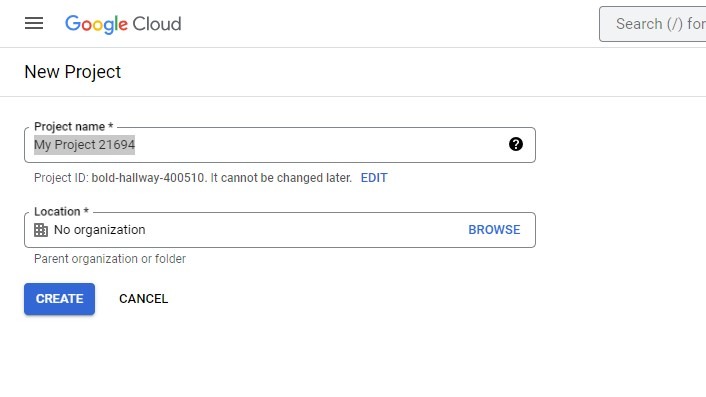
Step 2. Set up a project over at the Google Developer's console. I had a project set up there already, but you can make a new one if you're starting from scratch.

Step 3. Turn on the relevant APIs for your project. I want my shell script to talk to YouTube, so I've enabled the YouTube API.

Step 4. Head over to the credentials section of the console and create a new set of OAuth client ID credentials.

Step 5. Properly configure your credentials. For Application Type, select Web Application, for Name enter the name of your choice. Now for the most delicate setting: adding the correct redirect URL.

If you're using my oauth2handler that URL will be:

  https://domain-hosting-the-script/oauth2handler/<slug>

I'm hosting the oauth2handler over at https://code.benjisimon.com/oauth2handler, and I'm using the slug blog_sample, so my redirect URL is:

 https://code.benjisimon.com/oath2handler/blog_sample

Once all the settings are in place, click Create.

Step 6. Download the JSON credential details.

Step 7. Copy the JSON credentials file onto the server hosting oauth2handler. The name of the file must match the slug that you entered in the redirect_url. oauth2handler expects to find JSON files here:

  /var/www/private/oauth2handler

Continuing my example, I copied the JSON credentials file to:

 /var/www/private/oauth2handler/blog_sample.json
$ cat /var/www/private/oauth2handler/blog_sample.json | jq .
{
  "web": {
    "client_id": "XXXXXXXXXX-idh870p1hr4udihsu9v4s13pc08mm9lo.apps.googleusercontent.com",
    "project_id": "XXXXXXX-XXXX-89019",
    "auth_uri": "https://accounts.google.com/o/oauth2/auth",
    "token_uri": "https://oauth2.googleapis.com/token",
    "auth_provider_x509_cert_url": "https://www.googleapis.com/oauth2/v1/certs",
    "client_secret": "XXXXX-XXXXXXXXXXXXXXXXXXXXXXXXXXXXXX",
    "redirect_uris": [
      "https://code.benjisimon.com/oath2handler/blog_sample"
    ]
  }
}

Step 8. Grab the gapi_auth shell script from Github and set it up to be executable from the command line. You can use gapi_auth and oauth2handler to authenticate any OAuth2 API, not just the YouTube API.

$ gapi_auth -h
Usage: gapi_auth -i CLIENT_ID -p CLIENT_SECRET -r REDIRECT_URI -s scope [-h] [-c context] {init|token}

Step 9. Initialize your shell script for execution by calling gapi_auth with the CLIENT_ID and CLIENT_SECRET mentioned in the JSON credentials file. Set the scopes per the API documentation. My youtubeassist shell script let's you initialize authentication by setting specific variables in ~/.config/youtubeassist/config. Alternatively, you can call gapi_auth directly.

# init with youtubeassist
$ cat ~/.config/youtubeassist/config

# Auth setting
CLIENT_ID=XXXXXXXXXX-idh870p1hr4udihsu9v4s13pc08mm9lo.apps.googleusercontent.com
CLIENT_SECRET=GXXXXX-XXXXXXXXXXXXXXXXXXXXXXXXXXXXXX
API_SCOPE="https://www.googleapis.com/auth/youtube"
AUTH_REDIRECT_URI=https://code.benjisimon.com/oauth2handler/youtubeassist
AUTH_TOKEN=`gapi_auth -i $CLIENT_ID -p $CLIENT_SECRET -s "$API_SCOPE" token`

$ youtubeassist -a init
...

# init directly with gapi_auth
$ gapi_auth -i XXXXXXXXXX-idh870p1hr4udihsu9v4s13pc08mm9lo.apps.googleusercontent.com \
            -p GXXXXX-XXXXXXXXXXXXXXXXXXXXXXXXXXXXXX \
            -r https://code.benjisimon.com/oauth2handler/blog_sample \
            -s https://www.googleapis.com/auth/youtube -c blog_sample init
Visit:
https://accounts.google.com/o/oauth2/auth?client_id= XXXXXXXXXX-idh870p1hr4udihsu9v4s13pc08mm9lo.apps.googleusercontent.com&redirect_uri=https://code.benjisimon.com/oauth2handler/blog_sample&scope=https://www.googleapis.com/auth/youtube&response_type=code&access_type=offline&approval_prompt=force
JSON doc?

Step 10. Visit the URL offered by the command line and don't panic when Google gives you an error. In my case, I had a typo in my redirect URL. I fixed the typo in the Google Console, downloaded the credentials again and copied them over to the oauth2handler directory. Hopefully you won't mess up the redirect_url, but as my example shows, there's no harm if you do.

Step 11. Run gapi_auth init and visit the URL offered at the command line. Answer the prompts provided by Google. Paste the resulting JSON document back at the command line and hit Control + d to complete the script.

Step 12. You're done! youtubeassist will run gapi_auth token to get an authentication token whenever it needs one. You can also do this from the command line using gapi_auth directly.

$ token=$(gapi_auth -i XXXXX -p GXXXXX -s https://www.googleapis.com/auth/youtube -c blog_sample token)
$ echo $token
ya29.a0AfB_byBwZPgKpO9d8Whtkp2lZhjCmUF9uep8vqqepuca7SBd44gYoTSo_FzNZk48WxCndq450DcIYDVUVBN2l76cOZ8VNqTFurJmpg6jok5wN3FNHeNIG8AeGmMtoGr-ABtHA9RF1dtBmE1R9ofxIczYSFq_riVxhYw8aCgYKAWASARISFQGOcNnCU1gLb0amDlZ1Sutefe7GGg0171
$ curl 'https://youtube.googleapis.com/youtube/v3/channels?part=statistics&mine=true' \
     --header "Authorization: Bearer $token"  \
     --header 'Accept: application/json'
{
  "kind": "youtube#channelListResponse",
  "etag": "eOJPfNqYIr0W6hNUsh8QW8ETULU",
  "pageInfo": {
    "totalResults": 1,
    "resultsPerPage": 5
  },
  "items": [
    {
      "kind": "youtube#channel",
      "etag": "Gxyk-N0SnISUEq-DoTYlo1umrM0",
      "id": "UCCsd3dwyF1qnzzmk7vrRbbQ",
      "statistics": {
        "viewCount": "13152",
        "subscriberCount": "17",
        "hiddenSubscriberCount": false,
        "videoCount": "37"
      }
    }
  ]
}

The API request above shows that that I've got 37 videos uploaded to YouTube and 17 subscribers. Success! With the authentication complete, it's time to start hacking my way to a more efficient YouTube experience. Stay tuned!

Wednesday, September 27, 2023

Taming YouTube, Part 1: Why?

I have a love-hate relationship with YouTube. On one hand, its endless content is an invaluable resource for learning darn near anything. Where else can you watch a 45 minute video on boiling water, and think, man, that was awesome. Or ponder why does a battleship need to carry hand grenades, or rock out to 59 minutes of near perfect music?

On the other hand, my account is cluttered (hello 600+ items on my 'watch later' list), I find it tricky to track and organize videos--especially the ones I want to come back in the future. And most problematically, the very endless content which I love, can easily result in zombie scrolling. That is, instead of doing something useful with my time, I find myself scrolling page after page of videos.

And don't even get me started on 'YouTube Shorts.' That aspect of YouTube is a disaster. I mean, it's impressive content and kudos to the content creators who make the fascinating work that's featured there. It's just that consuming shorts feels like I'm doing battle with an addictive drug. C'mon man, just one more video, this next one is the best. I promise! Best to just not hit play in the fist place.

To address these issues*, I've conjured up a workflow that lets me be more disciplined about finding, consuming and tracking YouTube content. YouTube offers an API and back in 2017 I wrote a shell script to interact with it. My plan was simple: tweak this shell script to make my workflow trivial to execute. I could then have the good parts of YouTube with the annoyances dialed down.

My plan fell apart almost immediately.

The first step in running the tool I created all those years ago, was to authenticate with Google:

$ youtube_auth init
Visit:
https://accounts.google.com/o/oauth2/auth?client_id=XXXXXXXXXXXXXXXXXXXXXXXXXXX&redirect_uri=urn:ietf:wg:oauth:2.0:oob&scope=https://www.googleapis.com/auth/youtube&response_type=code
Code?

I dropped this URL into my browser, like I have so many times before. But this time I got an error:

Ahh yes, Google has banned OOB style OAuth. The authorization method that I used back in the day is no longer available. Before I could implement my Life Optimizing YouTube Workflow©, I was going to have to untangle this OAuth challenge. And that, my friends, shall be the topic of part 2 of this series.

*Except YouTube Shorts. That section of YouTube is irredeemable.