Showing posts with label hardware. Show all posts

Tuesday, February 27, 2024

Man-Bag Dump, 2024 Edition

I've talked a bit about the philosophy behind what goes into my man-bag, now let's get into the kit itself.

Purse Things

Most of these items are ones that I have carried for years. One new addition is the USB rechargeable dog collar light that gets attached to the outside of my bag. It adds visibility when I'm walking at night and serves as a task light for up-close work. Unlike other small safety lights I've tried in the past, it's USB rechargeable. It's a bit thicker than I'd like, but otherwise, it's just about the perfect marker light.

I've been experimenting with carrying a few compressed towels. I added these because I found myself stepping out of the house too often without grabbing a handkerchief, an item that I find to be absolutely essential. I'm thinking the towels may be able to serve as a field expedient replacement. We'll see if they get any use; if not, they'll be evicted from the bag.

Finally, I'm on the fence about carrying the mini-deck of cards and dice. On one hand, these are great for entertainment and improvisational purposes. They are also quite compact. Yet, I'm still not entirely convinced that their bulk is justified. Time will tell if they prove their worth.

  • Buff
  • Flip & Tumble shopping bag
  • Pepper spray
  • Glasses pouch
  • Peanut M&M's
  • Dice and Cards
  • Marker light
  • Glow in the dark tape
  • Reflective tape
  • Extra cash
  • Backup credit card
  • Fresnel lens
  • Large sewing needle
  • Tissues
  • Res-q-me glass punch
  • Car keys
  • Hair band
  • Nitcore TIP flashlight
  • Compressed towels

Tech Stuff

Recently, I've made a significant improvment in the tech side of things. I replaced three specialized cables, a USB C, USB Micro and Garmin Watch Charger with two USB C cables and teeny tiny adaptors. The adapters turn the USB C cables into the other varieties that I need. My phone makes use of a USB C cable, so having two of those cables is very handy.

I'm still making use of the same relatively small Anker battery. While the battery can only bring my phone to 80% of a charge, I find that's sufficient and allows me to save on the weight that would come with a larger battery.

  • Folding keyboard
  • Anker battery
  • USB C cables
  • Wall adapter
  • Micro SD cards
  • Micro SD to SD card adapter
  • USB C to 3.5mm adapter
  • USB C to USB Micro adapter
  • USB C Micro SD card reader
  • USB A Micro SD card reader
  • USB C Host on the Go adapter
  • SIM tool
  • Backup cell phone
  • Headphones

Drugs

After a hot glue gun incident, I took the hint and added a couple of packets of burn cream to my kit.

Surprisingly, the cough drops saved the day a number of times last year. Who knew how handy they would be?

Not shown below is a 24-hour supply of meds for both Shira and myself. I think it's pretty essential to always have these on hand, as they simplify being stuck somewhere unexpectedly for the night.

  • Cough drops
  • Claritin D
  • Anti-diarrheal
  • Burn cream
  • Cortisone cream
  • Aspirin
  • Benadryl
  • Dramamine
  • Drip-drop rehydration
  • Crystallized lemon flavoring
  • Melatonin
  • Ibuprofen
  • Band-aids
  • Leuko tape

Outdoors and Emergency

Finally, we come to a few odds and ends, many of which make sense in an outdoor setting. Though the plastic bags are especially handy for when we travel with kids and the threat of car sickness looms.

The tea bag is mainly there for its caffeine, so technically it belongs in the 'drugs' section. Yet, this advice I read nearly 10 years ago still resonates with me, causing me to store it among my outdoor gear.

The trauma kit is detailed here (it's the pocket variety). I keep it vacuum-sealed for easy access.

  • KT, Leuko, and Duct tape
  • Portable Aqua tabs
  • Bic lighter
  • True Liberty bags
  • Quart-sized Ziplock bag
  • KN95 Mask
  • Ear plugs
  • CPR Mask
  • Tea bag
  • Trauma kit

Monday, February 26, 2024

Man-Bag Dump, 2024 Edition: Let's Talk Philosophy

It's been four years since I last posted a bag dump of my man-bag, so I'm overdue to post a fresh snapshot of what's inside. However, before I get into these details, I thought I'd talk a bit about the philosophy behind the gear and its selection.

At a high level, I'm striving to balance the 3P's of gear selection: Preparedness, Practice, and Predictability.

Preparedness

Preparedness is the most straightforward attribute, and here my gear tends to fall into one of four buckets. First, there are convenience items. These tend to be frequently used but low-impact. That is, I use them fairly often, but it would be more of a nuisance than a catastrophe if I went without. This covers things like a reusable shopping bag to avoid accumulating more plastic, a microfiber cloth to clean my glasses, or a dose of Claritin D, which has saved me from a number of annoying allergy attacks due to cat allergies.

Next, there are tech items. Some of these are pretty obvious: ways to charge my cell phone and headphones to turn any space into one where I can get lost in media. Other items may seem over the top, like a folding keyboard and various USB adapters. These items let me turn my phone into a Linux workstation. From there, I can help rescue my customers if their servers go down, or tackle countless other tasks that benefit from having a laptop.

There are also a few outdoorsy items, like a Bic lighter and Aquatabs. I spend enough time outdoors that it's reassuring to always have these items on me. I'm also keenly aware that while I may be planning a day full of indoor activities, I may unexpectedly find myself in nature.

Finally, I carry a few doomsday items. These are on the opposite spectrum of the convenience items: used infrequently, but with high impact. Examples of these items include a trauma kit, a glass punch for escaping or getting into a vehicle, and digital copies of important documents. I'm just as disbelieving as the next person that I will ever need these items, yet there's ample evidence to suggest that nobody is immune from these crises.

Practice

Gear is good. But gear plus experience is far superior. But how does one get this experience? One way is through deploying your kit even when it's not entirely necessary. This is what I identify as the goal of practice.

For example, every so often I'll charge my phone from my bag's battery pack even though there's a perfectly usable outlet in front of me. Or I'll use that bag's flashlight when Shira and I go on a winter evening's stroll through our neighborhood even though we could probably forgo a light altogether. Or, I'll grab my folding keyboard and use it and my phone to respond to any work issues that have come up overnight, even though a proper computer is just a few paces away. What these detours lose in efficiency, they more than make up for in experience. I get to learn firsthand if my battery pack is still holding a charge, if the flashlight I intend to depend on in emergencies is as bright as I expect it to be, and if my phone is still on speaking terms with the Bluetooth keyboard I intend to deploy to rescue a customer's server.

Predictability

Finally, there's predictability. That is, having a very high degree of confidence that your gear is where you expect it to be, and that it is ready to perform. Predictability is key when a situation is stressful. In these conditions, the last thing you want to be worrying about is your equipment.

For example, while on a camping trip with our nieces and nephew, I was separated from Shira and needed to give her a call. I reached for my phone and found, thanks to the heap of photos I'd taken and my neglecting to charge it the night before, that it was dead. Without missing a beat, I pulled out my battery pack and a USB cable, and within a minute or two, I was on the phone with Shira. I didn't need to think: did I pack the battery pack? Did I bring it on our hike? Did I have a working charging cable with me? This was handy for the low-risk scenario of my phone being dead, but I imagine this would make a world of difference should I ever need to deploy one of those doomsday items I mentioned above.

Finding a Balance

The thing about these three goals is that the first one is in direct conflict with the last two. Preparedness can be solved by bringing lots of stuff. But, practice calls for your kit to be as portable as possible, so you'll take it with you and use it as often as possible. Similarly, predictability is optimized when you have fewer items in your kit, as there's less to mentally track and to physically maintain. In short, it can be just as valuable, if not more so, to remove items from my man-bag than it is to add them.

Ultimately, searching for this balance is a game of trial and error. I'm always looking for that sweet spot of having the most effective gear with the fewest items in my kit. Up next is a snapshot of my latest setup.

Tuesday, December 12, 2023

Review: Skybase 50-1000x Wi-Fi Microscope | Low Cost, Solid Performance

I added the Skybasic 50X-1000X Wi-Fi Microscope to my Amazon Wishlist for both practical and creative purposes. On the practical side, I wanted to use it to help identify and solder tiny electrical components. On the creative side, I'm always looking for novel photography ideas, and I thought the scope would give me a unique way to capture the world around me.

My parents bought me the Skybasic for Channukah (thanks Mom & Dad!) and I was eager to play with it.

I unboxed the device, turned it on and installed and launched Max-See, the companion app. The app had me connect to the microscope via Wi-Fi and in a few moments, I had an image on my screen. In terms of setup, I was impressed: the device and app more or less worked flawlessly out of the box.

After a bit of adjusting the focus / zoom and positioning the scope, I captured this image:

That red smudge is one of these dots:

While hardly great art, it does give a sense of how zoomed in one can get using the device. The Amazon description for a device like this is always hyperbole. There's no way a $40 device is capable of the 1000x high def view that the description promises. But, it's certainly significantly more zoomed in than my Galaxy S22+ can do on its own. The app is easy to use and the images are more than adequate. Sure, there are limitations in the magnification, focusing and depth of field. And because the wireless connection works over Wi-Fi, you can't access the web when you're using the microscope. But for $40, it's hard to argue with any of this.

Over the last couple of days Shira and I have been cataloging jewelry that were part of her parent's estate. I found the Skybasic to be surprisingly functional in helping us learn about and capture the details of a number of pieces. Here are some examples of my S22 vs. the scope:

In these examples, the zoomed in view is sort of nice to have. We could probably have discovered the same markings by digitally zooming in on the cell phone images. But that's not the case on this Lucien Piccard watch. The cell phone's shot makes it appear as though the back has no markings, while the Skybasic clearly shows the model number and 14 caret gold stamp.

I have to say, I'm impressed by what this budget microscope can do. I expected it to be a novelty, but it's already proven its worth as a functional tool. Sure, I'm excited to take this on my next hike to try capturing some interesting field pics. And I'm eager to have my nieces and nephews play with this, to let them experience a unique point of view. But it's already earned a spot in our kitchen's utility drawer for doing quick, close up inspections. And for that, it's already a winner.

Friday, March 24, 2023

Attempt #1: How Not To Measure an Audio Amplifier's Gain

I want to measure the gain of the audio amplifier that powers my  Elenco AM/FM Radio Kit build. The instruction manual gives straightforward directions for doing this. Unfortunately, I don't own an audio generator, which the instructions call for, so I can't follow them.

However, I figured could McGyver my way through this process by using tools I have on hand. Gain is the output voltage of the audio amplifier divided by the input voltage. I'm thinking this is simple: I'll feed in an audio signal from my cell phone into the radio and then use my multimeter to measure the input and output voltage. A bit of basic arithmetic would then tell me what the gain was. Easy peasy.

Wrong Way #1

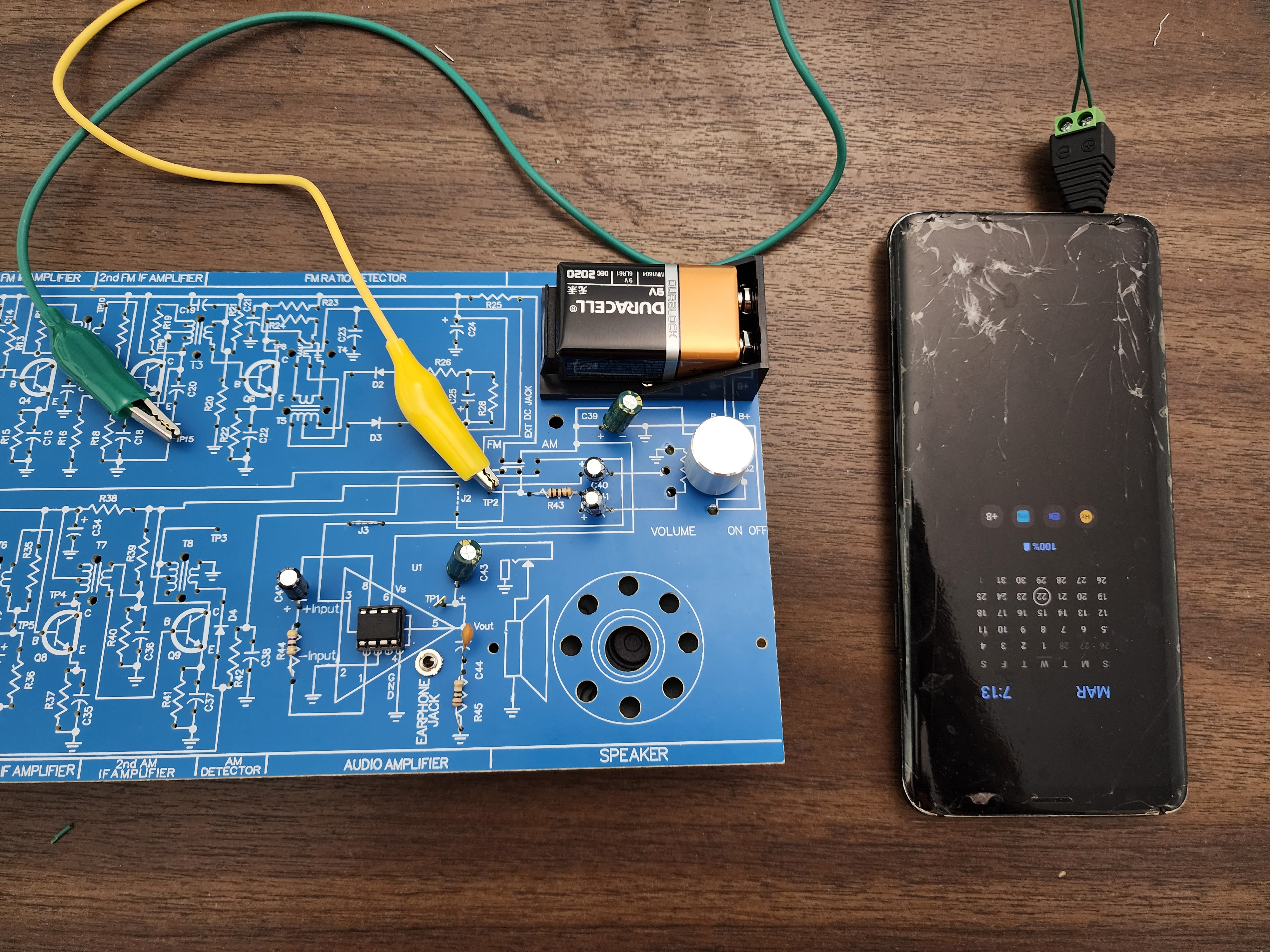
To feed in an input signal, I downloaded the Frequency Generator App, and used the setup described previously to connect my phone to the radio.

Next, I measured the output voltage:

The meter read: 4.51 volts. Fair enough. Now's it was time to measure the input voltage:

And my meter told me: 89.2kΩ. Wait, what? I'm no electronics expert but even I know that's not right. What the heck?

It took me a few days to figure out what's going on here, but in hindsight, it's obvious. At the start of this project I picked up a TESMEN TM-510 multimeter. I knew I'd need a meter and figured a basic one would do the trick. It was cheap, compact and even automatically selected the measuring mode so I couldn't screw that up. I figured any low cost multimeter would get the job done. Apparently, I was wrong.

The meter's automatic mode selection must work by first looking for a voltage. If one is found, then it must guess that I want to measure voltage. If no voltage is detected, then it must mean that I want to measure resistance.

In this case, when I try to measure the input voltage, the meter must not be detecting enough voltage to convince it to properly measure the right value. Therefore, it falls back to resistance and tells me some nonsense value. Looking at the specs of the meter I see it has a minimum voltage of 0.8 volts. If my output voltage is 4.5 volts, and the gain of the amplifier is 150, then the input voltage should be around 0.03. That's way below the minimum voltage this meter can detect.

It never occurred to me to consider this bit of fine print. I'm not sure what role this meter is optimized for, but it's probably not designed for hobby electronics where one may deal with small voltages. That's my guess anyway.

I've since ordered a KAIWEETS HT118A, which is also relatively low costs, and generally receives a good bit of praise on YouTube. This is probably the meter I should have bought in the first place.

The mystery of my audio amplifier's gain is going to have to wait for another day. But the lesson on respecting fine print has been learned today.

Wednesday, March 22, 2023

But Does It Amplify Audio?

I've finished building the first stage of my Elenco AM/FM radio kit, which is an audio amplifier. The build instructions now recommend a series of tests using a multi-meter, audio generator and oscilloscope. While I'm all for doing these formal tests, I couldn't help but take a detour and try my own more casual experiment.

Here's my thinking: if I've built an audio amplifier, doesn't that mean it should amplify audio? That is, if it I take an audio signal from my cellphone's headphone jack, shouldn't I be able to hear it over the speaker? I really wanted to find out.

I picked up a set of these audio jack adapters that allow you to connect arbitrary wires to any 3.5mm headphone jack. Using a bit of hookup wire and some alligator clips, I connected one lead of the headphone cable to ground , and the other lead to the audio amplifier's input.

On my cell phone, I switched over to YouTube and hit play on a video. I then cautiously turned on the radio, increasing the volume every so slightly. And....

Success! I could hear the cellphone's video playing through the radio's audio amplifier. Whoo! I'm #1, I'm #1!

To anyone with even a bit of electronics experience, I'm sure you're shaking you're head. I'm using an audio amplifier to amplify audio; of course it works. And technically, I didn't even build the audio amplifier. All I did was wire in an audio amplifier chip (an LM386N) to a speaker with a few resistors and capacitors to help it out.  But still, to have my mental model match up to hardware I've personally built was quite a rush!

Next up: I'll get a bit more technical and the measure gain of the amplifier I've built. This is fun!

Monday, March 20, 2023

Lessons from the Electronics Bench: Trust Nothing.

I've finished building the first stage of my Elenco AM/FM radio kit. One of the key features of the Eleneco kit is that it comes with instructions for testing each module that you've built. This helps ensure you don't get too far along in the build process before discovering issues. More importantly, it helps ensure that you understand what you're actually building, which for me is what this exercise is all about.

One of the first tests I was supposed to run was the 'Output Bias Test.' Basically, you pop in the battery and turn the radio on. You then check the voltage coming out of the audio amplifier I just built.

Even as a electronics novice I could appreciate that this test was confirming that at least power was flowing through the radio.

I grabbed a random 9 volt battery from our battery pile. I plugged it in. I turned on the radio and used my volt meter to test the output. Nothing.

I didn't panic.

I looked over the circuit and realized I'd never installed the IC amplifier into the IC socket. I did this and repeated the test. Still nothing.

I looked over the circuit, all seemed fine. Then it hit me: I bet this random battery is dead. I poked around and found a sealed package of Duracell, 9 volt batteries. Now we were talking. I popped one of those into the radio.

Nothing. The volt meter still read 0.

Hmmmm.

If this were a software problem I'd debug it by picking something that I knew was true and confirming that it was so. I knew very little about the circuit I'd just soldered together, but I did know that a 9 volt battery should be spewing out 9 volts. So I tested the batteries.

The first, sketchy battery, was indeed dead. It read 1 volt when I measured it with my volt meter. To my surprise, the second battery wasn't much better: it was brand new, but read only 4 volts.

I grabbed another from the package and tested it: 8.8 volts. That seemed better. I put that battery in the radio and turned it on. A got a hum from the speaker! And check it out, here's my volt reading from the audio amplifier's output:

The manual says that my meter should read between 3 and 6 volts. My meter read 4.34. Success!

Lesson learned: Trust Nothing.

Before you boycott Duracell, take a closer look at the above pic. The expiration date of my new-in-box battery was 2020. Yikes, those are ancient. No wonder the first was a dud. Onward!

Wednesday, March 08, 2023

I'm Glad I Soldered This Backwards. Really.

I've started building my Elenco AM/FM Radio Kit and breathed a sign of relief when I finished soldering the audio amplifier's IC socket. The socket's polarity and eight legs were opportunities to mess up the trickiest component I'd worked with yet.

Noooooooooooo

When I went to solder the capacitor between pins 2 and 6, to my horror, I realized I'd soldered the socket on backwards:

What the heck? It took a few minutes, but I figured out where I went wrong: I'd carefully oriented the socket and flipped the board over to solder it into place. Gravity did its thing and the socket fell out. I put the socket back soldered it, all without considering its orientation.

At the time I was really ticked. I realized I better deploy some countermeasures before I started fuming and did something I'd regret.

First off, I put the project down and called it a day. While I wanted to fix this NOW, I realized that taking a beat would be much smarter.

The next day, I Gratitude Gamed this failure.

Let's Gratitude Game This

The Gratitude Game is a technique I use for dealing with mistakes. It has two parts. First, without judgment or filtering I enumerate all feelings related to the debacle. The nastier and more irrational, the better:

  • Of course you screwed this, up you always screwup projects like this.
  • You've broken the project. It's done.
  • I bet if you try to fix this, you'll only make this worse.
  • You should chuck this all in the trash and pretend it never happened.
  • You're an idiot and a loser.

Inner voices can be real jerks.

Next, I posed the question: how was this blunder a good thing?

  • If the goal of this project is to learn things, then this is an excellent opportunity to learn to desolder. That's a useful skill.
  • I need to stop thinking of hardware projects as an exercise in perfection. Screwing up and recovering is a basic skill I need to embrace and master.
  • I messed up the trickiest component yet, and the project isn't over. Despite what my inner voice claims, I haven't failed.
  • I can use this as a great example to talk about Gratitude Gaming on the blog.
  • I'm a beginner at this, of course I'm going to make mistakes. Who cares?

As is often the case, this exercise exposed my negative inner voice as a fraud and that far from my mistake being catastrophic, it was actually a good thing.

Let's Fix This

Using desoldering wick, it took just a couple of minutes to get the socket removed from the board.

I reoriented the socket and used a bit of masking tape to fight off the effects of gravity:

Within no time I had the socket soldered correctly. Far from being a crisis, my mistake had let me work on an important skill and set the tone for this project as being far more forgiving of errors than I imagined.

Monday, March 06, 2023

Warming Up My Soldering Skills: Building Hue

To understand the electronics behind radio, I need to build a radio. But before I can build a radio, I need to have basic soldering skills. So, to that end, I picked up Hue, a small 'learn to solder' project that would let work on these skills.

Before Hue arrived, I hit YouTube to watch a number soldering tutorials. Here are some of my favorites:

The last video is a handy source for cheap, yet still recommended, electronics tools.

Surprisingly, my favorite 'learn to solder' video is this one. I say surprisingly because the purpose of this video isn't to teach technique. What I found impressive was just how casually the author of the video solders 40 header pins to his Raspberry Pi Pico. I assumed 40 nearly-touching pins would have required brain-surgery level detail and accuracy. Not so. The author makes the process look simple: heat up the pad and pin, touch with solder, and go on to the next one. It's this simplicity-first approach that's on display in the video and I realized is what I should be striving for.

When my Hue arrived, I was ready to put my newly acquired knowledge and mindset to work. I warmed up my soldering iron and put the first resistor in place on the board. I touched the tip of the iron to the leg of the resistor and the pad. After a few seconds I touched the solder to another part of the pad. And...nothing. The solder would not melt. I fiddled with different combinations, but I couldn't get the solder to flow like all the demos I'd seen. Ugh.

Not exactly sure what to try next, I ordered some lead based solder off of Amazon. That seemed to help significantly and I was able to proceed with building Hue.

Ultimately, I managed to assemble Hue a minimal of drama. I even managed to seat the LED properly, so I didn't find myself reversing the one component that needed to be placed a particular way.

When Hue was assembled I slid the battery into place and turned it on. Nothing. As I slid the battery mostly out of the slot, Hue lit up. Apparently my soldering was fine, it's just that the battery wasn't making quality contact with the board itself.

Building Hue was a gratifying experience. The small board and close together contacts made for a nice beginner challenge. Having only 9 components, one of which had polarity, also fit with the beginner theme. I could see using Hue as a nightlight when we travel, which means that Hue may very well have a life beyond this learning exercise.

I don't love that the battery holder design seems too fragile. And more than that, I wish there were an explanation about what each of the electronic components do and why they were selected. Writing up these details would add almost no cost to the project and would dramatically increase its value.

The real question is: am I ready to tackle my radio project? If anything, Hue has shown me just how far I have to go before I'll be comfortable with a soldering iron. Still, it also showed me that this isn't rocket surgery and I can muddle through. Enough prep, let's build a radio!

Friday, January 27, 2023

The Goldilocks Problem, Backup Phone Edition

I've shared why I carry a backup phone, and the plan I use to power it. Now comes the fun part: talking about the device itself.

Here are three examples of what I consider top notch backup phones, but as you'll see one is clearly the winner. All three phones make use of the same old-school operating system which will be familiar to those of us who grew up on turn of the century Ericssons and Nokias. For everyone else, these phones will feel primitive. Remember: what they lack in pizzazz they more than make up for in functionality.

Finally, all three phones rely on 2G networks. One day, T-mobile & US Mobile may stop supporting this type of network. When that happens, these phones will be useless and I'll need to search out new devices. But until then, these devices rock. One just happens to rock more than the others.

The Slide: Too Little

The CR1102GD Slide, aka the M5 mini phone, is a remarkable device. It's easily one of the best phones I've ever owned. Weighing in at just over an ounce (31g!), having form factor of a credit card and costing $19.95, it's the just about the perfect minimalist communication tool.

The Slide has you covered for calls and text messages and includes extras like speakerphone, Bluetooth and a physical off switch to avoid power drain while not in use. If you pair it with a Micro USB to 3.5mm audio jack cable, you also get access to FM radio. You can even pair the device with your main cellphone, letting the Slide serve as a 'Bluetooth dialer.' This lets you handle this unassuming phone in public, while calls are routed through the $1,000 cell phone in you pocket.

The Slide isn't without its quirks. It doesn't pickup the current date & time from the cell network, so you have to set it yourself. And the screen and keyboard are obviously sub par. But still, as backup devices go, it's gold.

But, we can do better!

The A10: Too Much

The full metal construction and comparatively expansive color screen of the A10 1.77 HD mini phone makes it feel luxurious compared the Slide. The built in 3.5mm audio jack and support for capturing voice memos is a nice bonus, making it useful for on the go journaling.

Alas, the all metal construction is also the phone's Achilles' heel. The phone weighs in at a massive 66g (for context: my S22 Ultra, with case, weighs 300g), which I can't justify when there are lighter options out there. Like the Slide, it doesn't appear to pick up the date from the network either. Finally, for the life of me, I couldn't figure out how to get the battery removed to install an SD card.

Again, we can do better!

The Soyes 7S+: Just Right

The Soyes S7+, aka the PUSOKEI Mini Cell Phone, is a delightful step up from the Slide without the weight penalty of the A10. Weighing in at 36g, and being slightly thicker, yet narrower than the Slide, it maintains a tiny footprint. The phone adds a larger and more functional screen than the Slide, a very low resolution camera, flashlight and primitive Micro SD card support. And hallelujah, it gets its date and time from the network, so you don't need to set it manually.

The flat keyboard is handy for storage, but not as pleasant to use as the A10. The voice recorder of the A10 is probably more practical than the camera from S7+, but that hardly justifies the weight increase.

Overall, the Soeys S7+ is the way to go if you're looking for a backup phone that disappears in a murse, yet can be a lifesaver when you need it.

Wednesday, January 25, 2023

5 Reasons I Carry a Backup Phone

Here's my top five reasons I carry an itty bitty backup cell phone:

1. To find my 'main' phone. In that moment of panic when I realize my regular phone isn't in my pocket, I can use my backup phone to find out where it's located.

2. To let me communicate when my main phone gets lost, broken or separated from me. We ran into this over the summer when I handed my phone to my nephew to take pics. Shira and a few kids got separated from me and the rest of the little ones. Of course my nephew was in Shira's crew, safely holding my phone. My backup phone let us gracefully reconnect.

3. To access FM radio in an emergency. In a disaster, the humble FM radio can become a critical lifeline. That's why a radio is mentioned on Arlington County's build an emergency kit page as a 'basic emergency' item. Having the radio as part of my backup phone, rather than built into my primary phone, means that I can get info in a disaster while not running down the battery of my main device.

4. To avoid the distractions of a cell phone while still maintaining a safety net. I carry my backup phone on Shabbat, a day when I relish and recharge by being offline. By carrying my backup phone, I know I can still reach 911 or Shira in an emergency. The backup phone also disappears into a small zippered pocket on my running shorts; so it's ideal for taking on run when I'd like to go ultralight and leave my clunky phone behind.

5. To serve as a 2-Factor Authentication backup device. For critical accounts, like Google or Apple, I like being able to provide my backup phone's cell number as a yet another way to get a one time code delivered to me.

And here's 10 bonus reasons:

  1. To Test out SMS based Tasker routines.
  2. To avoid carrying a flashy phone in a high crime area.
  3. To avoid being a target for hackers.
  4. To experiment with low resolution photography.
  5. To hand to stranger so they can make a call.
  6. To share with someone so we can be temporarily in contact.
  7. To sneakily store names, numbers of other details in the phone's contact section.
  8. To access data stored on an SIM or SD card.
  9. For use as a four function calculator.
  10. To show kids what phones used to be like back in the day.

Friday, January 13, 2023

Digital Redneck Engineering: a Trip Timer for the Mazda CX-5

We recently leased a Mazda CX-5. While it surprised us with it's comprehensive feature set (heads up display, baby!), it was missing one important aspect: a simple trip timer. This is nothing more than a stopwatch that starts when the car is turned on. The idea is that you can glance at it to see just how long you've been stuck in traffic, or just how quickly you got home from a daycare run.

Fortunately of all the features offered by a car, this is an easy one to add on. I know this because our Acura RDX had the same issue. Having built my own timer in the past, I had a good idea as to how to do this again.

First off, I visited adafruit.com and did a bit of shopping. I was looking for the components I'd need to create a simple programmable display. It didn't take long before I found the ESP32-S2 TFT Feather. This combined an ESP32 chip with a tiny, but sharp, display. It looked it would be perfect for a timer. I purchased one and patiently waited for it arrive.

When the board arrived I put Circuit Python 8 on it by following these instructions. The installation process went smoothly and I was able access the top level web page offered by the web workflow. Unfortunately, my luck stopped there and I wasn't able to access the Web REPL or file browser. While I wanted to try these features, I realized I didn't actually need them for this project so I gave up on trying to use the Web Workflow.

Starting with a simple Hello World example, I was able to create a code.py file that implemented my timer. Here it is in all its glory:

##
## Shows how long the car has been turned on for
##

import time
import board
import terminalio
from adafruit_display_text import bitmap_label

scale = 5

started = time.monotonic();
text_area = bitmap_label.Label(terminalio.FONT, text="---", scale=scale)
text_area.x = 0
text_area.y = 60
board.DISPLAY.show(text_area)

def digit(value):
    return str(value) if value > 10 else "0" + str(value)

def time_string(started):
    now = time.monotonic()
    t = round(now - started)
    ss = t % 60
    mm = (t // 60) % 60
    hh = (t // (60*60)) % 60
    return digit(hh) + ":" + digit(mm) + ":" + digit(ss)


while True:
    text_area.text = time_string(started)
    time.sleep(1);

Deploying this code to the board is easy: I connected the ESP32 to my laptop via a USB-C cable, mounted it as a drive, and copied code.py into the root directory. Copying the file into places causes the board to reboot and execute code.py. It's all very slick and coder friendly.

The trickiest part of the process was installing the various library dependencies that code.py imported. I did this through trial and error. The board would run code.py, and display an error message as to which library was missing. I'd copy the relevant library from the bundle I'd downloaded, and repeat the process.

Eventually my code ran without issue. I grabbed a cigarette lighter* to USB-A adapter, USB-C cable and some mounting putty and brought it out our car. I then quickly rigged up this demo:

Success!

I'm in awe of the Adafruit ESP32-S2-TFT. For $24, I've now own tiny computer that includes a brilliant color screen, a built in neopixel and WiFi support. Trivially, I'm able to program it over the air using Python, and with effort I could almost certainly turn it into a forth or scheme computer. My timer scratches only the surface of these capabilities. I'm not sure whether I'll build a v2.0 of my timer, or use the board in another project altogether. But I almost certainly need to do something with this device, it's amazing.


*Kids today must be baffled as to why the strange shaped power plug on a vehicle is a called a cigarette lighter. Have no fear, YouTube can explain. I have a vague memory of being a kid figuring out that this oddly shaped knob could pressed in and would eventually get red hot. Perfect for lighting up your cigarette. Crazy, right?

Tuesday, December 06, 2022

Taming The Moby Wrap

One of my go-to pieces of baby gear is the Moby Wrap baby carrier. I've used it to soothe and schlep countless little ones. From miles of laps around the first floor of our home, to the jungles of Belize, the Moby has been a constant and reliable companion.

To underscore its utility and effectiveness, I'm composing this blog entry at my standing desk with baby L softly snoring away in the Moby.

One challenge with the Moby is that its roughly 900 feet of cotton fabric can make it unwieldy to don. At home, with practice, this turns out to be easy enough to do. But in more hostile territory, say a parking lot, airport or trail head, keeping the fabric off the ground can be a chore.

After over a decade of tripping over this problem, I finally found a simple solution. I stuffed each end of the wrap into mesh reusable produce bags:

Once in this configuration, I had essentially two separate rope bags. If I gently pull on either bag the fabric feeds out. If I stop pulling, the fabric stays put. The result is that I can effortlessly put on the Moby without the fabric flopping around everywhere.

I field tested this setup on our last vacation, and I was amazed at how seamlessly it worked. Putting on the Moby at various trail head parking lots was a breeze. I used this same arrangement again last night, putting the Moby (and baby!) on in the lobby of Shira's gym. Again the process was hassle free.

Hurray for little wins!

Tuesday, March 15, 2022

Beats By Ben | Building and Using a Digital Stethoscope

Since 2018, I've had on my Blog Ideas List the topic of recording heart sounds. Mind you, this isn't for any practical purpose; my Garmin watch has me covered in that department. Instead, the motivation was to record one of life's greatest miracles: the always-on, never-tires heart that sustains us all.

When I initially had the idea, I watched a few random videos on YouTube and found a reddit thread on the topic, but none of these resources left me with an obvious path forward.

I recently revisited the idea and was surprised to see a number of new videos on YouTube that were exactly what I was looking for. One tutorial was from two electrical engineers in Israel, and the other was from an ER doc in Toronto. Both videos described how you could cheaply capture heart and lung sounds, and both had the same motivation: to offer low-cost telehealth tech for the Covid-19 pandemic.

In the US, at the moment things are looking fairly stable from a Covid-19 perspective. We've got access to vaccines, high quality masks and promises of additional Covid treatments on the way. When these videos were published, the situation was far more fluid and dire. There was a very real fear that hospitals would be overrun and low-cost, hacky solutions for doing telehealth may very well have been a game changer.

In short, I look at these videos as more than How-Tos. They're the medical community thinking on its feet and MacGyvering solutions in real-time, and it's amazing.

The approach that both the Israeli Team and the Doctor from Toronto recommend are essentially the same. Get a cheap stethoscope and cheap microphone. Cut the tubing of the stethoscope a couple of inches away from the bell. Jam the microphone into the tubing and secure it. And you're done.

The microphone, once plugged into your cell phone, can be used in any video conferencing or audio recording app. Doctors could listen to heart sounds in real time in a Zoom-like session or have patient e-mail samples to them.

I purchased a $6.95 stethoscope and a $10.99 lavaliere microphone from Amazon. I cut the tubing, and unscrewed the microphone to remove the housing. Initially I used mounting putty to secure the microphone in place. I quickly swapped that out for Sugru, which is a more durable and permanent solution.

I recorded the following clip on my Galaxy S10+ by using the built in voice recorder app and plugging the microphone into the headphone jack. I messed with the audio a bit in Audacity, though I have little clue as to what I'm doing there. The first clip is the original version of the recording, the second clip uses Audacity's 'Noise Reduction' effect to clean things up.

As you can hear, it works! The sound quality is far from perfect, but you can definitely hear a steady heartbeat. In the version without noise reduction, you can hear breath sounds, too.

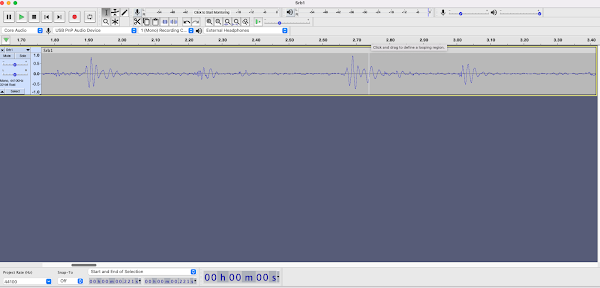
The screenshot below of Audicity shows the wav form of the audio I collected. It even looks like the heartbeat pattern you see in the movies. That's to be expected, but it's still cool to see.

I'm not entirely sure how I'm going to put my $18 digital stethoscope to use. But I'm psyched to add a media capture tool to my toolbox, especially one that let's me record phenomena that are typically undetectable.