This is a Just the Facts (JTF) post: generated by AI from my own raw material (voice memos, session notes) and a short outline I wrote, then checked by me. What's a JTF?
Previously in this series: Cloudslate: Turning an Old Kindle Into a Workday Dashboard
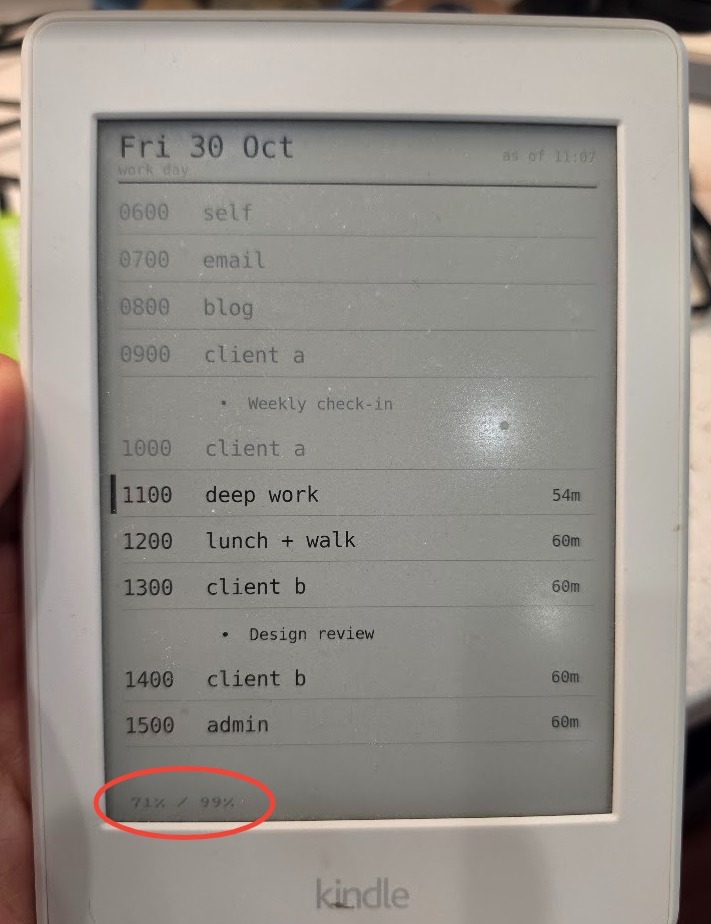
In part 1 I jailbroke an old Kindle Paperwhite and turned it into cloudslate: a dashboard that pulls an image from S3 every fifteen minutes and paints it on the screen. The good news is that it works great as a live view of my workday time boxes. The bad news is that the battery barely lasted a day. I asked Claude to fix that without changing the simple architecture, and a handful of small changes got it from about a day to roughly seven weeks on a charge.
The Problem
- The dashboard itself works. It shows my day's time boxes, it refreshes on its own, and it mostly stays out of my way.
- The battery life was awful. It went from 100% at 8am to 65% by 12:38. One day was enough to drain it.
- When Claude read the battery's own registers (
cat /sys/class/power_supply/*/uevent), the cell turned out to be fine: 1408 mAh full charge against a 1420 mAh design, and 36 cycles. The Kindle was pulling about 171 mA on average, and 1408 / 171 comes to about 8.2 hours. That's pretty much what I was seeing.
My Worry
- What made this project a win was how simple it is:
curlthe image, paint it,sleep, repeat. No app, no SDK, no cross-compiler. - I was afraid that same loop was what was eating the battery. If the only way to fix the battery was to throw out that design, then
cloudslatewas just a toy proof of concept.
Asking Claude
- I put the question to Claude. It guessed it could get the battery life way up without changing the architecture.
- Its explanation: a Paperwhite lasts weeks because it spends almost all its time suspended.
cloudslatehad it suspended 0% of the time. The problem was software, not hardware.
The Changes (in Claude's words)
- Frontlight off. This was already done in part 1. E-ink holds an image with no power, so the light was the obvious draw and the easy win.
- Stop telling it to stay awake.
lipc-set-prop com.lab126.powerd preventScreenSaver 1was there so powerd wouldn't draw a screensaver over the dashboard. But the screensaver is the first step in the chain that ends in suspend, so that line also meant the Kindle never slept. That's where the battery was going. - Stop waking up every 30 seconds. The old loop woke up every 30 seconds to write a heartbeat file, which also kept the device awake.
- Sleep between refreshes, using the clock's alarm. Set the alarm, then suspend to RAM:
echo "+900" > /sys/class/rtc/rtc0/wakealarmecho mem > /sys/power/state
echoblocks until something wakes the device, which is why this fits right into a shell loop. No daemon, no timer thread. It's about thirty lines ofsh. - Use the power button for refresh-on-demand. Tap-to-refresh doesn't survive suspend, because touch only wakes a PW3 while the Kindle framework is running, and
cloudslatestops the framework. The power button does wake it. You can't tell a button wake from an alarm wake by reading input, because resuming makes the power key report itself either way. So the rule is: if it woke up earlier than the alarm, someone pressed the button, so repaint. - Time the loop off the wall clock.
sleepdoesn't count time spent suspended, so anything timing the loop has to check the real clock instead. - Let the screen finish before sleeping.
fbinkreturns when a screen update is queued, not when it's done. Suspending right after a refresh froze the panel halfway through. Asleep 3after the refresh fixes it, and three seconds every fifteen minutes is nothing. - Don't poll more often than you need. Every wake costs a wifi reconnect, and that's now the expensive part. The poll stays at fifteen minutes.
All of this lives in cloudslate.sh, including the suspend and wake handling.
The Result
- I last charged the Kindle about two weeks ago, and the slate read 100% then. (The fuel gauge reads high right after charging, so it may really have been in the high 90s.)
- Today the status line in the corner reads
71% / 99%. The first number is the battery charge. The second is how much of the time the Kindle has spent suspended. - That's about 15 days for 29%, or roughly 1.9% a day, which works out to about seven weeks on a full charge.
- So it went from one day to seven weeks, without changing the architecture. Not too shabby!
Behind This Post
The outline I wrote
- Good news: my low-effort Kindle based dashboard to show a live
  view of my work day time boxes functions great
- Bad news: the battery life is pretty awful. A single day is all it
  takes to chew through the battery life.
- My worry: the simple `curl`, `sleep`, `repeat` architecture that
  made this project such a win is also responsible for chewing through the battery.
- In that case, `cloudslate` is little more than a toy proof of
  concept
- I put my question to Claude, and it guessed that it could improve
  the performance without chaning the architecture.
- It made the following changes:
  - <consult the notes and insert the optimizations that Claude made,
    fine ot use Claude's voice here>
- The result: It's been about two weeks and the battery is now 71%,
  with 99% of the time the devicek has been sleeping
- So from 1 day to 7 weeks, not too shabby!


No comments:
Post a Comment