Tuesday, November 14, 2023

Citi Open 2023 | Murray, Tiafoe and glimpse of Gauff

[Composed 8/1/2023]

The promise of the Citi Open, now technically the Mubadala Citi DC Open, is the chance to see world class tennis on a relatively tiny stage. While we were only able to squeeze in a day of the tournament this year, it more than lived up to its promise. This year we also brought along B and P, who both appreciate sports even if they aren't huge tennis fans (yet).

We Ubered to the stadium in the afternoon and had no traffic or long lines to contend with. The weather was beyond perfect, unlike previous years which were oppressively hot.

We started watching tennis in the main stadium, watching the fifth seed Grigor Dimitrov take on Mackenzie McDonald. We caught the first set tie break, where the two battled it out. And then started the second set, which Grigor pulled away in. While we watched the second set, Shira snuck off to one of the side courts to secure us a spot watching former number one Andy Murray.

Eventually, P, B and I joined Shira on the side court and watched Murray and Dan Evans take on Maximo Gonzalez and Andres Molteni. We tried to explain to P and B that they were mere paces away from a tennis great. It really is tons of fun watching doubles tennis in such an intimate setting. Ultimately, Gonzelez and Molteni won the day; but it was a treat getting to watch Murray emote all over the court during play. And Shira enjoyed pointing out that Andy's mom was in the stands just a few rows behind us.

After the doubles match we got lunch and hovered around the practice courts. We got lucky and managed to catch Coco Gauff warming up. This was one of the first time's we got to see that Brad Gilbert had joined her coaching team, and it was fun seeing BG on the court, not just in the commentating box.

From there, we made it to the night match, where we saw Francis Tiafoe take on Aslan Karatsev. Frances is essentially our local tennis star, so we're always eager to cheer him on whenever we see him. I'm sure winning his home tournament is top on his list of goals, and watching him play tonight it looked like that may very well happen. Frances entertanied, as always does, with his larger than life personality and some massive serves. Man he's fun to watch.

When we asked P and B what they thought of the experience, they were most surprised by just how casual the whole affair was. Not only are you close to the players, but they walk through the venue, among the fans to get to and from the locker room. P tried to imagine what would happen if a pro-soccer play just casually walked through the stands to a match. Yeah, not going to happen.

Friday, November 10, 2023

Make It Obvious | Graphically Annotating Images with Metadata for Easy Analysis

To analyze my DSLR usage I wanted an easy way to look at day's worth of photos and see which were taken with my cell phone and which with my Canon Rebel. The first challenge was normalizing the image capturing device and timestamp. That was tricky, but doable. Annotating the images with this data turned out to be straightforward. ImageMagick easily had me covered.

Ultimately, I settled on the following convert command. It adds a colored border based on the camera that took the photo and prints the timestamp and device in the corners. I scale the image down to 800 pixels wide to make large numbers of images easy to work with.

      convert $file -scale 800x \
              -bordercolor "$color" -border 20 \
              -pointsize 10 -fill white \
              -draw "text 800,15 '$device'" \
              -draw "text 15,15 '$timestamp'" $output/$outfile

I incorporated this command into photoassist as -a analyze. Running analyze against 6 gigs worth of photos from our 4th day in Tucson yielded a paltry 160 megs(!) worth images. The images have all had their names normalized to the format <date>_<time>_<device>.jpg. Using this convention I can see, for example, just the photos I took from 10am to 11am:

$ ls 20230709_10*
20230709_101428_s22.jpg  20230709_102534_s22.jpg  20230709_104116_t6s.jpg  20230709_104225_t6s.jpg  20230709_104510_s22.jpg  20230709_104850_s22.jpg  20230709_105050_s22.jpg  20230709_105245_s22.jpg
20230709_101801_t6s.jpg  20230709_102541_s22.jpg  20230709_104127_t6s.jpg  20230709_104229_t6s.jpg  20230709_104511_s22.jpg  20230709_104851_s22.jpg  20230709_105053_s22.jpg  20230709_105247_s22.jpg
20230709_101802_t6s.jpg  20230709_102837_s22.jpg  20230709_104139_s22.jpg  20230709_104234_t6s.jpg  20230709_104539_t6s.jpg  20230709_104854_s22.jpg  20230709_105055_s22.jpg  20230709_105312_s22.jpg
20230709_101804_t6s.jpg  20230709_102839_s22.jpg  20230709_104141_s22.jpg  20230709_104237_t6s.jpg  20230709_104549_t6s.jpg  20230709_104855_s22.jpg  20230709_105059_s22.jpg  20230709_105422_s22.jpg
20230709_101805_t6s.jpg  20230709_102843_s22.jpg  20230709_104150_s22.jpg  20230709_104259_s22.jpg  20230709_104559_t6s.jpg  20230709_104924_t6s.jpg  20230709_105101_s22.jpg  20230709_105532_s22.jpg
20230709_101810_t6s.jpg  20230709_102948_s22.jpg  20230709_104150_t6s.jpg  20230709_104327_t6s.jpg  20230709_104601_t6s.jpg  20230709_104926_t6s.jpg  20230709_105106_s22.jpg  20230709_105534_s22.jpg
20230709_101812_t6s.jpg  20230709_103541_s22.jpg  20230709_104153_s22.jpg  20230709_104328_t6s.jpg  20230709_104636_t6s.jpg  20230709_104932_s22.jpg  20230709_105131_t6s.jpg  20230709_105537_s22.jpg
20230709_101813_t6s.jpg  20230709_103543_s22.jpg  20230709_104153_t6s.jpg  20230709_104336_t6s.jpg  20230709_104712_s22.jpg  20230709_104933_s22.jpg  20230709_105133_t6s.jpg  20230709_105607_s22.jpg
20230709_101815_t6s.jpg  20230709_103849_s22.jpg  20230709_104154_s22.jpg  20230709_104344_t6s.jpg  20230709_104713_s22.jpg  20230709_104950_t6s.jpg  20230709_105139_s22.jpg  20230709_105614_s22.jpg
20230709_101816_t6s.jpg  20230709_104029_t6s.jpg  20230709_104154_t6s.jpg  20230709_104347_t6s.jpg  20230709_104715_s22.jpg  20230709_104954_t6s.jpg  20230709_105143_t6s.jpg  20230709_105617_s22.jpg
20230709_101819_t6s.jpg  20230709_104040_t6s.jpg  20230709_104155_t6s.jpg  20230709_104348_t6s.jpg  20230709_104716_t6s.jpg  20230709_104957_t6s.jpg  20230709_105144_t6s.jpg  20230709_105630_s22.jpg
20230709_101820_t6s.jpg  20230709_104044_t6s.jpg  20230709_104156_t6s.jpg  20230709_104438_t6s.jpg  20230709_104737_s22.jpg  20230709_105002_s22.jpg  20230709_105158_s22.jpg  20230709_105631_s22.jpg
20230709_102431_s22.jpg  20230709_104047_t6s.jpg  20230709_104157_s22.jpg  20230709_104455_s22.jpg  20230709_104742_t6s.jpg  20230709_105004_s22.jpg  20230709_105201_s22.jpg  20230709_105659_s22.jpg
20230709_102524_s22.jpg  20230709_104050_t6s.jpg  20230709_104159_t6s.jpg  20230709_104456_t6s.jpg  20230709_104743_t6s.jpg  20230709_105010_s22.jpg  20230709_105206_s22.jpg
20230709_102527_s22.jpg  20230709_104058_t6s.jpg  20230709_104203_s22.jpg  20230709_104457_s22.jpg  20230709_104746_t6s.jpg  20230709_105012_s22.jpg  20230709_105215_s22.jpg
20230709_102532_s22.jpg  20230709_104101_t6s.jpg  20230709_104222_t6s.jpg  20230709_104503_t6s.jpg  20230709_104822_t6s.jpg  20230709_105034_t6s.jpg  20230709_105239_s22.jpg

Using feh I can preview these images as a contact sheet:

$ feh -m -E 120 -y 160 20230709_10* -H 1000

All the photos with a red border were captured with my Canon DSLR, the photos with a blue border were from my Galaxy S22. I can also use feh to inspect the images manually:

$ feh 20230709_10*

Using these annotated images I get a much better picture (hah!) of how and to what effect I use my DSLR. Up next, I want to spend some time with these images and see if I can reach any useful conclusions.

Wednesday, November 08, 2023

Finding a Photo's Who and When | Extracting and Scrubbing Exif Data

To simplify analyzing my DSLR vs camera phone pictures, I'd like a reliable way of pulling two key pieces of metadata from a photo: the name of the capturing device and the timestamp of when it was captured) taken. A typical JPG stores this information in exif data, so it shouldn't be hard to access. Consider these four sample photos:

ImageMagick's identify command extracts exif entries with ease. Here's what I see when I run it against my sample photos and look for interesting keywords:

$ for f in *.jpg *.JPG ; do echo $f ; identify -verbose $f | grep exif: | egrep -ie '(date|canon|samsung|eos)' ; done
20230709_050311.jpg
    exif:DateTime: 2023:07:09 05:03:11
    exif:DateTimeDigitized: 2023:07:09 05:03:11
    exif:DateTimeOriginal: 2023:07:09 05:03:11
    exif:Make: samsung
20230709_055335.jpg
    exif:DateTime: 2023:07:09 05:53:35
    exif:DateTimeDigitized: 2023:07:09 05:53:35
    exif:DateTimeOriginal: 2023:07:09 05:53:35
    exif:Make: samsung
IMG_0029.JPG
    exif:DateTime: 2023:07:09 09:00:00
    exif:DateTimeDigitized: 2023:07:09 09:00:00
    exif:DateTimeOriginal: 2023:07:09 09:00:00
    exif:Make: Canon
    exif:Model: Canon EOS Rebel T6s
IMG_0045.JPG
    exif:DateTime: 2023:07:09 09:02:59
    exif:DateTimeDigitized: 2023:07:09 09:02:59
    exif:DateTimeOriginal: 2023:07:09 09:02:59
    exif:Make: Canon
    exif:Model: Canon EOS Rebel T6s

Extracting a Device Name

It looks like exif:Make or exif:Model is going to be the best source for the camera name. Focusing on these fields, I see:

$ for f in *.jpg *.JPG ; do echo $f ; identify -verbose $f | grep exif: | egrep -ie 'exif:(Make|Model):' ; done
20230709_050311.jpg
    exif:Make: samsung
    exif:Model: SM-S908U1
20230709_055335.jpg
    exif:Make: samsung
    exif:Model: SM-S908U1
IMG_0029.JPG
    exif:Make: Canon
    exif:Model: Canon EOS Rebel T6s
IMG_0045.JPG
    exif:Make: Canon
    exif:Model: Canon EOS Rebel T6s

SM-S908U1 doesn't mean anything to me, and Canon EOS Rebel T6s is a bit verbose. But mapping these values to easy to work with names requires only a  bit of trivial shell scripting:

case $make in
  SM-S908U1) echo "s22" ;;
  *T6s*) echo "t6s" ;;
  *) echo "unknown" ;;
esac

Extracting a Timestamp

On the surface, it looks like DateTime contains exactly the timestamp I'm looking for. It uses :'s instead of -'s to delineate the date, but that's trivial to fix:

$ for f in *.jpg *.JPG ; do echo $f ; identify -verbose $f | grep exif:DateTime: | sed -r 's/([0-9]{4}):([0-9]{2}):([0-9]{2}) ([0-9]{2}):([0-9]{2}):([0-9]{2})/\1-\2-\3 \4:\5:\6/' ; done
20230709_050311.jpg
    exif:DateTime: 2023-07-09 05:03:11
20230709_055335.jpg
    exif:DateTime: 2023-07-09 05:53:35
IMG_0029.JPG
    exif:DateTime: 2023-07-09 09:00:00
IMG_0045.JPG
    exif:DateTime: 2023-07-09 09:02:59

While these are all seemingly valid timestamps, there's a problem: these photos were all taken in the early morning of July 9th. Why do some have the timestamp of 5am and some 9am? Something's not right.

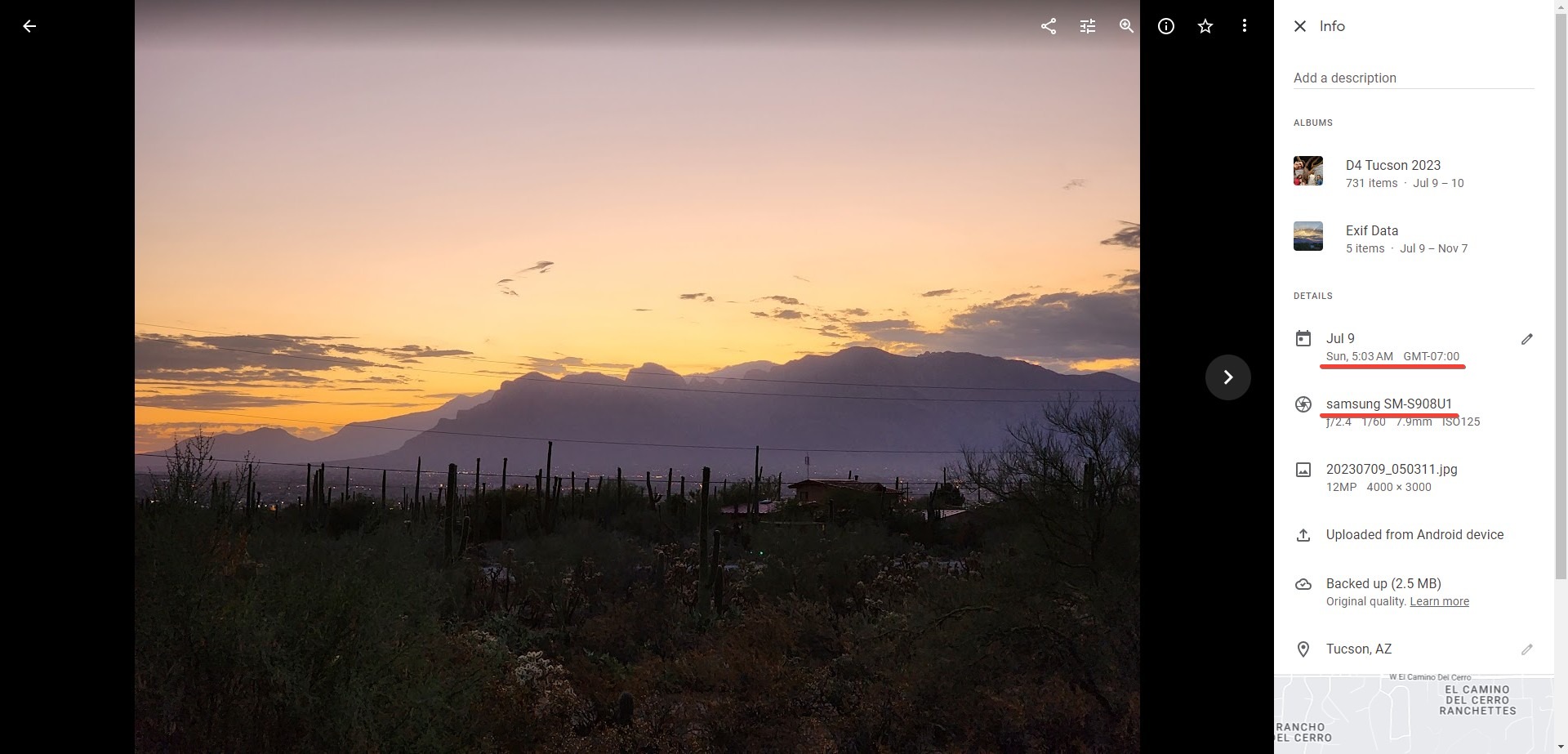
According to the Google Photos UI, they were all taken between 5am and 6am:

The photos from my Galaxy S22 have exif timestamps that match Google's UI. But the DSLR are pics are totally off. What gives?

First, I spent time closely analyzing the photo metadata from the DSLR's pics. I could see no timestamp that matched what the Photos UI reported.

$ identify -verbose IMG_0029.JPG |egrep -ie '(date|time|stamp)'
    date:create: 2023-11-08T06:59:29-05:00
    date:modify: 2023-11-08T03:58:16-05:00
    exif:DateTime: 2023:07:09 09:00:00
    exif:DateTimeDigitized: 2023:07:09 09:00:00
    exif:DateTimeOriginal: 2023:07:09 09:00:00
    exif:ExposureTime: 1/125
    exif:SubSecTime: 41
    exif:SubSecTimeDigitized: 41
    exif:SubSecTimeOriginal: 41
  User time: 0.210u
  Elapsed time: 0:01.329

Then I cursed out Google: how could they show me a correct timestamp on the web, but give me back a random timestamp in the image itself?

And then I remembered that I shot these photos with my camera's internal clock set incorrectly. I used a clever feature offered by Google Photos to shift the image capture time by a relative amount:

Google's almost certainly returning the original exif timestamp to me, not the one that I shifted on Google Photos. While this isn't the behavior I want, it is reasonable behavior. To deal with this, I've implemented my own time shifting logic. My approach is to describe in a text file the original and corrected timestamp for a given photo. Any other photos taken that day will be corrected by the same offset. For example, I can describe my DSLR's timestamp correction for July 9th, 2023 as:

device|date|exif_timestamp|google_photos_timestamp
t6s|2023-07-09|09:00|05:46

With this approach, I can issue a correction once and have it apply to the hundreds of photos taken on a give day.

I've packaged up the friendly device name mapping and timestamp correction logic into a shell script named photoassist. Using this script, I can now access scrubbed metadata.

$ for f in *.jpg *.JPG ; do d=$(photoassist -a device -i $f) ; t=$(photoassist -a timestamp -i $f); echo "file=$f, device=$d, timestamp=$t" ; done
file=20230709_050311.jpg, device=s22, timestamp=2023-07-09 05:03:11
file=20230709_055335.jpg, device=s22, timestamp=2023-07-09 05:53:35
file=IMG_0029.JPG, device=t6s, timestamp=2023-07-09 05:46:00
file=IMG_0045.JPG, device=t6s, timestamp=2023-07-09 05:48:59

These timestamps now agree with Google Photos and the device names are far easier to recognize and work with.

Next up, I want use this data to annotate and organize a day's worth of photos so I can clearly see what my DSLR is bring to the table.

Tuesday, October 31, 2023

DSLR vs Cell Phone Camera: To Schlep or Not to Schlep

Before each adventure I go on, whether it's a trip around the block or around the world, I have the same debate: should I lug along my Canon T6s DSLR? On one hand, the telephoto lens and old school camera form factor lets me capture pics I'd miss out on if I relied solely on my cell phone. On the other hand, the T6s is fragile, bulky, heavy and relatively dated. My cell phone, a Galaxy S22 Ultra has a remarkable camera system and its 10x telephoto lens lets me record photos that would have been impossible using previous phones.

Lingering in the back of my mind is this question: if the DSLR is such an asset, then perhaps I should upgrade? I was gifted the T6s back in 2016. In 7+ years cell phone camera technology has noticeably improved, could the same be said for the DSLR market? If so, maybe a camera refresh is in order.

To answer these questions, I want to compare my DSLR and camera phone pics from our travels over the summer. The challenge here is that I've got thousands of pictures to sort through and no easy way to compare them. 

So let's build the tools I'll need to simplify this comparison. And then let's put the DSLR to the test: is it worth its weight, or time to retire it?

Up next: normalizing exif data for easy photo comparison.

Tuesday, October 24, 2023

On the Difference Between Answers and Understanding

Both my Father and my Father-in-Law (z"l) were science teachers. Between my Dad's teaching non-majors and my FiL teaching high school, I'm certain they both strived to impart a love and appreciation of science to a skeptical audience. In their own ways, they imparted to me the fundamental difference between understanding versus simply having the right answer. My father-in-law would pour over physics textbooks the same way most people would re-read a favorite novel; all along the way relishing the fundamental. My Dad would pass along the warning he gave his students about spreadsheets: they'll always give you an answer, but is it the right answer?

Yesterday, as I fiddled around with the math behind stadiametric range finding I had a moment where this notion of understanding a topic crystalized. Typically, range finding is used to find an unknown distance. The forumula I was working with was as follows:

ad   od
-- = --
ah   oh

In every YouTube video I saw on the topic, the goal was to calculate the distance to some target, ad (actual-distance). But, it ocurred to me that you could use this same forumula and technique, yet flip around what you're solving for.

Say you were with a buddy and you wanted to run some 100 meter sprints. You could plug the known values into the formula above:

100m    66cm
----  = ----
5'6"     oh

In this case, we can solve for oh (observed-height). Doing this, comes to:

(100m / 5'6")        = (66cm / oh)  ; plug in the numbers
(10,000cm / 167.64cm) = (66cm / oh)  ; convert to cm
(66cm x 167.64cm) / 10,000cm = oh ; solve for oh
1.1cm = oh

This is what 1.1cm looks like marked out on my wallet-sized ruler:

I can now find 100 meters by walking away from my buddy and every so often holding this marked-off ruler out in front of me. When my running partner completely fills the marked off bounds of the ruler, I I've hit 100 meters. Science for the win!

While this may be a very minor bit of mathmetics, it made me smile when it all clicked for me. I'm confident both Dads would appreciate my little discovery and that I'm grasping their wisdom.

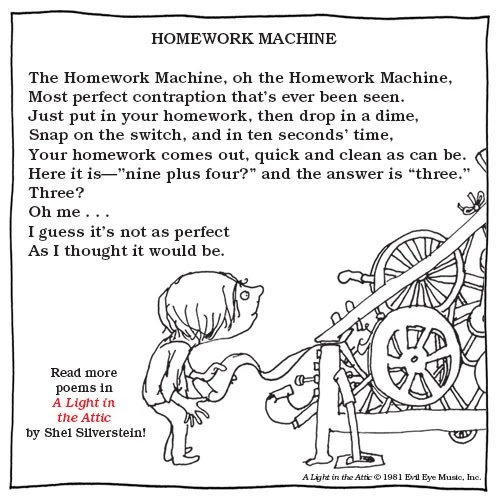
Over the years, I've watched as answers have become easier and easier to come by. Calculators, spreadsheets, Google, Wikipedia and Stack Overflow; oh how wonderful these services can be and how quickly they can reveal an answer. And now we seem to have reached peek-answer availability with Chat GPT. You can not only have the answer you want, but in your preferred voice and tone. Who could ask for more? And yet, understanding is still the gold the standard. Perhaps Shel Silverstein put it best:

The Homework Machine,
Oh, the Homework Machine,
Most perfect
contraption that's ever been seen.
Just put in your homework, then drop in a dime,
Snap on the switch, and in ten seconds' time,
Your homework comes out, quick and clean as can be.
Here it is— 'nine plus four?' and the answer is 'three.'
Three?
Oh me . . .
I guess it's not as perfect
As I thought it would be.

Monday, October 23, 2023

The $1.50, Ultra Compact, Field Expedient Rangefinder

I wanted to see if I could DIY a stadiametric rangefinder. But, before I could start crafting I needed to understand the math behind this distance estimation technique.

One clue as to how stadiametric rangefinding is calculated, comes from the unit of measure found in military spotting scopes: the mil. Mil stands for milliradian and is a measure of angular distance. From this, I inferred that I was going to be digging into trigonometry. I braced myself some complex math. When I finally untangled the how this all works, I found the process to be delightfully simple. In fact, we can trivially derive it.

Decoding the Math

Consider this crude drawing of me standing in front of an object:

The object is ad (actual-distance) away from me, and is ah (actual-height) tall. Assume that I know ah, and am trying to figure out ad. Now imagine I grab a ruler and hold it up in front of me. The picture now looks like this:

The length of my arm is od (observed-distance), and I can read off of the ruler how tall the object appears to me, oh (observed-height).

The magic, if you will, is that these measurements are in proportion. That is:

od   ad
-- = --
oh   ah

Intuitively, this makes sense: how tall the object appears to me is directly related to how close I stand to it. But, there's no reason to trust your gut here: the mathematical principle in play is similar triangles and it's more than worth your time to read up on it.

As with any proportion, if you know three values you can calculate the fourth. This suggests that there's nothing to actually build to create this type of rangefinder. I simply need a ruler I can hold out in front me. As luck would have it, the wallet sized fresnel lens I carry in my man-bag has both inch and centimeter markings on it. By the principles above, I should be able to calculate distances in the field using it. Let's try this out.

Let's Try It

I situated myself on the edge of my driveway and peered down to a bank of traffic lights in the distance. My goal: find the distance to the traffic lights.

I held up the wallet sized magnifier, and read .7 centimeters off of it. Keep in mind, all I'm interested in is the ruler on the magnifier; I'm ignoring the magnification itself.

Using a sewing style measuring tape, I measured the distance from my face to my outstretched arm. That came to 66cm. I also Googled around to figure how out how tall a bank of traffic lights may be. The consensus was that each light was 12". So I used: (12" x 3) + 4", or 40", as my estimate. I now had all the information I needed to fill into the formula above:

(ad / ah)      = (od / oh) ; the formula
(ad / 40")     = (66cm / .7cm) ; known values plugged in
(ad / 101.6cm) = (66cm / .7cm) ; inches to cm
ad             = 101.6cm x (66cm / .75cm) ; solve for 'ad'
ad             = 9,579cm ; divide and multiple values
ad             = 95.79m ; convert cm to m

According to the math above, the stop light was about 96 meters away. I then pulled up Google maps, switched to satellite view, and measured the distance on the map. It came out to a shockingly close 92 meters. I'm amazed that my estimate was so close to what I measured in Google Maps. Still, I suppose the math is sound, so I can't really complain.

A Little Field Prep

While there may be nothing to build to do this kind of range finding, there is important information to know. To make performing these calculations in the field easier, I created a text file containing some common unit conversions, as well as some sizes of standard objects (thanks range-r-card for inspiration!). Here's what in the file:

Arm length: 66cm

To centimeters
inch x 2.54
feet x 30.48
yard x 91.44
meter x 100
kilometer x 100,000
mile x 160,934

From centimeters
cm / <factor above>

Objects
traffic light: 12" (30.48cm)
person: 5'9 (175.26cm)
avg SVU: 1.9m (190cm)
door: 2m (200cm)
semi truck: 3.5m (350cm)

I printed this information out as a cheat sheet and did a bit of poor-man's laminating by covering it with packing tape. I then tucked it in to the same slot that holds the fresnel lens.

And just like that, I'm ready to do some field expedient distance estimation. And best of all, the setup was free and doesn't add any bulk to my gear.

Friday, October 20, 2023

In Search of a Low Cost and Compact Field Expedient Distance Calculator

Imagine you're a sniper (or hunter, or golfer, or surveyor), to do your job you need know the distance from yourself to some far off point. To get this value, you'd probably reach for your high tech laser, infrared or sonic rangefinder. But what if you're rangefinder's batteries are dead or the device damaged? All isn't lost, as you're probably using an optic that includes a ticked-crosshair like this:

Those dots aren't just for decoration, they are designed for estimating distance. This method is known as stadiametric range finding, and it works by having the viewer plug two values into a math formula. The values are the actual height or width of an object in the scene, and the number of ticks the object takes up in the scope. For example, if you know there's a 5'6" (1.67 meters) person in the scene, and this person takes up 3.5 ticks in your mil-dot scope, then you know that you are approximately ((1.67 x 1000) / 3.5), or 477 meters away from that person.

This method is handy because you don't need a special piece of tech to use it. The optic you are already schlepping around can have this built in. There's nothing extra to carry, break or forget.

What interested me however, was whether it's possible to use this same technique without an optic. Whether in a wilderness or urban setting, being able to estimate distances would be a handy skill. I can't, however, justify carrying around a mil-dot monocular on the off chance I'll want to measure a distance.

The good news is that you can absolutely do stadiametric range finding without magnification. The range-r-card by Black Hill Designs does exactly this. You hold the plastic card in front of you, and estimate distance using the same principle as a mil dot reticle.

While more purpose built, the Dead On Range Finder does the same thing. The Dead On is used by bow hunters, and on the surface doesn't look anything like a sniper's scope or range-r-card. However, the principle remains the same: you know an object's size in the scene (the average belly height of a deer), an observed size of this object and therefore, an approximate distance.

This type of range finding isn't new. Back in the 1800's when soldiers switched from muskets to rifles they found themselves with both an opportunity and a challenge. Rifles had a much larger range than muskets, but one could only take advantage of this if you could properly estimate the distance to your target. The December 1st, 1869 edition of the North Iowa times gave this grim prediction if the challenge of fast and accurate range finding was ever solved:

An Italian officer is reported to have made a discovery, by means of which any private soldier is enabled to measure the distance of any object within range, instantly, and at the same time to aim a gun or canon with unerring accuracy. This would make all firearms such murderous weapons, that two detachments of troops within range would be enabled to utterly destroy one another.

During the Civil War, the US issued stadia to select soldiers as a means of doing, you guessed it, primitive stadiametric range finding.

The Civil War stadia, like the range-r-card, works by holding the device at just the right distance from your eye by having the operator bite down  on, and extend a cord. When an enemy soldier fills up a marked section of the stadia, you effortlessly know his distance.

While both the range-r-card and 19th century stadia replica are relatively cheap and compact, I was curious if it was possible to DIY a solution from gear that I already carry. That way, I won't have to take up space on a purpose built item that will get used infrequently.

Stay tuned, I'm planning to tackle that challenge next.

Tuesday, October 17, 2023

Review: A Prayer for the Crown-Shy

I zipped through Becky Chamber's A Psalm for the Wild Built and was eager to read the second book in the series: A Prayer for the Crown-Shy. A Prayer turned out to also be a quick and enjoyable read. Like A Psalm I found myself arguing, sometime aloud, with the text. But for me, that's very much the joy of this series.

Below are some of these ideas. I'd consider them spoilers, so if you haven't read A Prayer for the Crown-Shy, do so now.

***Spoilers Below***

A Psalm for the Wild Built was marked by four notable features: the normalization of gender-free characters, the lack of physical conflict, a detailed description of features that power the Woke Utopia the characters inhabit, and the declaration of an unexpected organic trait by the robot population. To quickly recap, in A Psalm, the main character is sibling Dex. Not brother Dex or sister Dex. The fact that sibling has no gender is taken as a given, and plays no obvious role in the plot. Other than a few fleeting moments in A Psalm, the characters are never in any real danger. They appear to live in a crime and corruption free society. The main conflicts of the story are emotional, not physical. In A Psalm, we learn how society has finally come in to balance with nature: single use materials (like 'oil plastic'), are considered an anathema. Finally Mosscap explains, unintuitively, that the robots of the planet opt to die. They do this to emulate the organic life around them.

Does A Prayer for the Crown-Shy deliver on all four of these fronts? Yes, yes it does.

First, on the topic of gender, the text makes use of the title Mx. Because I listened to the text instead of reading it, it took a few moments to register what was going no. Mx. is pronounced 'mix', and I thought at first this might be a character's first name. Then I realized that Sibling Dex and Mosscap were talking with a stranger, and as such it would be respectful to refer to them as 'Mr.' or 'Ms.' Mx. is apparently the title to use when you don't want to specify a gender.

The use of Mx. in the text is perfect: it normalizes non-gendered interactions, yet does so in a casual non-plot impacting way. It's both an inconsequential choice (Chambers could have opted for a 'Mr.', 'Mrs.', or 'Ms.' title) and a deeply consequential one (Chamber is offering an education for folks like myself, and that's appreciated).

Next, there's the question of whether the characters are in any real danger. The short answer is, no. There's a moment involving the coastal town they visit where Sibling Dex confesses to Mosscap that the community they are approaching won't be fond of their presence. For a second, I thought Chambers might veer off course from A Psalm and put Dex and Mosscap in danger. I could imagine the scene: townsfolk descend on Dex and Mosscap armed with pitchforks and torches. Alas, it doesn't happen. The conflict with this community is purely an emotional one. The premise is that they don't like technology, and so they won't like Mosscap. As Mosscap explains, and I'm paraphrasing here, to not be liked does not feel good.

I think I see where Chambers was going with this. I can guess what it must be like to grow up in a community that rejects you. That kind of environment would be a source of significant trauma.

But, to tour the country and arrive in one town out of many where you aren't adored, and somehow feel sad, seems excessively fragile. I'm not buying it. Put another way, when I drive into southern Virginia, my self worth doesn't dip because I see Trump and Let's Go Brandon signs everywhere.

Also, I'm not convinced that the anti-technologists of the coastal town would even have a problem with Mosscap. From what we learn of them, they bristle at the way technology can lead humans down a flawed path. But Mosscap isn't human. If anything, I think they'd want to see for themselves how Dex interacts with Mosscap. Does Dex treat Mosscap like a piece of technology to be harnessed for the betterment of his life; or does he treat Mosscap as a sentient entity. They would find the latter, which I think would fit with their world view.

Next, I expected Chambers to school me on the Woke Utopia that Sibling and his fellow citizens live in and I was not disappointed. In this book we learned about 'pebs.' Pebs are a facility for tracking how much you've contributed to society. Exchanging pebs seem like a transaction: Bob gives Sally 1 peb, and Sally gives Bob a loaf of bread. But, its purely informational. Bob can always get the bread from Sally. The use of pebs just provides a public metric to let society know the current status of contribution vs. consumption.

This is a fascinating idea and is rooted in the idea that people fundamentally want to contribute. Sure, Bob could game the system by collecting up loaves of bread and sitting around playing video games all day. But if he did that, he would be showing he has a root issue he needs help with. Maybe he doesn't know how to contribute (Bob, open up a video game parlor - duh!), or maybe he's unwell (Bob recently lost his cat, and needs emotional support). What seems out of the possibility is that Bob is a moocher. They don't have moochers in Sibling Dex's world, apparently.

Pebs are interesting, but what I found especially powerful was Sibling Dex's response when Mosscap suggested, 'oh, so pebs are like money.' Dex responds the same way you or I might if you mentioned to a visitor that you have a housekeeper come on Wednesdays and they responded,  'oh, so you have slave.' You'd quickly explain that while a housekeeper and a slave may have some very shallow similarities, the analogy doesn't work. Slavery is irredeemably evil. And so it goes with money as it relates to pebs. Money is a big no-no.

Finally, there's the question of what unexpected declaration Mosscap will make about his robot clan. Here too, Chambers delivers. Mosscap explains that the robots have observed that all life eventually goes extinct. Therefore, robots take no special measures to fight off their own extinction. Eventually their parts will all fail, and robots will fade from existence, like dinosaurs or the passenger pigeon.

So robots opt to die and to let themselves go extinct. I appreciate that Chambers is looking for some controversial, yet fundamental truths about life here. And while the robots have a point, I think they've misread what nature is trying to teach them. More core than these two principles are that (a) every being clings to life, and (b) every being evolves.

Yes, every plant and animal will die. But before that, every plant and animal will fight to exist and to allow future generations to exist. And just as fundamentally, every plant and animal will adapt to the settings it finds itself in. One clever example of these principles is found in the text itself, where Dex notes the presence of trees wedged into the cliffs above the sea. These trees no doubt call for a generous amount of soil to exist and would normally thrive in a forest. But, life finds a way. Over time, the trees of the area became adapted to surviving in cracks between rocks. That's life. Yes, these trees will all die, and their species may ultimately go extinct. But the far more interesting story is what happens on the way to this.

By this logic, it's far more 'life like' to have Mosscap augment his body with organic material, then it is for him to opt to 'die' because a part failed.

A Prayer for the Crown-Shy checks the same boxes A Psalm for the Wild Built does. So yes, the storyline does have more than a little predictability to it. And yet, I still found the book to be an enjoyable read. The dialog I find myself having with characters is precious in its own right. I hope Chambers mixes things up in the future. But the topics she's playing with in these initial two books are thought provoking and I'm eager to join in on the debate.

Monday, October 16, 2023

Taming YouTube, Part 5: Command Line Searching

The last piece of my YouTube hacking journey was to implement command line searching for content. The idea is that rather than paging through results in a web browser, I can kick off and process searches at a shell prompt. As with many Unixy endeavors, the approach initially seems less powerful than an interactive UI. But, given the ability to script and post process results, I'm confident that the command line approach will ultimately win the day. 

Let's see this in action. Suppose I want to catch up on a classic outdoorsy topic: Altoids Survival Kits. The idea is to pack an Altoids candy tin with the essentials for dealing with an emergency in the woods.

Here's what my initial search looks like:

$ youtubeassist -a search -q "Altoids Survival Kit" | wc -l
     198

$ youtubeassist -a search -q "Altoids Survival Kit" | head -5
0-fj28qufo0|2023-09-23T01:35:37Z|Rivers End Outdoors|Altoids Tin Can be used for many other things. #Shorts #Bushcraft #Survival.
kqPGdBdB8ow|2023-09-20T22:04:00Z|Best Damn EDC [Taylor Martin]|I put together an EPIC EDC Urban Altoids Survival Kit 2023
LXf-fiAhOlo|2023-08-20T06:53:35Z|Ashton's EDC|My Take on the Altoids Tin: What I Keep in Two Different Altoids EDC Kits
dpwEhyV-VbA|2023-08-18T18:15:04Z|Jon Gadget|My 2023 Altoids EDC Essentials Kit (Everyday Carry)
cECC341Y074|2023-08-10T00:35:18Z|Typical Chris|How to Make A Mini Survival Kit Out of an Altoids Tin!

My search turned up only 198 hits out of the bazillion of these videos on YouTube. That's because I limit my search results to the first 200 hits.

If I wanted to move all 200 of these videos to a playlist for easy watching I could say:

# make the playlist
$ youtubeassist -a playlist-create -n "Search Hits"
PLBuxEPZOHHKZE-uDfDReNTN6bmUu3r_WE|private|Search Hits

# -o 'output's the results to the requested playlist
$ youtubeassist -a search -q "Altoids Survival Kit" -o 'Search Hits'
...bye bye quota...

Outputting to a playlist helps bridge the divide between the command line and interactive worlds.

It's also possible to process the output and add videos to a playlist after the fact. For example:

# Put all fire related videos into a 'Fire Making' playlist
$ youtubeassist -a search -q 'Altoids Survival Kit' -F | \
    grep -i fire | cut -d'|' -f1 | \
    youtubeassist -a playlist-items-add -n "Fire Making"

The -F in this case shows the 'full results', not just the most recently executed search.

Because executing a search is quota heavy, I've set it up so that searches are cached for one hour. After an hour, re-running a search will show you only the new results. For example:

# wait a couple of hours ...
 
$ youtubeassist -a search -q "Altoids Survival Kit" 
EHK820jd32c|2023-07-09T22:58:59Z|Mount Kephart Outdoors|Altoids tin Kits USLESS? Blackie Thomas does it again Bushcraft & Wilderness Survival Gear
PA_TpbwCfQQ|2023-07-01T17:00:22Z|The Modern Rogue|Filling an Altoids Tin with crime tools �
jXWqPw27Yk8|2023-06-28T20:00:10Z|Survival Dispatch|From the City to the Wilderness: EDC Survival Kit | Fuel The Fires
dIuYFZ1zRN4|2023-05-02T21:21:13Z|WayPoint Survival|Perfect Belt Survival Kit?  [ It has ALL the stuff! ]
eHuMgL4Ex-k|2023-03-03T00:12:05Z|Comandos Benin Prepper|EDC melhor kit de sobrevivência do mundo. Altoids é passado?
DbnHhFhG2Bo|2023-02-21T01:27:17Z|WayPoint Survival|Old School Pocket Survival Kit!
WCb6kVgMGl0|2023-01-28T16:02:48Z|David Hindin, M.D.|Squeezing an operating room inside an Altoids tin
mZiasleIwxM|2022-10-09T22:58:26Z|Buckeye Bushcraft|Ultralight Survival Kit For Hunters
u5wieAfgR3o|2022-03-12T16:23:17Z|Freddy Ramos|Custom Sheath Bushcraft Utility Pouch for Altoids Tin
4zrjx40_gHc|2021-09-29T22:34:09Z|Grim Granite|Is survival gear REALLY possible from a DOLLAR STORE?
8X4dHYnPdUM|2021-04-09T09:00:03Z|Ultimate Survival Tips|IT WORKS! Cheap DIY Survival Kit Compass Hack - Altoids Tin Micro Compass Kit...
sGyv_dkWLfk|2020-10-14T00:24:13Z|JoeDom|Altoids Survival Tin
h6dQK4tp2yI|2020-10-09T17:43:28Z|Lone wolf Survival|Altoid Tin Survival Kit
IFF1vmMnSjo|2020-10-03T05:28:05Z|Adventures with Cowboy Col|20 Altoids Survival Tin/Kit Items In A Wallet ? The ULTIMATE EDC WALLET!
YgOvhC0_lCw|2020-10-01T01:58:59Z|Overlander Benny|DIY altoid survival kit tin! More than your average tin. Fire, water, hunt, fish from your kit!
jO3il9sdLG8|2020-09-15T15:13:12Z|Rockos Modern Survival|Altoids survival kit
LmfaNcvYS60|2020-09-09T19:49:15Z|Swagger|Altoids Survival Kit
QIJr7RuYgoc|2020-08-19T00:09:08Z|Old Time Skills|How to make an Altoids tin survival kit
UrKMGooOYZc|2019-10-05T17:01:34Z|yamato623|The altoids smalls survival kit $15
$ youtubeassist -a search -q "Altoids Survival Kit"  | wc -l
      19

$ youtubeassist -a search -q "Altoids Survival Kit"  -o "Search Hits"

By default, searches have their sort order set to date, which should only show me newly added content to YouTube. But, as you can see above, the results aren't that strict. I'm seeing 19 'new' hits, even though many of them are from years ago.

In general, YouTube API searches tend to be broad in what they return. For example, not all of the hits above mention 'Altoids' in their title. Generally, this works for me as I'm often looking for more esoteric content rather than the same high-profile videos YouTube show again and again.   I can always narrow down searches by using grep and other tools.

I'm not entirely sure how I'm going to fold this search capability into my YouTube workflow. However, I am confident that running and grep'ing through command line searches will be far more efficient than mindlessly scrolling.

Give all this a try by grabbing youtubeassist from github. Happy hacking!

Tuesday, October 10, 2023

Taming YouTube, Part 4: Playlist Aging and Rotating

After much setup and cleanup, I was finally ready to code my way to a better YouTube experience. The goal I'm after is to craft a workflow that has me spend an accountable amount of time queuing and watching videos, and helps avoid clutter and brain overload.

The workflow I envisioned consists of a series of playlists and rules for moving videos betwee these lists. Here's what I'm planning:

  • Incoming - where videos are queued up for watching.
  • In Progress - where longer videos live after I've started watching and they have caught my interest.
  • Stale - where videos are moved to after they've spent too long on Incoming or In Progress.
  • Nice - where videos that were educational, inspirational or hilarious end up.
  • Wow - where life changing videos end up.

The idea is that once a day I queue up videos in Incoming. This limits my zombie scrolling time on YouTube to a single session. From there, it's fair game to watch Incoming and In Progress videos throughout the day. Running youtubeassist -a playlists-rotate moves videos either between or off playlists. The rules are tersely defined in $HOME/.config/youtubeassist/config:

ROTATE_DIR=$HOME/dt/i2x/youtube-archive/src/main/playlists/archived
ROTATE_RULES="Incoming:7:Stale: \
      Stale:14::Stale \
      In_Progress:14:Stale: \
      Nice:7::Nice \
      Wow:30::Wow"

The format is: playlist, time-to-live in days, destination playlist followed by destination directory. For example, videos stay on the Incoming playlist for 7 days, and then are moved to Stale. Videos live on the Stale playlist for 14 days and then are moved to the Stale directory, found inside of the $ROTATE_DIR. This takes them off of YouTube, stashing them in a git repository for long term archival.

The Nice and Wow playlists are ultimately archived in a git repo, too. My expectation is that I'll eventually mine these directories, publishing a list of my favorite videos over a given time or subject.

Here's the output of me rotating playlists for today:

$ youtubeassist -a playlists-rotate
name=Incoming, ttl=7, output=Stale
name=Stale, ttl=14, dir=/Users/ben/dt/i2x/youtube-archive/src/main/playlists/archived/Stale
name=In Progress, ttl=14, output=Stale
name=Nice, ttl=7, dir=/Users/ben/dt/i2x/youtube-archive/src/main/playlists/archived/Nice
name=Wow, ttl=30, dir=/Users/ben/dt/i2x/youtube-archive/src/main/playlists/archived/Wow

Implementing -a playlists-rotate was easy once I'd implemented a slightly lower level operation, -a playlist-age. Aging a playlist works by taking in a number of days and moving all videos off the list that meet that threshold. Below is an example of aging items out of the Sketching playlist.

# All videos on the list for more than 15 days are moved to the 'Stale' playlist  
$ youtubeassist -a playlist-age -n "Sketching" -t 15 -o "Stale" -p preview
Aging 'Adriaen van de Velde (1636-1672) A collection of paintings 4K Ultra HD.mp4', 20 > 15
Aging 'Sketch People Loosely like a Pro: Urban Sketching Tips', 20 > 15
Aging 'How to do urban sketching', 20 > 15
...

# See, all the videos are gone
$ youtubeassist -a playlist-age -n "Sketching" -t 15 -o "Stale" -p process

# And, they were moved to the Stale playlist
$ youtubeassist -a playlist -n "Stale"
UExCdXhFUFpPSEhLYVhuUHpzdTRqUUxUMUhQb3lic29Cby4zMDg5MkQ5MEVDMEM1NTg2|czCqXPURvK0|0|9 Drawing Exercises to Improve Your Urban Sketching Skills
UExCdXhFUFpPSEhLYVhuUHpzdTRqUUxUMUhQb3lic29Cby45ODRDNTg0QjA4NkFBNkQy|05Ucm95fpTs|0|Travel Journal Sketching #1 Start up tips
UExCdXhFUFpPSEhLYVhuUHpzdTRqUUxUMUhQb3lic29Cby5EMEEwRUY5M0RDRTU3NDJC|emCpEE223RI|0|How to Draw and Sketch with a Fountain Pen - The Very Basics - Tutorial and Tips
...

# Let's see what's left
$ youtubeassist -a playlist -n Sketching
UExCdXhFUFpPSEhLYjRNZ2hwdHRnV3FNd3gzMnZjQVRsVS4zRjM0MkVCRTg0MkYyQTM0|2gY51vW2H-U|12|How to Draw Anything - 7 Easy Tips for Beginners
UExCdXhFUFpPSEhLYjRNZ2hwdHRnV3FNd3gzMnZjQVRsVS5DNzE1RjZEMUZCMjA0RDBB|BjSJCMeH_8I|11|A Brief Guide to Perspective // Urban Sketching for Beginners
...

# I can use a time-to-live of -1 days to move all items to a a playlist. In this case
# I'm moving all items to 'Incoming'
$ youtubeassist -a playlist-age -n "Sketching" -t -1 -o Incoming -p preview
Aging 'How to Draw Anything - 7 Easy Tips for Beginners', 12 > -1
Aging 'A Brief Guide to Perspective // Urban Sketching for Beginners', 11 > -1
...

# And poof, I can delete 'Sketching'
$ youtubeassist -a playlist -n Sketching

I've set up youtubeassist -a playlists-rotate to run daily from cron. Now I just need to be disciplined about keeping my mindlessly scrolling of YouTube to a once a day occurrence. That habit will take practice, but I'm confident I'll get there.

Next up: the last piece of the YouTube optimization puzzle: streamlining video discovery.

Tuesday, October 03, 2023

Taming YouTube, Part 3: Declaring YouTube Playlist Bankruptcy

I've got my youtubeassist shell script authenticated with the Google API so I can finally get down to the business of optimizing my YouTube workflow.

First things first, I wanted to clean up the 300+ playlists I currently have in my account. To do this, I added a playlists-snapshot command to youtubeassist. This action grabs all the playlists on my account, creates a fresh local directory with today's timestamp, and writes out each playlist as its own .json file. Here this option in action:

$ youtubeassist -a playlists-snapshot -d ./snapshots
[wait for it...and done]
$ ls
20231003.0709
$ ls 20231003.0709 | wc -l
316
$ ls 20231003.0709 | head
15.json
17.json
18.json
21_Years.json
A_Trip_To_The_Zoo.json
Audio_Magic.json
Bedtime_Tunes.json
Best_of_Brad.json
Blog_it.json
Carry.json

In a single command I've captured all 316 of my playlists to a local directory. I can confirm the .json files are valid by using jq.

$ cat 20231003.0709/Weekly_Discoveries_2019_02_03.json | jq -r '.items[] |  "https://youtube.com/watch?v=" + .contentDetails.videoId + "|" + .snippet.title'
https://youtube.com/watch?v=HNAM2EVXH9A|Owl City - Not All Heroes Wear Capes (Acoustic)
https://youtube.com/watch?v=I-QfPUz1es8|Imagine Dragons - Bad Liar
https://youtube.com/watch?v=jrlMaRdM4wI|LÉON - You And I (Official Video)

To complete the snapshot procedure, I set up the local directory to be part of a git repository. Once the snapshot command finished, I did a git add, git commit and git push to ensure that the snapshot was safely stored in the cloud.

With all 316 playlists captured, I'm ready to remove the majority of them. To accomplish this, I captured a list of playlists in a .txt file. I edited this file, removing any playlist I wanted save. Finally, I deleted the rest using this one-liner:

$ youtubeassist -a playlists > all.txt
$ emacsclient all.txt      # edit all.txt, removing playlists to save
$ cat all.txt | while read line ; do \
  id=$(echo $line | cut -d: -f1); \
  name=$(echo $line | cut -d: -f2) ; \
  echo $name ; \
  youtubeassist -a playlist-delete -i $id ; \
done | tee yt.cleanup
Carry
Skills
To build
Weekly Discoveries
Weekly Discoveries - 2022-12-25
...
The request cannot be completed because you have exceeded your

All went well until I realized I'd maxed out on my YouTube quota for the day:

Whoops. Part way through the list, YouTube stopped honoring my requests to delete playlists. My dreams of having a pristine set of YouTube playlists are going to have to wait for another day (or two). My quota should free up tomorrow, and I can delete the rest of playlists then. When the playlists are cleaned up, I can move to the next part of my plan: creating a workflow that let's me efficiently find, watch and archive YouTube content. Stay tuned!