Monday, August 22, 2016

Well Duh: a more intelligent emacs file opening strategy

Last week I finally modernized my PHP emacs setup. I did so by selecting two powerful modes (php-mode and web-mode) and implementing a bit of code to easily toggle between the two. I included this comment in my blog post:

At some point, I could codify this so that files in the snippets directory, for example, always open in web-mode, whereas files loaded from under lib start off in php-mode.

When I wrote the above statement I assumed that I'd need to dust off the o'l emacs lisp manual and would need to write some code to analyze the directory of the file being opened. Turns out, I was vastly over-thinking this.

The standard way to associate a mode with a file is by using the elisp variable auto-mode-alist. This is Emacs 101 stuff, and is something I've been doing for 20+ years. In my emacs config file I had this line:

(add-to-list 'auto-mode-alist '("[.]php$" . php-mode))

Which says too open .php files in php-mode. What I'd never done, nor considered, is that you don't have to limit yourself to matching the base filename. The auto-mode-alist is matched against the entire path. To open up ‘snippet’ files in web-mode is trivial. I just put the above code in my .emacs file:

(add-to-list 'auto-mode-alist '("[.]php$" . php-mode))
(add-to-list 'auto-mode-alist 
   '("\\(pages\\|snippets\\|templates\\)/.*[.]php?$" . web-mode))

The order is key here. add-to-list pushes new items to the front of the list. So the first line adds a general rule to open up all .php files in php-mode, and the second line adds a specific rule: if the full path to the file contains the the word pages or snippets or templates, then open the file in web-mode. It's not perfect, but files matching this path convention are far more likely to be in the right mode for me.

While I'm a bonehead for not seeing this sooner, I sure do appreciate trivial solutions.

Thursday, August 18, 2016

Oy Vey, What's a Nice Jewish Boy Doing With a Yarmulke That Says That?!

Picture it: it's late March, 2016 and the primaries are in full swing. Most of the candidates are scheduled to speak at AIPAC, though the only one that seems to matter is Donald Trump. In a rare flipping of roles, after the speech it's the organization, rather than Trump himself, who feels compelled to issue an apology. Phil shows up at minyan that week with a special "gift" for me in hand: a Donald J. Trump yarmulke from the big event.

I know then that I have a single mission: find, buy and give Phil a Hillary Clinton yarmulke.

I figure it's a race against the clock: I'll need to complete this project before Trump's campaign flames out; which we're sure will be any day.

Turns out, I needn't have worried.

I suppose I could have gone the route of finding a professionally done yalmuka with Hillary's name on it. But a hand made one consisting of a nice poofy kippah with glittery lettering seemed like it would be far more appropriate.

Last week, months after I had the idea, I finally finished preparing the specimen. And by "I," I really mean We. Our Rabbi was kind enough to do the Hebrew lettering. So here it is, the action shot!

Phil, to his credit, proudly donned the kippah and promised he'd wear it to Minyan, like I do with my Trump yalmukah.

It's not exactly the lamb lying down the lion, but it sure is of peace when we can disagree and still have a great laugh.

I'm telling you, look at this craftsmanship! Rabbis just never know what task their going to be called on to do. I wonder if they take classes in fabric paint techniques?

Wednesday, August 17, 2016

Gotcha of the Day: WordPress 4.6 Crashes with a Segfault when Serving HTTPs Content

See Also: Gotcha of the Day: More WordPress 4.6 Segfault Challenges

Earlier this morning, one of my clients' sites started spitting out Secure Connection Failed messages when attempting to access https pages within WordPress:

PHP files served via https worked fine, and WordPress files served via http worked fine.

Looking in Apache's error log I saw a stream of generic segfault message:

[Wed Aug 17 12:06:19 2016] [notice] child pid 9015 exit signal Segmentation fault (11)
[Wed Aug 17 12:06:22 2016] [notice] child pid 9035 exit signal Segmentation fault (11)
[Wed Aug 17 12:06:25 2016] [notice] child pid 9034 exit signal Segmentation fault (11)
[Wed Aug 17 12:06:33 2016] [notice] child pid 8883 exit signal Segmentation fault (11)
[Wed Aug 17 12:06:42 2016] [notice] child pid 9031 exit signal Segmentation fault (11)
[Wed Aug 17 12:06:52 2016] [notice] child pid 9037 exit signal Segmentation fault (11)
[Wed Aug 17 12:07:04 2016] [notice] child pid 8976 exit signal Segmentation fault (11)
[Wed Aug 17 12:07:11 2016] [notice] child pid 9033 exit signal Segmentation fault (11)
[Wed Aug 17 12:07:19 2016] [notice] child pid 9036 exit signal Segmentation fault (11)

Ugh. That's not good. Or helpful.

In response to the ticket I opened with the hosting company, the support tech suggested I follow the instructions here which outline a method for analyzing the core dump generated during a segfault.

It's been years since I busted out gdb and tried to make sense of a core dump, but I didn't have much choice.

I tried to follow the instructions in the article, but most of steps didn't work. I wasn't able to install the debug symbols, and my attempt to have the core dump written to a special directory failed. But still, setting ulimit -c unlimited was key, and once that was done, Apache was glad to drop 200+ Megabyte core files in my webroot.

Analyzing the core dump was more fruitful than I'd imagined. Here's a relevant snippet:

Core was generated by `/usr/sbin/httpd'.
Program terminated with signal 11, Segmentation fault.
#0  0xb77d0a0a in ?? () from /lib/libpcre.so.0
Missing separate debuginfos, use: debuginfo-install httpd-2.2.15-54.el6.centos.i686
(gdb) bt
#0  0xb77d0a0a in ?? () from /lib/libpcre.so.0
#1  0xb77d33d4 in ?? () from /lib/libpcre.so.0
#2  0xb77dafb4 in pcre_exec () from /lib/libpcre.so.0
#3  0xb6c658ed in php_pcre_split_impl () from /etc/httpd/modules/libphp5.so
#4  0xb6c65ed7 in ?? () from /etc/httpd/modules/libphp5.so
#5  0xb6e18659 in ?? () from /etc/httpd/modules/libphp5.so
#6  0xb6deee7e in execute () from /etc/httpd/modules/libphp5.so
#7  0xb6dbd0fb in zend_call_function () from /etc/httpd/modules/libphp5.so
#8  0xb6d048c6 in ?? () from /etc/httpd/modules/libphp5.so
#9  0xb6e18659 in ?? () from /etc/httpd/modules/libphp5.so
#10 0xb6deee7e in execute () from /etc/httpd/modules/libphp5.so
#11 0xb6dbd0fb in zend_call_function () from /etc/httpd/modules/libphp5.so
#12 0xb6d048c6 in ?? () from /etc/httpd/modules/libphp5.so
#13 0xb6e18659 in ?? () from /etc/httpd/modules/libphp5.so
#14 0xb6deee7e in execute () from /etc/httpd/modules/libphp5.so
#15 0xb6dbd0fb in zend_call_function () from /etc/httpd/modules/libphp5.so
#16 0xb6d048c6 in ?? () from /etc/httpd/modules/libphp5.so
#17 0xb6e18659 in ?? () from /etc/httpd/modules/libphp5.so
#18 0xb6deee7e in execute () from /etc/httpd/modules/libphp5.so
#19 0xb6dbd0fb in zend_call_function () from /etc/httpd/modules/libphp5.so

What I see there is an infinite loop within PHP code. The system is probably crashing due to running out of stack space. As noted above, this is a WordPress and https problem. Given that there's no mention of SSL in the above function calls, this lead me to believe the problem was strictly within PHP.

Then it hit me: earlier in this morning we'd upgraded the site to WordPress 4.6. Could that be the cause? I grabbed WordPress 4.5.3 and ran some diffs. Whoa, there was way too many changes to detect what might have happened in 4.6 to cause this.

I then decided to try rolling back WordPress. I followed the instructions here, which turned out to be surprisingly simple. They boiled down to:

  1. Shutting down the web server
  2. Moving the existing 4.6 wp-includes, wp-admin away
  3. Copying 4.5.3 version of wp-includes and wp-admin into the web root
  4. Copying and overwriting top level 4.5.3 *.php files over those that came with 4.6
  5. Started up the web server
  6. Logged into wp-admin
  7. WordPress detected the version change and told me that it would need to "upgrade" the database. I clicked the button to proceed
  8. The system was happy again

I have to say, I'm quite impressed that WordPress can so smoothy "upgrade" to a past version.

Most importantly, WordPress + https worked again!

I've got to say, I'm totally floored by this. It appears as though a WordPress update triggered a low level PHP bug which triggered a massive stack overflow and core dump. What are the odds?

A quick check of Twitter showed that nobody else was complaining of this issue, so my guess is that it's a weird mix of the version of PHP and Apache and such that's causing this. More than anything, this is a reminder that under the hood there's serious complexity (WordPress depends on PHP, which depends on Apache, which depends on the OS, which depends on SSL networking code, and so on) and yet most of the time, things Just Work. Remarkable.

See Also: Gotcha of the Day: More WordPress 4.6 Segfault Challenges

Tuesday, August 16, 2016

Emacs + PHP - A Modern and (Far More Complete) Recipe

Recently, I had a chance to do a bit of emacs evangelism. Man, is that a soapbox I like to climb on! I hit all my favorite features from dired and dynamic abbreviation expansion to under appreciated gems like ispell. I talked about the power of having a fully programmable, self documenting editor at your fingertips. When I was done, I thought for sure I had managed to add another member to the tribe.

Then, yesterday, my possible convert came to me with a simple question: what mode do you use to edit PHP? Considering that most of the code I write is PHP, you'd think I would be ready to deliver a solid answer. Instead, I mumbled something about having a hacked bit of code I relied on, but really wouldn't recommend it for the general use. Yeah, not cool. I closed out the conversation with a promise: I'd see what the latest PHP options were and report back.

PHP is actually a fairly tricky language to build an editor for. That's because depending on the style it's written in, it can range from disciplined C like code to a gobbly gook C like code with HTML, CSS and JavaScript all mixed in. Add to that the classic emacs problem of having too many 85% solutions, and there's definitely room for frustration. Check out the emacs wiki to see what I mean. You'll find lots of promising options, but no one definitive solution.

After reading up on my choices and trying out some options, I do believe I have a new recipe for PHP + emacs success. Here goes.

Step 1: Setup Melpa

Melpa is a code repository that emacs can magically pull in packages from. Back in the day, adding packages to emacs meant downloading, untarring, and running make. Like all things emacs, the process has been both streamlined, and of course, is fully executable from within emacs. To add Melpa, you'll need to follow the instructions here. Assuming you have a modern version of emacs, this probably just means adding the following to your .emacs:

(add-to-list 'package-archives
             '("melpa" . "https://melpa.org/packages/"))

Step 2: Install the Melpa available PHP Mode

Emacs comes with a PHP mode out of the box, but it seems as though this one (also named php-mode) is more modern. I love that the README talks about PHP 7, showing just how up to date this mode is with respect to the latest language constructs.

Installing this mode, assuming Melpa is cooperating, couldn't be easier. Just run: M-x package-install and enter php-mode.

My preference for indentation is 2 spaces and no insertion of tab characters. Two other tweaks I was after was to turn off HTML support from within PHP and enable subword-mode. All these tweaks are stored in a function and attached to the php-mode-hook. This is all standard .emacs stuff:

(defun bs-php-mode-hook ()
  (setq indent-tabs-mode nil)
  (setq c-basic-offset 2)
  (setq php-template-compatibility nil)
  (subword-mode 1))

(add-hook 'php-mode-hook 'bs-php-mode-hook)

Step 3: Install Web-Mode.el

php-mode above is ideal for code centric PHP files. But what about those pesky layout files that contain HTML, CSS and JavaScript? For that, web-mode.el looks especially promising. Installation and configuration mirrors php-mode. Here's the code I use to customize it:


(defun bs-web-mode-hook ()
  (local-set-key '[backtab] 'indent-relative)
  (setq indent-tabs-mode nil)
  (setq web-mode-markup-indent-offset 2
        web-mode-css-indent-offset 2
        web-mode-code-indent-offset 2))

(add-hook 'web-mode-hook 'bs-web-mode-hook)

Web-mode.el is quite impressive and who knows, it may actually fulfill all my PHP needs. If that's the case, I may choose to stop using the php-mode. However, for now, I like the idea of being able to switch between the two modes. Which brings me to the next step...

Step 4: Add a Quick Mode Toggle

Inspired by this tip on the EmacsWiki, I went ahead and setup a quick toggle between php-mode and web-mode. Here's that code:

(defun toggle-php-flavor-mode ()
  (interactive)
  "Toggle mode between PHP & Web-Mode Helper modes"
  (cond ((string= mode-name "PHP")
         (web-mode))
        ((string= mode-name "Web")
         (php-mode))))

(global-set-key [f5] 'toggle-php-flavor-mode)

Now I'm only an F5 keystroke away from two different editor strategies.

When I have a say in the matter, I tend to be pretty particular about which files in my source tree are pure code and which are pure markup. At some point, I could codify this so that files in the snippets directory, for example, always open in web-mode, whereas files loaded from under lib start off in php-mode. Such is the joy of having a fully programmable editor at your fingertips. You make up the rules!

Step 5: Bonus - Setup aggressive auto-completion

For bonus points, I decided to play with ac-php, a library that supports auto completion of function and class names. I followed the install here, updated my .emacs file as noted below, created the empty file named .ac-php-conf.json in my project's root and then ran M-x ac-php-remake-tags-all. Once that's done, emacs now shouts completions like crazy at me:
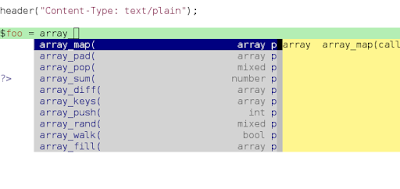
It's slick, I'll give you that. I think I may have to see if I can turn down the volume, a bit. Here's what my .emacs now looks like to configure php-mode: now looks like:


(defun bs-php-mode-hook ()
  (auto-complete-mode t)                 ;; «
  (require 'ac-php)                      ;; «
  (setq ac-sources  '(ac-source-php ))   ;; «
  (yas-global-mode 1)                    ;; «
  (setq indent-tabs-mode nil)
  (setq php-template-compatibility nil)
  (setq c-basic-offset 2))

Bye-bye hacked PHP code. Hello modern, feature filled, super easy to install, mega powerful code.

Update: updated the web-mode hook I'm using to make sure all code on the page, not just markup code, is indented 2 steps.

Monday, August 15, 2016

The Nike Approach to Learning about eCommerce

MailChimp, one of the well known names in e-mail marketing wanted to up its eCommerce game. Did they hold a summit, spam folks with surveys or hire an expert in the space? Nope, they took a far more straightforward approach: they opened a web store themselves.

You can check out the store here.

It's the brilliant treat the problem like an experiment approach to problem solving that's not about success or failure, but about collecting data. Does the store crash and burn? Well there you go, now you know first hand the frustrations of life in the digital marketplace.

Naturally, the team at MailChimp will need to remember that their data set is a so called N of 1, so they shouldn't read too much into any specific aspect of their experiment. But I'm willing to bet that they learn far more by trying than they would be sitting passively on the sidelines.

Bottom line: want to understand something? Just Do It!

Update: You can read about the evolution of the store here.

Friday, August 12, 2016

Tasker + NFC providing 1½ Factor Authentication

Between a parent hack posted on Facebook and this YouTube video about embedding a NFC tag in your manicure, I'd realized it's been too long since I've done any NFC hacking. I've got NFC stickers lying around, just waiting to be put to use. With the security inspiration of the aforementioned posts, I decided I'd do something NFC + Security'ish.

The obvious hack of using NFC to unlock your phone is actually quite tricky. Without a rooted phone, a Tasker based NFC Task won't be activated if the phone screen is off or the phone is locked. So yeah, my hope of creating a magic wand (read: sharpie with a NFC tag stuck to it) to unlock my phone was a no-go. But surely there had to be something security related I could do.

Tasker comes with it's own Lock Action which pops up a PIN entry screen. My original plan: kick off this Lock Action and then use an NFC tag to hide it. Unfortunately, this idea too doesn't work, as there seems to be no way to close out the Lock Action once it's running.

After a day or two more of brainstorming, I finally figured out a workable solution. First off, I created a new Profile that detects when particular apps are launched. When these apps are launched, the Locker screen is invoked. For testing purposes, I set it up so that launching the two blog authoring tools I've got on my phone kick off the locking task:

The code for the Lock Out App action is straightforward:

Lock Out App (138)
  A1: Variable Randomize [ Name:%pin Min:1000 Max:9999 ] 
  A2: Lock [
    Title: Code:%pin Allow Cancel:On Remember Till Off:Off
    Full Screen:On Background Image: Layout:Lock ] 

Note that the pin used in the lock screen is a random 4 digit pin. In other words, the lock screen's job is simply to lock folks out, there's no well known pin capable of unlocking it.

Next up, I needed to add support for toggling this profile. Here are the profiles to do this:

The first profile runs hourly and enables the App Lockdown Profile. The next profile is kicked off when a specific NFC tag is invoked, and it's job is to disable the App Lockdown Profile. The result is that every hour the phone is re-locked down, and one can only gain access to these specific apps by touch the correct NFC tag to the back of the phone, which lifts the restrictions.

For this to provide any level of security I'd need to insure that the particular profile and apps that can mess with Tasker are also included in the list of apps to block.

And here's the physical tag that unlocks these apps:

I'm fairly surprised at the range of the NFC sticker that I used. Either side of the plastic tag, which is wrapped in duct tape, trigger the NFC action. If I got creative, I really could hide these tags in plain sight.

It's fair to ask, given that Android has fairly extensive lock screen options, is this even of value? Maybe. I can see where it would be potentially handy for casual situations (do your homework, and a parent will unlock the games on your phone) or as an extra level of security while traveling. Ultimately, it's just fun playing with NFC.

Thursday, August 11, 2016

Asked and Answered: Displaying A Random Answer From A Google Spreadsheet Based Survey

Apparently Cool Tools ran a reader's survey and the results are now posted. I've picked up many solid tools based on the site's recommendations and the site's signal to noise ratio is something they should be proud of. I appreciate that there's a fundamental challenge to the site: conventional wisdom says to succeed you need to publish frequently, but for the site to maintain its value and credibility it needs to publish less so. I'm sure striking that balance is non-trivial, especially with the need to continually grow the site.

If I'd actually seen the survey and had the chance to chime in with recommendations, I'd have made these two:

(1) Stay small and stick what the core site does well. I don't need another gear blog telling me I need the latest gadget. I just need to know about rock solid tools that have proven themselves. Less is more.

(2) The latest site redesign is absolutely horrendous. I mean, visually, it's painful. I'm not sure if you were going for a retro look or not, but yeah, no. If you want old school by all means go the Craigslist route. What you ended up with was like something I'd concoct, so I know you're on the wrong track. The Turkish Proverb applies here; time for another redesign.

OK, back on topic.

The folks at Cool Tools were kind enough to publish the underlying data behind their survey (they did so here). Looking it over, I got a kick out of the second question, which poses:

If you were marooned on a desert island after a plane crash, what is the one tool you’d take that could pass TSA screening?

Now that's my kind of question. I was curious to see what the 1,400 or so responses were. I suppose I could have just read through them, but that would be too easy. I decided to use this as a little programming exercise.

The idea: create a quick little website that pulls and displays a random answer based on the data of a Google Spreadsheet. While I was writing the code to get at a specific answer on a specific Google Sheet, the solution should be easily adjusted to any Google Doc data source.

And here's my solution: Asked And Answered, it's about 75 lines of PHP. The code is built using this strategy to access the data in the Google Spreadsheet. It even includes caching to provide for relatively quick page loading.

Here's the script in action:

http://code.benjisimon.com/aaa/

So sit back and enjoy a little peek into the mindset of Cool Tool readers. And feel free to grab the code and customize it for your own project.

Wednesday, August 10, 2016

Type II Fun Explained

I was reading a post linked to from /R/ultralight that finished with a whimsical comment about Type 2 Fun. Which begged the question, what the heck is Type 2 Fun?! The Internet Explains:

Type I Fun – true fun, enjoyable while it’s happening. Good food, good sex, 5.8 hand cracks, sport climbing, powder skiing. Margaritas.

Type II Fun – fun only in retrospect, hateful while it’s happening. Things like working out ‘till you puke, and usually ice and alpine climbing. After climbing the West Face Couloir on Huntington, Scotty and I both swore that we hated alpine climbing. The final 1,000′ was horrific – swimming up sugar snow that collapsed beneath us, roped together without protection – and took nearly as long as the initial 3,000′ from camp. On the summit, Scotty turned to me and said, in complete seriousness, “I want my mom so bad right now.” By the time we reached Talkeetna our talk of Huntington turned to, “Ya know, that wasn’t so bad. What should we try next time?”

Type III Fun – not fun at all, not even in retrospect. As in, “What the hell was I thinking? If I ever even consider doing that again, somebody slap some sense into me.” The final 1,000′ of Huntington, when I stop and think about it…but, then again, a friend climbed it the next year and had perfect conditions.

Man, can I relate. This actually helps explain my love of backpacking, travel and other unscripted activities: things can and do go wrong, but the results are often more fun than if things had gone right. Sure, it might be Type II fun, but it's fun none the less.

All this brings back a smattering of memories I had as Boy Scout nearly 25+ years ago. We had a leader named Doc Ernesey*. As far as we boys were concerned, he was Chuck Norris before we knew who Chuck Norris was. If Doc had an encounter with a bear, you feared for the safety of the bear. One summer at Camp Massawepie my older brother did have a bear encounter. Story goes, he walked into our camp and found the bear noshing on a package of raw hot dogs. After stuttering the phrase "bbbbbear!" he ran for his life. I recall Doc offering some sage wisdom along the lines: the times when you're most afraid in your life, you'll look back at as the most fun and exciting. He was definitely referring to Type II fun there.

Doc was right then, and he's right now. Join me in the woods where things will almost always go as unplanned, and I'll promise you one heck of a good time!

[Any of my Troop 3 bretheran want to correct / enhance the above story? Josh, want to set the record straight? I'd love to hear from y'all.]

*Oy, how can I not know how to spell his name!? As a kid, I never had any reason to write it down, I suppose.

Tuesday, August 09, 2016

Your Location Automatically Pushed to a Map, Now Robustified

Version 1.0 of my location tracking + Mapalist visualization was functional but not robust enough for use in the backcountry. Essentially, I needed to rework the Tasker code I wrote to support offline and unstable networks. Here's my code to meet these needs:

First, the code that runs to track record your location does so by appending to a local file:

Flag Drop (107)
  A1: If [ %par1 Set ]
  A2: Variable Set [ Name:%note To:%par1 Do Maths:Off Append:Off ] 
  A3: Else 
  A4: Variable Set [ Name:%note To:  Do Maths:Off Append:Off ] 
  A5: End If 
  A6: Get Location [ ... ] 
  A7: Variable Set [ Name:%location To:%LOC ... ] 
  A8: Variable Search Replace [ Variable:%location Search:, ... Replace With:; ] 
  A9: Variable Set [ Name:%data To:%location;%TIMES; ] 
  A10: Write File [ File:Tasker/flags.txt Text:%data ... ] 
  A11: Notify [ Title:Flag Dropped ...] 

The above task, along with recording latitude and longitude, also captures the current Unix timestamp.

For last nights run, I set this up to record my location every 500 steps:

Next, I created a Task that executes and pushes lines of the data file to a Google spreadsheet:

Flags Publish (111)
  A1: Perform Task [ Name:FileGet Priority:%priority
    Parameter 1 (%par1):/sdcard/Tasker/flags.txt
    Parameter 2 (%par2):peek 
    Return Value Variable:%line
    Stop:Off ] 
  A2: If [ %line neq EOF ]
    A3: Spreadsheet Update [ Configuration:Update Where was I? Timeout (Seconds):20 ] 
    A4: Perform Task [ Name:FileGet Priority:%priority
      Parameter 1 (%par1):/sdcard/Tasker/flags.txt
      Parameter 2 (%par2):update
      Return Value Variable:  Stop:Off ] 
    A5: Goto [ Type:Action Number Number:1 Label: ] 
  A6: End If 

This task is made more robust by a generic FileGet task which is noted below. The FileGet tasks pulls a line from a file with the option of either updating the read pointer, or leaving it as is. The result: if there's a problem saving a line to the spreadsheet the process will fail, and when the task tries again it picks up exactly where it left off. Should be nice and robust, so if there is some sort of network issue publishing will be delayed but no data will be lost.

I wired this task into the Wifi Connected state. This means that the process is run automatically when you connect to Wifi and should happen behind the scenes automatically.

Using the the latitude, longitude and Unix timestamp it's possible to create a fairly informative map automatically. Consider the More Info pop-up that's visible when you click on the waypoints from last night's run:

Thankfully, Google has quick answers to quandaries like how do I format a Unix timestamp in Google Sheets? and how do I calculate the distance between latitude and longitude in a Google Sheet?, which make generating the above data surprisingly simple.

Finally, here's the implementation of FileGet which intelligently reads lines from a file in a reliable and repeatable manner:

FileGet (105)
  A1: Variable Set [ Name:%source To:%par1 Do Maths:Off Append:Off ] 
  A2: Variable Set [ Name:%action To:%par2 Do Maths:Off Append:Off ] 
  A3: Test File [ Type:Type Data:%source.pos Store Result In:%type Use Root:Off Continue Task After Error:On ] 
  A4: If [ %type !Set ]
  A5: Write File [ File:%source.pos Text:1 Append:Off Add Newline:On ] 
  A6: End If 
  A7: Read Line [ File:%source.pos Line:1 To Var:%offset ] 
  A8: Read Line [ File:%source Line:%offset To Var:%line ] 
  A9: If [ %action eq update ]
  A10: Variable Set [ Name:%next To:%offset + 1 Do Maths:On Append:Off ] 
  A11: Write File [ File:%source.pos Text:%next Append:Off Add Newline:On ] 
  A12: End If 
  A13: Return [ Value:%line Stop:On ] 

Monday, August 08, 2016

Tweaking Ratpoison: Less Mouse, Less Keystrokes, More Productivity

I'm probably one of the last production users of ratpoison, a Window Manager for Linux designed to avoid using the mouse. But I don't care, it's just brilliant software. When I initially set it up, I made a few tweaks (for example, setting Caps Lock as the Escape key) and pretty much left it alone.

Recently, I decided it was time to streamline things a bit. I found that I had a number of standard window configurations I was switching between (Work Browser + Xterm, Emacs + Development Browser, etc.) and I wanted a single keystroke to jump me to these. I experimented with fancy virtual desktops, but in the end, went with a simple solution.

First, I needed to make sure my .xmodmap configuration was setup correctly. Here's the code I have in place to map the Caps Lock key to Hyper and the Windows key to Super:

clear   lock 
clear   control
clear   mod1
clear   mod2
clear   mod3
clear   mod4
clear   mod5
keycode 66 = Hyper_L
add     control = Control_L Control_R
add     mod1 = Alt_L Alt_R Meta_L
add     mod2 = Num_Lock
add     mod3 = Hyper_L
add     mod4 = Super_L Super_R
add     mod5 = Mode_switch ISO_Level3_Shift

Next up, I set up the following new keystrokes in my .ratpoisonrc:

definekey top s-j exec rpwin restore J
definekey top s-k exec rpwin restore K
definekey top s-l exec rpwin restore L
definekey top s-h exec rpwin restore H
definekey top s-J exec rpwin capture J
definekey top s-K exec rpwin capture K
definekey top s-L exec rpwin capture L
definekey top s-H exec rpwin capture H

The H K L J keystrokes are inspired by vi, of course. Holding down Shift + Windows Key + J grabs whatever the current window configuration is and stores it (that is, it runs rpwin capture J). Pressing Windows Key + J updates the screen to re-show the stored window configuration. In other words, I now have four keystrokes I can quickly setup as different window configurations, and a fast way to access them. After a couple of weeks of use, I'm totally loving this.

Below is the rpwin script that captures and restores the window configuration.

#!/bin/bash

## A shell script for capturing / restoring ratpoison window configurations
RATPOISON=ratpoison
RP_SNAPSHOT=$HOME/.rp.snapshot

usage() {
  echo "Usage: `basename $0` {capture|restore}"
  exit 1
}

rp_cmd() {
  $RATPOISON -c "$@"
}

case "$1" in
  capture)
    if [ -n "$2" ] ; then
      loc=$2
    else
      loc='default'
    fi
    touch $RP_SNAPSHOT.$loc
    rp_cmd sfdump > $RP_SNAPSHOT.$loc
    ;;
  restore)
    if [ -n "$2" ] ; then
      loc=$2
    else
      loc='default'
    fi
    if [ -s $RP_SNAPSHOT.$loc ] ; then
      rp_cmd "sfrestore `cat $RP_SNAPSHOT.$loc`"
    else
      echo "Refusing to restore an empty snapshot"
      exit
    fi
    ;;
  *)
    usage
    ;;
esac

Sunday, August 07, 2016

Camping at Westmoreland State Park, Next Door and A World Away

[Originally composed 8/1/2016]

Snakes appearing to defy gravity by slithering up trees, prolific jellyfish, shark teeth, a garden overflowing with fluttering butterflies and trees with menacing thorns. Sounds like some exotic location, right? In fact, these are the sights we encountered traveling a mere 2 hours away in our home state of Virginia, at Westmoreland State Park.

We spent a fun couple of days camping at the park with our friends, Lauren and Nick, their two kids, and our friend's 6 year old. This was Lauren and Nick's kids first time camping, and they did fantastic! We had many of our usual camping fun experiences, including cooking hot dogs and s'mores over a fire (which I built and lit without cussing or throwing a tantrum, thank you very much!), sleeping out in a tent and getting in swim time both at the beach and pool. Westmoreland, however, brought a few bonuses I'd not encountered before.

After spending a good few hours playing at the pool and enduring a downpour, we returned to camp to find (what I believe to be) a black rat snake sunning itself. This part isn't especially unusual, but what I hadn't expected was to see it a few feet up in a tree. And more surprising was to see it slither down the tree. I didn't catch any video, but it's basically the same sight as this YouTube video. That just shouldn't work, but it does.

Speaking of run-ins with animals, Lauren and her daughter found out the hard way that the jellyfish activity in the Potomac river is thriving. While exploring Fossil beach, they both got stung. Ouch! Luckily the park has a pool, so the kids could get their swim time in there without fear of getting assaulted.

Speaking of stinging, J got a first hand introduction to stinging nettle which he won't soon forget. And check out this guy:

If my Google skills are up to the task, I do believe that's Aralia spinosa, more commonly known as devil’s walking stick or Hercules club for obvious reasons. Nasty, but beautiful. I'd only ever encountered such vicious trees in Central America before.

I'll be honest, I pushed hard to go to Westmoreland just because of this one sentence from the state park home page:

Fossil collectors enjoy hunting for ancient shark teeth along the Potomac.
Ancient shark teeth?! Seriously, who can resist ancient shark teeth<!/p>

Our first attempt combing the beach didn't turn up anything other than jellyfish stings. But later in the afternoon we returned and happened to run into a park ranger. I finally had a chance to ask: uh, what exactly am I looking for?. She explained it and then within a few minutes of looking, found a shark tooth. I was amazed. To her credit, she quickly offered it up to J, not me. Well done. I then spent the next hour combing (J had important castle infrastructure projects to work on) the beach and I ended up with two finds: a shark tooth(!) and a random bone. Is the bone from a pterodactyl or someone's chicken lunch last week? I've got no idea. I'm going to assume the former, though it's probably the latter. See:

I'm surprised, a quick Google search on amateur methods of dating bone turned up nothing. Surely there must be some way to determine if what I'm looking at is months, years, decades or older, right?

Near the visitor's center, the park had a small garden which was absolutely overflowing with butterflies and other pollinators. I don't recall seeing so many butterflies clustered in one location in the wild; at least not in the U.S.

It's hard to believe that the same Potomac river situated a few miles from our home could provide a rafting adventure as well as an exotic beach to hunt for shark's teeth. What a fun weekend!

For more photos, View The Full Album.

Friday, August 05, 2016

A Recklessly Good Time

Every few years an article pops up saying that our playgrounds are too safe. To all those individuals longing for the days of rusty jungle gyms built on a concrete slab, I recommend you stop by Rocky Run Park.

After having some play time with friends last night, I can honestly tell you that I'm amazed you can play on that equipment without signing a waiver. Seriously, the rope climbing structure thing seems like something out of a dauntless challenge: want to go down the slide kid? First you've got scale to the top of this crazy structure.

And it's not just heights. There's this funky, twisty section of webbing that flips back and forth with ease, tossing kids left and right. I'm amazed the large metal polls didn't thunk of the children tackling it's challenge.

Don't get me wrong, I'm totally loving this playground. Heck, I really should go back and use it to work on my fear of heights. But man, I'm amazed (and oh so thankful!) this is considered child friendly.

Here's to being just the right level of irresponsible!

Thursday, August 04, 2016

Tasker Hacking: Automatically Publish Your Location To A Google Map

Matt, is an ultra hiker who wanted to publish his location for all to see, yet mask some of the details (such as timestamp). His solution, which he describes here, makes use of a clever service: mapalist. Mapalist monitors a Google Spreadsheet and converts the data published there to flags on a map.

Matt's solution for sharing controlled waypoints involves manually editing a Google Doc on his phone and then having Mapalist publish this data. That's certainly a workable solution, but of course, my first thought was: how can I automate this?

The answer: Tasker! What makes this so easy to do is the existence of a Tasker plugin to update Google Spreadsheets. I installed the plugin, signed up with mapalist, and created a skeleton Google Spreadsheet. All that was left to do was to use Tasker to glue everything together.

First, I had to figure out what event I wanted to trigger logging my location. I could have done it based on time of day, which for a multi-day hike, makes quite a bit of sense. Another option: I could have wired this into my Pebble watch, so points are saved whenever I click a button on my watch. For my little test, I hooked it into the Steps Taken event in Tasker.

For testing purposes, I choose 50 as the step interval. In a real hiking scenario, I'd probably set it to five or ten thousand steps, depending on how frequently I wanted the points to be published.

Next, I had to write the actual Tasker action to grab the location, tweak the format a bit and push the data to the Spreadsheet plugin. Here's that code:

Profile: Map My Location
  Event: Steps Taken [ Number:50 ]

Enter: Map My Location
  A1: Get Location [ Source:GPS ... ] 
  A2: Variable Set [ 
    Name:%data
    To:%LOC;My Location within %LOCACC  meters Do
  ] 
  A3: Variable Search Replace [
    Variable:%data Search:,
    Replace With:; 
  ] 
  A4: Spreadsheet Update [
    Configuration:Update Where was I?
    Timeout (Seconds):20
  ] 

I then turned on the event during a walk and logged a few points. You'll notice that the points are sort of all over the place. That's due to the limitation in GPS accuracy and the fact that I was logging points so close together. I'll replace this example with data from my next run or hike, and the map should be more informative. Here's an example of a run I captured and published:

If I were using this data for more than testing purposes, I'd update the above action to also store the data in a text file locally. That way, even if there were internet issues along the trail, I'd know I would have a reliable stash of data regardless.

As a visualization tool, it's hard to beat mapalist. And with Tasker integration, the only thing limiting the data you publish is your imagination. Fun stuff! Thanks Matt!

Update: I've temporarily disabled the map above until I get a better data set.

Update: I've got a real example map above in place, and have published version 2.0 of this solution, which supports offline publishing.

Wednesday, August 03, 2016

See the ROTUS in Action, Grow as a Person

I find this video tour of the West Wing especially powerful. What makes it so is that it's lead by the West Wing's ROTUS (Receptionist Of The United States), Leah Katz-Hernandez, who happens to be deaf. The American Sign Language tour is a nod to the 26th anniversary of the signing of the American with Disabilities Act.

It's tempting to treat this as inspiration porn, which is a decidedly bad idea. No, I'm enamored with this video from a totally different angle.

A while back a friend remarked how she struggled to think of a meaningful action to take with respect to the police violence that was splashed across the headlines. After much mulling, the best I could come up with was this simple first step to take:

Next time you take your kids to the playground look around. Do all the kids look like your children? If so, find another playground.

My hypothesis is that as people we're designed to build up patterns and use these patterns to make quick decisions. This let's us function without knowing the full details of a given situation. Of course, these patterns break down. At times, this can be harmless. A friend of mine told me that her daughter went to all female pediatric office. At one point she asked, "Dad, can boys be doctors too?"

Other times, these patterns can lead to horrendously bad outcomes. This American Life has covered this topic quite well, and I'd urge you to listen these two episodes: 547: Cops See It Differently, Part One and 548: Cops See It Differently, Part Two, to see what I'm blabbing on about.

I think Einstein said it well when he remarked:

Common sense is the collection of prejudices acquired by age eighteen.

In other words, you're not going to get rid of these patterns, be they helpful common sense or hurtful prejudice. But you can add to them and make them more nuanced. And that's why I love the video tour of the Whitehouse. We should see Ms. Katz-Hernadez for what she is: not a hero or outlier, but as a dedicated and likable employee. Having kids see her in this role helps neutralize the idea that her deafness turns her into an 'Other' or that people with deafness should limit their aspirations.

Here's the video:

Tuesday, August 02, 2016

Hershey Adventure: Wave Pools, Butterflies and Lasers!

[Originally composed 7/27/2016]

I'm typing this post out as we cruise down Route 15, heading back to DC from a terrifically fun last couple of days in Hershey, PA. Yesterday we spent the day at Hershey Park with friends and a handful of kids. Everyone had a blast. Given the crazy heat, you can appreciate why we spent most of the time near the water attractions. And man, they did not disappoint. Even though the wave pool only gets to 6 feet deep, once those wave start rolling it, it's a bouncing good time. The kids, who all got to wear lifejackets, really enjoyed it. The park also has a number of spraygrounds which the younger kids really enjoyed. Most of the rides we went on were pretty standard amusement park fare. Alas, Shira didn't have time to try any wild and crazy roller coasters, which the park seemed to have.

One aspect of the park which I enjoyed was that it seemed like the marketing push was dialed down a bit. Other than the fact that the height rankings correspond to the names of Hershey candy, and an occasional chocolate reference here or there, I didn't feel the constant push to buy, buy, buy that I'd expected. At least it seemed toned down when compared to Disney or Lego land, where you feel as though you're in one big commercial. I suppose it does cut both ways, though. The Lego Miniland in in Florida's Legoland is impressive enough to be an attraction in and of itself. In that case, I suppose the branding really works.

One definite personal highlight was the Kosher food offering in the park. The Kosher foodstand in the park is among the most complete menus I've seen outside a traditional restaurant. We split a chili-dog and hamburger, and could have opted for more exotic fare had we been interested. As a bonus, the Kettle Corn Popcorn is proudly marked as pareve throughout the park.

Today we continued the Hershey experience by taking in the "factory tour," which is where the marketing push is in full swing. At least the tour is free, which partly makes up for the massive candy store you encounter to access it. Tour is in quotes above because you don't actually see anything functional. Instead, you sit on a ride and gently go through a series of active dioramas. It's nothing amazing, but our friend's 6 year old, was thoroughly impressed with the experience, so I can't complain. After the tour we couldn't resist buying a massive chocolate-peanut-butter cookie from the bakery, which actually tasted as a good as it looked.

As a memento of trip, we purchased a mug and decided to have it laser engraved on site. The operator did an excellent job of engaging us all in the process and we all stood around the machine anticipating the spark that would blast our initials on the mug. J, not exactly sure what to expected, stared intently at the mug as he was told to, but also plugged his ears just in case. We counted down, 3, 2, 1...and then zap! In a fraction of a second, the laser burned our message into the mug. J was floored. A laser, an actual laser! Even I have to admit, it was pretty cool. Definitely an unexpected highlight.

After the shopping and tour propaganda, I had enough of rides and amusement parks, and pretty much insisted we hit Hershey Gardens next, which is located a mile or so from the factory. It didn't disappoint. First up in the gardens was a visit to the Butterfly Atrium. This is probably the 3rd or 4th live butterfly exhibit I've been to, but I'm such a sucker for them. There's just something amazing about these tiny creatures, and being surrounded by them is such a treat. After walking in, one landed on J, which I'm pleased to say he didn't swat away (whew). After about 45 minutes in the atrium we made our way to the gardens proper. They too were impressive, and J definitely enjoyed the various activities in the Children's Garden. Alas, it was just so hot and sunny that we had to head out before we'd really scratched the surface of the 23 acres the gardens offers. I'd definitely go back.

After a delicious lunch of Indian food it was time to get on the road and make our way back to DC. Such a good time!

View All Photos

Monday, August 01, 2016

What's in his bag: A 6 Year Old's Hiking Kit

We went camping this last weekend (a trip report is coming soon, I promise) and I wanted to equip our friend's 6 year old with some functional, yet economically, priced gear. Here's what he ended up carrying:

  • A 5 minute haversack decorated with his choice of duct tape and stickers. Cost: Free
  • A ziplock bag for collecting rocks, acorns, etc. Cost: Free
  • A bandana. The classic multi-purpose camping item, perfect for attaining either the pirate or cowboy look, as needed. Not to mention, useful for drying off hands, or wiping off sand at the beach. At one point, I also tied it up using a bit of furoshiki to make a bag to carry back shells from the beach. Cost: 12 for $8.35
  • A whistle for signaling when lost. This one was a bit tricky, I didn't want to go so cheap that it wouldn't be functional should he ever need it. This 3 pack did the trick nicely. Cost: 3 for $2.42
  • A compass. Like the whistle, I didn't want to cheap out and end up with an item that didn't really work. I went with a Brunton Key Ring Compass, and I'm glad I did. It gives fast, reliable readings, isn't fragile and was a deal at 2 for $4.99. Cost: 2 for $4.99
  • A flashlight. This cheepy LED flashlight does the trick and at $8.00 for 4 of them, you can't complain about the price. Cost: 4 for $7.99
  • My Totes mini umbrella. This wasn't supposed to be in his kit, but he quickly became attached to it, so he carried it. He eagerly awaited rain, and it came, but it happened while we were under enough tree cover that we didn't need umbrellas. I'd never met anyone disappointed by the lack of rain before. Cost: unknown

As he gets older, I'll introduce him to the world of paracord, pocket knives and survival blankets. But for now, he enjoyed rocking his kit, and at a price of $6.00 or so, I didn't have to worry about him trashing it. Besides, who doesn't feel more comfortable in the woods toting the Avengers with them?

Thursday, July 28, 2016

Review: Divergent by Veronica Roth

I just finished listening to Divergent by Veronica Roth, and for the most part, I enjoyed it. The story, for those not in the know, is awfully similar to The Hunger Games in that it's a Sci-Fi novel taking place in a distopia, with a coming-of-age female character as the heroine. All distopian novels are at their core a quest for problem solving, so I definitely have an affinity to them. How can the character become aware of, and ultimately overcome their bleak surroundings when the system is so rigged against them.

In the Divergent universe, the world is divided into five separate factions. Each faction represents a pure lifestyle, that on the surface seems admirable. The Abnegation focus on being completely selfless, while the Dauntless focus solely on bravery, and so on. But of course, living a one dimensional life doesn't really work. Not to mention, how the virtues of a faction are actually executed are up for debate: is it brave to jump from a moving train, or just stupid? Still, the intellectual exercise of considering the factions is appreciated and it's all just plausible enough that I was willing to accept the premise.

So yeah, it was a pleasant read and on more than one occasion I found myself rooting for the main character.

When the book finally finished I found that I had three criticism to offer, but on further analysis, I realized that really only one was valid.

Here's the valid one: the ending was weak. I mean, the whole thing felt forced and overly simplistic. Much of credibility the book had worked up in terms of a careful storytelling was lost with what seemed like an "oh-oh, I better end this book soon" type idea.

The next issue I had was that I felt that at times the main female character was drifting off into a world of naive brattiness. This is a direct, and unfair result, of me comparing the book to the Hunger Games. Without dwelling on this too much, I felt like the Hunger Game series had the main character devolve throughout the books. In book 1 she's mainly the hero we want her to be, in book 2 she's blah and by book 3 she's downright awful (the same could be said about the general plots of book). As you can tell, it left a bad taste in my mouth. So every time the Divergent hero started down that path of whining or being self-unaware, I got concerned I was headed down the Hunger Games path. In the end, the character's of Divergent are solid enough and any concerns I had were for naught.

Finally, about a third of the book is spent dealing with our main character's, well, crush, on a boy. There's just something about juxtaposing life and death situations with getting all flushed when a boy touches your leg. What can I say, I'm a married 40 year old man, it's been a while since I was dealing with the trials and tribulations of first love. But this critique, too, is totally unfair. For the book's target audience, crushes may as well be a life and death situation. And thinking about it, I realized that the the book's portrayal of love is nearly Victorian. There's a lot of strange feelings, and blushing, and the occasional touch to the small of the back, and such. It's hard to believe that in a distopian novel with excessive blood and death, there's a puppy dog love story. But it is what it is. And given that teens are surrounded by sexting, unlimited access to pornography, and magazine covers telling them how to have Better Sex Now, it's actually a good thing to see a book portray young love in such a wholesome way. Props to Roth for pulling this off.

It's not the most edgy and deep Sci-Fi novel you can read, but it got me thinking about the world around me, so that makes it a winner in my book.

Monday, July 25, 2016

Harpers Ferry Rafting, v2.0

A little over a year ago, we had a chilly and wild ride rafting down the Shenandoah and Potomac. This year, our intrepid group returned to do the same section of river near Harpers Ferry, though instead of battling 8 feet of water, we had a much tamer 2 feet to deal with. This made for a far chiller ride. Because the water level was so low and the temperatures was so hot, the guide had us spend a fair bit of time floating in the water. Man, was that a huge treat.

As we approached Harpers Ferry I was surprised to see so many folks hanging out on the near the river, wading in and basically treating it like a beach destination. The water temperature was downright spa like, so this was a solid idea. Perhaps on our next feels-like-100°F day, we'll trek out to the river to dip our toes in.

You'd think that experience of going down the river once before would have prepared us to be a cohesive unit. You'd be wrong. Our guide basically pleaded with us the entire trip: paddle *together*. We just didn't have it in us. The fact that the water level was so low didn't help, as it means that the river is far less forgiving about getting hung up. So yeah, we're not going to be forming a rowing team any time soon.

What's that saying about never stepping in the same river, twice? That definitely applied here. While different, both adventures were a blast.